Sony announced the Xperia Z5 Premium today, boasting a 5.5″ 4K display. It was unveiled alongside the Xperia Z5 and Xperia Z5 Compact, and each offers a new 23MP 1/2.3-inch Exmor RS BSI CMOS sensor with an F2.0 lens. A new hybrid AF system claims to acquire focus in 0.03, which would make it the fastest AF system on any current smartphone camera. Read more
Tag: Screen
-
Anatomy of a Green Screen Shot: How to Use It Right
I have a family that I shoot several times a year, They’re “show people” , all outgoing and crazy and fun, and after at a certain point, the mom, Ginette, said to me, “You know, I love all of the perfect and beautiful shots that you get of us, but I think it’s time to show the world the kind Continue Reading
The post Anatomy of a Green Screen Shot: How to Use It Right appeared first on Photodoto.
-
Lenovo Vibe Z2 Pro combines 16MP camera, OIS and QHD screen
Lenovo has just announced what looks like one of the most interesting smartphones of the year, from a camera perspective. According to the announcement the Vibe Z2 Pro captures images with a 16MP camera that features an optical image stabilization system. Camera functions include a Pro Mode, which allows for manual control over a range of shooting parameters. The new device is also capable of 4K video recording. Read more
-
LG releases G3 with QHD screen and laser-AF

LG has announced the G3, succeeding last year’s G2 as the Korean manufacturer’s flagship smartphone. The new model’s headline feature is its screen. The 5.5-inch True HD-IPS+ display comes with a 2560 x 1440 QHD resolution which, at 534 ppi, makes it one of the pixel-densest current displays. Additionally, the G3 uses a new laser-AF system that is capable of measuring the subject-to-camera distance. Read more
-
[MODIFIED] Screen Capture – Greenshot for Windows can Upload to Dropbox, Flickr, Picasa, and More
Greenshot is an open-source screen capture program for Windows that allows basic image editing and integration with a variety of third-party software packages and web services.
Greenshot is an open-source screen capture program for Windows that supports window, region, and full-screen capture, as well as special support for Internet Explorer complete with auto-scrolling to grab entire webpages.
Greenshot has plugins for various services and applications including Imgur, Box, Dropbox, Flickr, Picasa, Photobucket, and Microsoft Office (make sure to enable them during setup), as well as support for multiple languages….
Read more at MalekTips.
New Computer and Technology Help and Tips – MalekTips.Com -
Windows 8 – Resize Start Screen Tiles
Change the size of tiles on your Windows 8.1 Start screen to show or hide live tile details.
Are some of the tiles on your Window 8.1 Start screen taking up too much room and you’d like to fit more on the screen simultaneously? Or do you only have a few apps installed (or a large monitor with lots of free space) and want to show as much information and pictures as possible from live tiles such as News, Store, and Weather?
To resize tiles on your Start Screen, just do the following:…
Read more at MalekTips.
New Computer and Technology Help and Tips – MalekTips.Com -
Blackmagic Design announces Blackmagic URSA with 10-inch screen

Blackmagic Design has unveiled its latest and most expensive camera to date, the URSA. The camera features a changeable sensor design, allowing the user to swap out the Canon EF lens mount and 4K Super 35 image sensor for a similar sensor with a PL mount. The URSA features touch screens for operator control – including a 10-inch flip-out screen. It also has another 5-inch screen showing timecode, histogram, and other indicators such as a spectrum scope for checking focus. Learn more
-
Lose the Bubbles: How to Properly Apply a Screen Protector on Your Camera’s LCD
So why put up with them on your camera’s LCD? If you’ve ever tried to apply, or thought about applying, or even looked at a screen protector before – you might want to read this. Fancy receiving a ‘spanking new Nikon D800, only to find a wafer thin scratch down the main screen within weeks. You were careful with it, Continue Reading
The post Lose the Bubbles: How to Properly Apply a Screen Protector on Your Camera’s LCD appeared first on Photodoto.
-
How To Improve an Image with 2 Steps in Photoshop Using Screen Mode
A Guest Post by Sergey Sus/
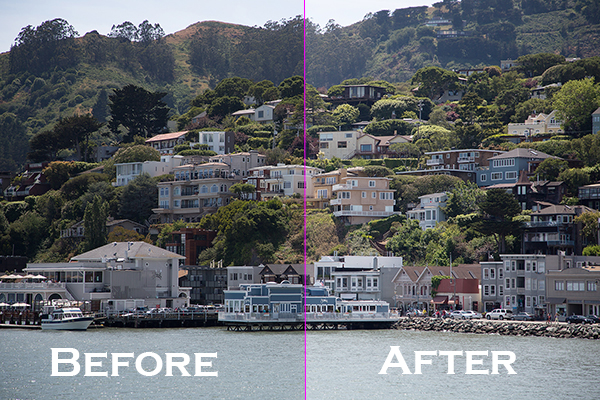
Wanted to share a very simple way for improving a photo without having to change the exposure. I use this method quite often and sometimes even after adjusting exposure.
The image is of a small hillside town in North California called Sausalito taken while on vacation.
Here the SOOC (straight out of the camera) image before any adjustments are applied or any cropping. It is just a bit under exposed and very flat looking.

Certainly there are many ways to brighten a photo in Photoshop like using Curves, Levels or Shadow layers. For this tutorial, we will be using a duplicate layer and then change the overlay to Screen mode to brighten up and give it a bit of a punch. I’ve seen many professional photo retouchers use this technique on both landscape and portrait photography as a starting point for retouching. This method works really well on jpgs as well!
1. Open image in Photoshop. Then duplicate layer by pressing Ctrl+J (Win) / Command+J (Mac)

2. Change blend mode to Screen and and then set Opacity to 50%.

Starting out with Opacity set to 50% and adjusting the slider for more or less brightness. For this image the opacity is about right at 50% for my eyes. See how this new layer in Screen mode added a subtle contrast and brightness.

Give this technique a try even if the image is not under exposed as it will brighten up overall highlights and will slightly increase perceived contrast. Make sure to experiment with different opacity values for different looks. Here is the final image cropped and with a bit more processing – how I remember Sausalito looking that day.

Let me know in the comments how this has worked for you or if you have questions.
Sergey Sus is a Los Angeles based photographer telling telling real stories, individual, professional and family. Problem solver, artist and teacher. His work can be found on http://www.sergeys.us/.
Post originally from: Digital Photography Tips.
Check out our more Photography Tips at Photography Tips for Beginners, Portrait Photography Tips and Wedding Photography Tips.
How To Improve an Image with 2 Steps in Photoshop Using Screen Mode
-
FujiFilm harnesses sliver for new touch screen technology

Fujifilm is looking to bring down the cost of touch screen technology by harnessing materials and manufacturing expertise used in creating film emulsions. Touch screens are quickly becoming the standard interface of nearly every piece of mobile technology. Currently these screens utilize the fairly rare metal, indium. Due to its rarity, indium is responsible for a significant portion in the cost of current touch screen displays. Fujifilm hopes to use its long history with silver to bring down the cost of these displays and grab a piece of the ever expanding touch screen market.(via Bloomberg)