RSS
 

Posts Tagged ‘product’

Tether Tools: Product Reviews: Adorama Photography TV

12 Dec

AdoramaTV presents Tether Tools. This week Mark will show some products from Tether Tools. This product line is designed to help photographers meet their tethered photography needs . He will show you a couple lightweight and versatile tables that attaches to any studio light stand or tripod providing a stable working surface for photographers shooting in studio or on-location. For more information about Tether Tools and related videos, go here: www.adorama.com Send your questions to: AskMark@Adorama.com

 
Comments Off on Tether Tools: Product Reviews: Adorama Photography TV

Posted in Photography Videos


Nikon Macro Gear: Product Reviews: Adorama Photography TV

08 Dec

AdoramaTV presents Nikon Macro Gear. This week Mark will show us some great Nikon macro products. From macro lens to on camera flashes. For more information about the Nikon 105mm f/2.5 Micro lens or the R1C1 Wireless Close-Up Speedlite System, and to learn more about macro photography, go here: www.adorama.com Send your questions to: AskMark@Adorama.com

Brief: In store support for the launch of the 400D, an entry level DSLR. Target market: Amateur photographers looking to upgrade their camera. Critical Insight: Nick, 39, lives in Andover, Hampshire, UK. Married with a 10-year-old son, he has been into photography for about 2 years since buying a digital point and shoot camera. “I love taking all types of photographs; rural landscapes, portraits and I like to experiment but I find my current camera limits my creativity. I have thought about buying a Digital SLR but I’m still worried they are too complicated… I just want to get out there and get a great shot”. Communications strategy: Welcome to the playground. Creative Innovation: Based on our research we found that the larger camera retailers also sold TV monitors, which were an excellent POS site – so long as the content is great. Kieran Dodds (www.kierandodds.com a friendly, approachable and down to earth professional photographer was cast to demonstrate the user friendliness of the 400D in an appealing and un-hurried series of films. ROI: We shifted Canon’s trade marketing budget from paper heavy POS (posters, leaflets etc…) to digital moving image content. This innovation revolutionalised the Canon approach to trade marketing tools and yielded dramatically increased ROI by developing content that could be used throughout the marketing mix ie in-store, on-line, on-pack and in-box. To date the films have been viewed by over 15 million people and continue to be a
Video Rating: 4 / 5

 
Comments Off on Nikon Macro Gear: Product Reviews: Adorama Photography TV

Posted in Photography Videos


Quantum Flashes: Product Reviews: Adorama Photography TV

26 Nov

AdoramaTV presents Quantum Flashes. This week Mark will show you strobists how to get to the next level of strobist shooting with Quantum Flashes. For more information about the Quantum products reviewed in this video, and for related articles, audio podcasts and videos, go here: www.adorama.com Send your questions to: AskMark@Adorama.com
Video Rating: 4 / 5

 
Comments Off on Quantum Flashes: Product Reviews: Adorama Photography TV

Posted in Photography Videos


How to Shoot and Create a Composite Image for a Product Advertisement

23 Nov

Background and Vision

The holiday season is upon us, and what better way to start the season than to share our behind-the-scenes video on how to shoot a composite image? I needed to shoot and create an advertising image for UNDFIND’s Fishbomb, which is a versatile accessory pouch that can carry lens filters, memory cards, and other small items. So I figured, why not create a behind the scenes video and tutorial on how I went about the shoot. Plus, it’s not a bad stocking stuffer for the photographer in your life, especially since you can get two for $ 13 (50% off) with this sale, wink! =)

Anyway, because the Fishbomb is shaped like a Christmas tree ornament, I decided to decorate a Christmas tree with the Fishbombs and shoot our model, Maria, placing a Fishbomb on the tree. Here is the final image we will be working towards.
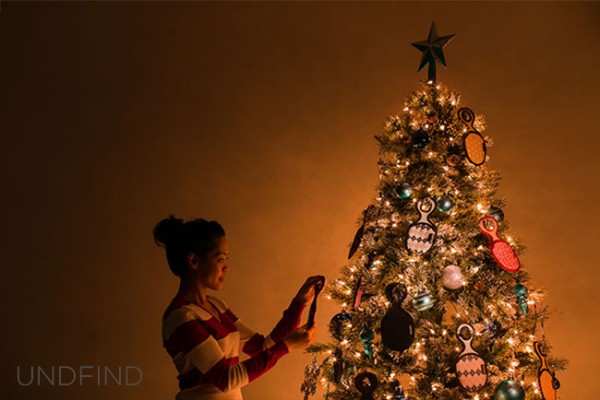
Fishbomb UNDFIND SLR Lounge

The Behind-the-Scenes Video

If you are interested in watching the full behind the scenes video on the SLR Lounge YouTube Channel, here is the video below.

How We Shot It
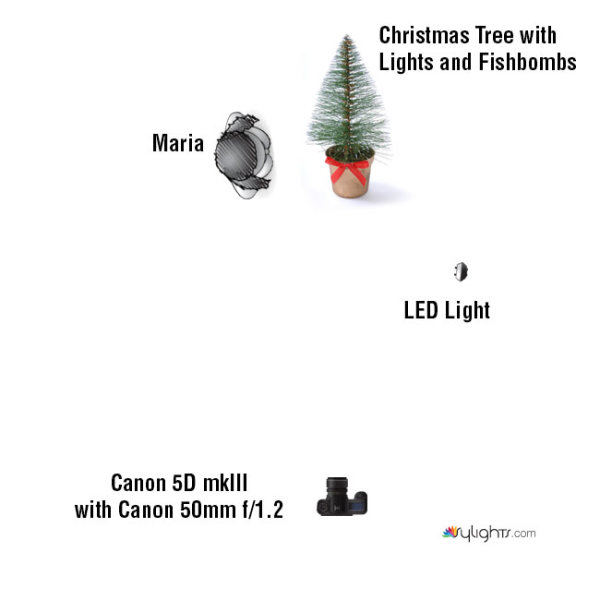
GEAR USED:

Camera: Canon 5D mkIII
Lens: Canon EF 50mm f/1.2 L USM Lens
Lighting: LED Light and Christmas lights on the Christmas tree

The biggest challenge that I encountered was how to light the Fishbombs in addition to lighting Maria, the Christmas tree, and the environment. The Christmas lights were used to light Maria and the environment.

However, when we hung the Fishbombs on the tree, we noticed that the front of the Fishbombs were not illuminated by the Christmas lights. This meant that we had to light the Fishbombs using another light source; I selected an LED light with an adjustable temperature so that I could color match with the tree’s natural Christmas lighting.

However, I ran into another problem. The LED light was casting a harsh shadow against the wall which destroyed much of the warm, ambient light from the Christmas tree as you can see in Shot 1 below.

The easiest way to solve this lighting issue was to light and shoot two separate images, one for the model and the environment, and the other for the actual detail on the Fishbombs and the tree. Afterwards, we can composite both images together in Photoshop via layers.

For each shot, I had the camera placed on a stationary tri-pod to make it simple to combine both layers into our final composite. So let’s look at how I shot each image.

Shot 1: The Fishbomb and Tree Details
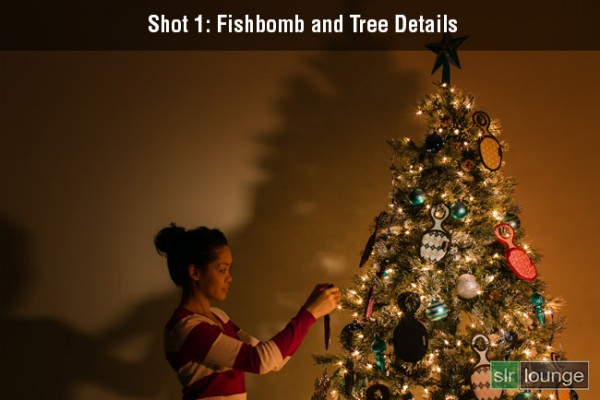
Shot-1-Fishbomb-and-Tree-Detail

Shutter: 4.0 seconds
Aperture: f/16
ISO: 100

For the first photo, I lit the Fishbomb and the front of the Christmas tree with the LED light. I also dragged the shutter speed and used the smallest aperture possible in order to get a twinkling/starburst effect from the Christmas lights. I didn’t have to worry about any camera shake because the camera was on a tripod and was triggered with a shutter release. The tree and the ornaments were completely still as well since we were in a closed environment.

Shot 2: Maria and the Environment
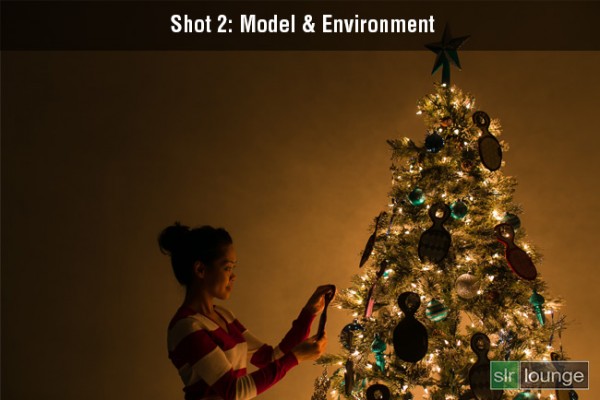
Shot-2-Model-Environment

Shutter: 1/8 seconds
Aperture: f/2.8
ISO: 200

This image was lit strictly by the lights on the Christmas tree. Because I want to minimize any motion blur with the model, a quicker shutter speed was required. Therefore, I used a wider aperture and a higher ISO in order to attain a shutter speed of 1/8 seconds. Even then, I still had to ask Maria to hold completely still during the photo to prevent any motion blur.

How We Processed It

In Lightroom, I applied the Soft Portrait preset from the SLR Lounge Lightroom 4 Preset System to both images. Additionally, I shifted the Tint and the Temperature in order to add a warm, intimate glow reminiscent of a fireplace. Once I achieved the look that I wanted, I exported the two images into Photoshop via layers for compositing.

In Photoshop, I used layer masking to reveal the Fishbombs and the tree details from the first image over the second image of Maria and the environment.
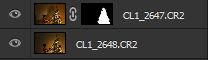
Photoshop Layer Mask

After a little bit of clean up in the hair and the cloning of an extra branch to the top of the tree, this is how the image looks.

Fishbomb UNDFIND SLR Lounge

Finally, here is how the UNDFIND Fishbomb ad looks after I added the text:

UNDFIND Fishbomb Advertisement

Hope you all enjoyed this article! If you are interested in picking up some Fishbomb’s for stocking stuffers, the deal is available on UNDFIND’s Camera Bags website through the end of the year.

Post originally from: Digital Photography Tips.

Check out our more Photography Tips at Photography Tips for Beginners, Portrait Photography Tips and Wedding Photography Tips.

How to Shoot and Create a Composite Image for a Product Advertisement


Digital Photography School

 
Comments Off on How to Shoot and Create a Composite Image for a Product Advertisement

Posted in Photography


Panasonic LUMIX G3: Product Reviews: Adorama Photography TV

21 Nov

AdoramaTV presents the Panasonic LUMIX G3. This week Mark Wallace reviews the new Panasonic LUMIX G3 – a compact camera with the benefits of a DSLR. It uses interchangeable Micro Four Thirds lenses to give you the flexibility of shooting with a DSLR, but it has a compact body with a touch-screen LCD. It focuses extremely fast and takes phenomenal video! Products featured in this episode: Panasonic Lumix DMC-G3 16 MP Micro System DSLR Camera Body www.adorama.com The Panasonic LUMIX G3 will be available from Adorama.com soon in black, red, brown and white. To learn more about the Lumix G3 and for related videos and articles, go here: www.adorama.com Find the Panasonic LUMIX G3 and kits here: www.adorama.com Visit www.adorama.com for more photography videos! Send your questions to: AskMark@Adorama.com
Video Rating: 4 / 5

 
Comments Off on Panasonic LUMIX G3: Product Reviews: Adorama Photography TV

Posted in Photography Videos


Tips For Buying a Tripod: Product Reviews: Adorama Photography TV

15 Nov

Adorama Photography TV presents Tips For Buying a Tripod. This week, Mark Wallace has some tips on purchasing the right tripod for you. Mark also recommends a tripod that is perfect for traveling. For related articles and videos, and for more information about the products mentioned in this video, go to www.adorama.com Visit www.adorama.com for more photography videos! E-mail your questions to AskMark@Adorama.com
Video Rating: 4 / 5

 
Comments Off on Tips For Buying a Tripod: Product Reviews: Adorama Photography TV

Posted in Photography Videos


Adobe Photoshop CS6: Product Review: Adorama Photography TV

09 Nov

www.adorama.com AdoramaTV presents Adobe Photoshop CS6. Rich Harrington describes the key features of the newly released digital imaging software. From the Look Up Tables to the all new Crop Tool, Join Rich as he demonstrates the benefits Adobe Photoshop CS6 has to offer to your post production workflow. AdoramaTV features talented hosts including: Mark Wallace, Gavin Hoey, Joe McNally, Joe DiMaggio, Tamara Lackey, Bryan Peterson, and Rich Harrington. Related Products: Adobe Photoshop CS6 www.adorama.com www.adorama.com www.adorama.com www.adorama.com PhotoshopCAFE Instructional DVD: Photoshop CS6 for Digital Photographers By Colin Smith www.adorama.com If you have questions, share them with us at: Adotv@adorama.com
Video Rating: 4 / 5

 
Comments Off on Adobe Photoshop CS6: Product Review: Adorama Photography TV

Posted in Photography Videos


Westcott 7 Foot Parabolic Umbrella: Product Reviews: Adorama Photography TV

08 Nov

Adorama Photography TV presents the Westcott 7 foot parabolic umbrella for studio and outdoor use. This week Mark provides a hands-on review of Westcott’s durable and versatile umbrella. Mark highlights the features and demonstrates the umbrella’s use indoors and outside. Products featured in this episode: Nikon 70-200mm f/2.8G AF-S VR II Zoom-Nikkor ED-IF Lens www.adorama.com Nikon D3S Digital SLR Camera Body, www.adorama.com Profoto Acute2R 1200 Generator (1200Ws) www.adorama.com Profoto Acute2 Twin Head www.adorama.com Feet White Diffusion Parabolic Umbrella www.adorama.com Westcott 7 Feet Parabolic Umbrella, White/Black www.adorama.com Westcott 7 Feet Silver Parabolic Umbrella www.adorama.com For related articles and videos, go here: www.adorama.com Visit www.adorama.com for more photography videos! Send your questions to: AskMark@Adorama.com Links Westcott 7 Foot Silver Parabolic Umbrella: www.adorama.com Westcott 7 Foot Parabolic Umbrella. White/Black: www.adorama.com Westcot 7 Foot White Diffusion Parabolic Umbrella www.adorama.com

 
Comments Off on Westcott 7 Foot Parabolic Umbrella: Product Reviews: Adorama Photography TV

Posted in Nikon Videos


Product Photography Walk-through/Workflow

07 Nov

Just showing a simple setup of a product and how I created some images that look pretty good in my opinion. In this instance I used a Xbox 260 Elite Controller on white foamcore. I used a Nikon Sb-28 flash with a 43″ Westcott umbrella. All flash, not other external or ambient light. Link to images – www.flickr.com Edited in Lightroom 3.4 and Adobe Photoshop Elements 3

 
Comments Off on Product Photography Walk-through/Workflow

Posted in Photography Videos


Lensbaby: Product Review: Adorama Photography TV

30 Oct

www.adorama.com Adorama Photography TV presents Lensbaby Optics and Lens Bodies. Rich Harrington reveals how Lensbaby can help you find the lens that matches your creative style of shooting. Lensbaby mounts directly onto your SLR or mirrorless camera body. Join Rich as he demonstrates the how to gain more control over depth of field with the Lensbaby Edge 80 Optic. AdoramaTV features talented hosts including Mark Wallace, Gavin Hoey, Joe McNally, Joe DiMaggio, Tamara Lackey, Bryan Peterson, and Rich Harrington. Related Products Lensbaby Macro Converter Extension Rings www.adorama.com Lensbaby Edge 80 Optic, 46mm Filter Diameter, 17″ Minimum Focus Distance www.adorama.com Sony Alpha NEX-7 Camera Body www.adorama.com Nikon D800 Digital SLR Camera Body www.adorama.com If you have questions, share them with us at: Adotv@adorama.com

 
Comments Off on Lensbaby: Product Review: Adorama Photography TV

Posted in Photography Videos