RSS
 

Posts Tagged ‘Hidden’

Secret Speakeasies: 6 Bars & Clubs Hidden in Plain Sight

15 May

[ By Delana in Design & Fixtures & Interiors. ]

speakeasies

Prohibition, otherwise known as the Volstead Act or the Eighteenth Amendment, barred the manufacture, transportation, and sale of all alcoholic beverages in America from 1919 to 1933 – but for some people, the appeal of the “forbidden” remains today. Despite the illegality of drinking establishments during prohibition, hidden bars could be found in just about every major American city if you knew where to look. Today, speakeasies are making a comeback in a very big way.

Blind Barber – NYC, Brooklyn & Los Angeles

blind barber culver city

barbershop blind barber

The name of this establishment may sound like a cruel joke or even an anti-advertisement, but it’s all part of a brand that has come to represent a simpler time. Past generations have enjoyed gathering and socializing in barber shops, and even today customers trade gossip as they get a haircut and enjoy a glass of wine in upscale salons.

blind barber back room

blind barber

This type of community gathering place is recreated in Blind Barber. An old-timey barber shop up front provides a bright and friendly place to sit and shoot the breeze as you enjoy a shave or a trim. Take a little walk through the secret door in the back and you’ll enter an a very different type of space.

blind barber bar

seating in blind barber bar

The bar is outfitted in rich wood, low lighting, and period-appropriate black and white tiles on the floor. The owners wanted to create not only an enjoyable drinking establishment, but a place where people could get together to socialize, relax, and maybe pretend for a bit that they are part of a small crowd of those who are “in the know” about a secret club.

Flask and The Press – Shanghai

flask and the press sandwich shop

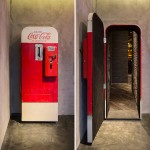
coca cola machine hidden door

It might be surprising to learn that there is an American-style speakeasy in China (although if you’ve been there you will have seen quite a few), but it’s even more surprising to witness someone actually entering the bar. The building’s front contains a bright, cheery sandwich shop with a classic Coca-Cola machine on the back wall.

flask bar

flask and the press hidden speakeasy

Pulling a lever on the soda machine reveals a “secret” passage that leads to Flask, an intimate and delightfully mysterious bar designed by Alberto Caiola. An eclectic mix of furniture calls to mind the furtive nature of assembling these establishments during prohibition.

flask and the press

flask and the press whiskey wall

A floor-to-ceiling display of 25 liter jugs filled with whiskey is a visually stunning detail which may or may not be historically accurate – speakeasies were generally designed to be easy to disassemble if the cops came sniffing around, after all. Regardless, it is still a charming deviation from the loud, crowded urban bar.

Williams & Graham – Denver

wg-outside

The first thing that will strike you as unusual when you walk into the small Denver “bookstore” called simply Williams and Graham is that it’s only open from 5 pm to 1 am. Good news for insomniac bibliophiles, perhaps…or maybe there’s a little more to this story.

williams and graham bar

wg private room

At the back of the shop, a heavy curtain swings open to reveal a very cozy little space with scarce seating, low lighting, and vintage furnishings. One can imagine the hoodlums and society folks alike lining up in the 1920s for a tasty libation while always keeping a wary eye trained on the door.

williams and graham denver speakeasy

wg-wide-bar-shot

The bar serves cocktails straight out of the prohibition era – though admittedly, not with liquor made in clandestine basements distilleries or delivered only under the cover of night. The establishment emphasizes its mission to replicate the speakeasy with its fancy drinks, relative exclusivity (reservations are recommended), and general air of mystery.

Next Page – Click Below to Read More:
Secret Speakeasies 6 Bars Clubs Hidden In Plain Sight

Share on Facebook


[ By Delana in Design & Fixtures & Interiors. ]

[ WebUrbanist | Archives | Galleries | Privacy | TOS ]


WebUrbanist

 
Comments Off on Secret Speakeasies: 6 Bars & Clubs Hidden in Plain Sight

Posted in Creativity


Secret Skies: See Starry Nights Normally Hidden by City Lights

03 May

[ By WebUrbanist in Art & Photography & Video. ]

sky glow

With the rise of urbanization, an estimated 80% of the world population has never seen the Milky Way – and while rural dwellers see thousands of stars on a typical night, those in cities typically see a few dozen at best.

night sky la overloook

time lapse anitmation

As part of their Skyglow project, astrophotographers Harun Mehmedinovic and Gavin Heffernan taking pictures from around the country in darkened areas where the night sky is visible, in some cases turning them into true-to-life composites showing what the skies above cities would look like with the lights turned off. In other instances, their timelapses show the rotation of Earth against the sky.

night sky images

night sky timelapse

night urban swirl

Urban light pollution is not just a problem of lost views – it has been known to interfere with bird migrations and other animal behavior, not to mention sleep disorders and disease correlations in humans. Cities like Phoenix, Arizona, are trying to take back the night sky, dimming non-essential artificial lights to cut energy consumption.

You can support the project on Kickstarter for rewards as well: “SKYGLOW will also explore the evolution of our relationship with astronomy over time, including the impact of stars on imagination, mythology, and the sciences. By visiting incredible archaeoastronomy locations like Canyons of the Ancients, Chaco Canyon and Mesa Verde, SKYGLOW will explore the relationship between ancient civilizations and the galaxies they worshiped. Can we learn from them? “

Share on Facebook


[ By WebUrbanist in Art & Photography & Video. ]

[ WebUrbanist | Archives | Galleries | Privacy | TOS ]


WebUrbanist

 
Comments Off on Secret Skies: See Starry Nights Normally Hidden by City Lights

Posted in Creativity


Luxury Retrofit: New 440-Square-Foot Condo Hidden in Old Garage

17 Apr

[ By WebUrbanist in Architecture & Houses & Residential. ]

box-home

Boxed in on both sides, this once-homely little garage space is now a cozy high-end condo, its rusted white corrugated metal front replaced with a still-concealing wood facade serving to hide something much more dynamic inside.

garage house interior

garage house kitchen

garage house seating

Designed by FABRE/deMARIEN, this ‘100% Box’ home features white walls and ceilings, reinforcing lightness and openness toward the front of the space, an area containing a kitchen and dining room as well as a front entry deck.

garage house living room

garage bathroom inside box

garage elevated sleeping loft

A wood-paneled box in back serves all kinds of additional functions, housing a series of desk and seating built-ins, enclosing a small bathroom and supporting the elevated bedroom with bed and storage above.

garage house before

garage reconstruction

garage under construction

garage house conversion

garage house car port

The sloping roof helps provide higher ceilings in the back spaces as well as accommodating the additional needs of the raised bedroom area, with periodic sunlights to help illuminate all of the above. Enclosed on all sides, this urban infill lot reuse manages to feel spacious and open despite the limitations of its site.

Share on Facebook


[ By WebUrbanist in Architecture & Houses & Residential. ]

[ WebUrbanist | Archives | Galleries | Privacy | TOS ]


WebUrbanist

 
Comments Off on Luxury Retrofit: New 440-Square-Foot Condo Hidden in Old Garage

Posted in Creativity


Dead Drops: Hidden USB Sticks Offer Anonymous File Sharing

07 Feb

[ By Steph in Gaming & Computing & Technology. ]

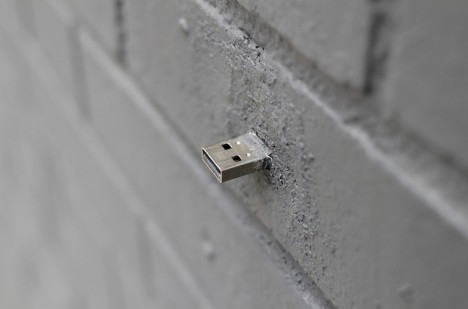
usb dead drop

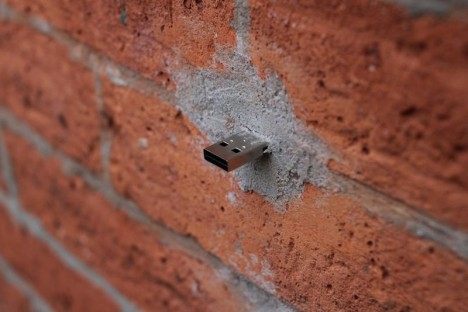
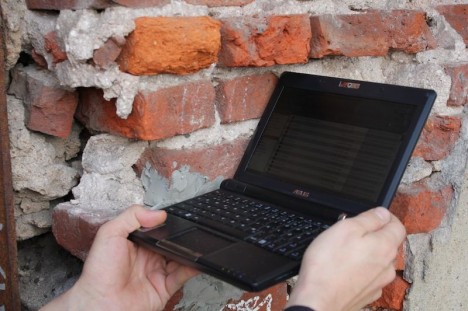
If you happened to notice a USB stick poking out of a brick wall in an urban space, would you be brave enough to connect your computer to it just to see what it might contain? Will it dump a bunch of malicious software onto your machine, or reveal something amazing? You just never know. The Dead Drops offline peer-to-peer file sharing project has been called “the nerd equivalent to glory holes,” bringing the sense of anonymity provided by the internet into the real world in a way that feels conspicuously sketchy.

dead drops 4

dead drops 5

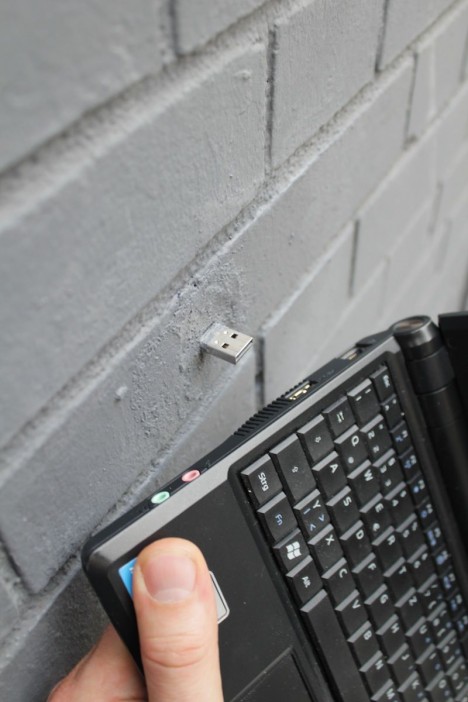
Berlin-based artist Aram Bartholl took inspiration from the methods spies used to transfer information in a secret location. The process of accessing or distributing files on these networks is anonymous, you can share anything you want, and actually plugging your laptop or tablet into the drive sometimes requires bending at awkward angles or doing something that looks vaguely suspicious.

dead drops 2

dead drops 6

Bartholl notes that the ‘danger’ of participating in the project is no different from that of sharing files on the internet. People typically share photographs, art, poetry and videos. The drives range from 64 megabytes to a whopping 120 gigabytes. To install one of your own, just find or create a hole in a wall or other urban surface, remove the thumb drive’s plastic case and wrap the memory board with waterproof tape, place it in the hole with just the port exposed and cement it in with fast-setting concrete.

dead drops 7

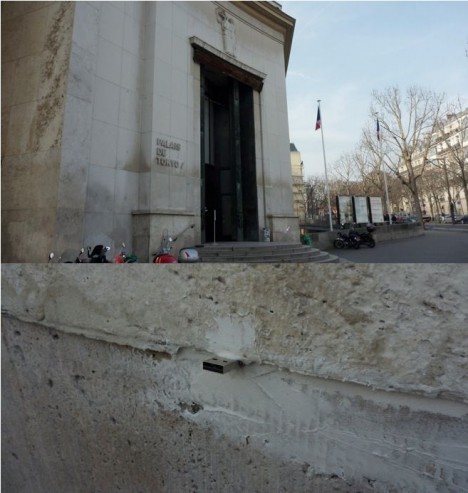
The project started in 2010 and has since grown to thousands of locations worldwide, according to a database that tracks where they’ve been installed. Some can be found in the busiest areas of cities like New York, while others are in abandoned buildings off the beaten track. You can find out whether there are any near you, or create one of your own using the Dead Drops site’s instructions.

Share on Facebook


[ By Steph in Gaming & Computing & Technology. ]

[ WebUrbanist | Archives | Galleries | Privacy | TOS ]


WebUrbanist

 
Comments Off on Dead Drops: Hidden USB Sticks Offer Anonymous File Sharing

Posted in Creativity


Coke Machine Acts as a Secret Portal to Hidden Speakeasy

17 Jan

[ By Steph in Design & Fixtures & Interiors. ]

hidden speakeasy

You’d never guess that there’s anything amiss at ‘The Press,’ a sandwich bar in Shanghai, unless you actually witnessed the surreal sight of someone pulling a lever on a vintage Coca-Cola machine and disappearing into it. The soda machine acts as a secret entrance to ‘The Flask,’ a contemporary lounge that forms a stark contrast to the brightly-lit sandwich shop.

hidden speakeasy 3

hidden speakeasy 4

Collectively known as The Flash and the Press, this hidden speakeasy by Alberto Caiola may not be the only such concept in town, but with the Coke machine and unexpected visuals, it adds another layer to the experience of accessing an exclusive-feeling ‘secret’ space.

hidden speakeasy 2

hidden speakeasy 6

hidden speakeasy 7

Once you open the door to that machine, the fun, bright, upbeat environment of the diner melts away and you’re enveloped by a dark, angular elegance marrying traditional speakeasy details like oversized glass liquor bottles with modern aesthetics. The bar is dimly-lit and eclectically furnished to recreate the subversive, fly-by-night feel of the originals.

secret speakeasy 2

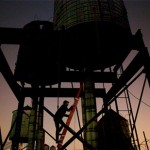
Another hidden speakeasy, this one in New York, requires a bit more of visitors in order to gain access – you have to meander up a winding path through a deserted building to reach what seems like an industrial wasteland. ‘The Night Heron’ was held illegally inside a water tower on top of a vacant building in Chelsea.

Share on Facebook


[ By Steph in Design & Fixtures & Interiors. ]

[ WebUrbanist | Archives | Galleries | Privacy | TOS ]


WebUrbanist

 
Comments Off on Coke Machine Acts as a Secret Portal to Hidden Speakeasy

Posted in Creativity


No Mirage: Unlock a Secret Pool Hidden in the Mojave Desert

07 Jul

[ By WebUrbanist in Art & Installation & Sound. ]

desert pool installation project

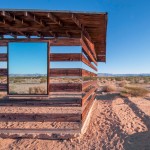
An art installation with a side of rugged adventure, the Social Pool is a project open to the public but locked and with a location only revealed via coordinates that lead visitors on a long trek to its discovery.

desert secret hidden pool

Seekers must first travel to the MAK Center for Art and Architecture in West Hollywood and retrieve one of four keys that open the pool, and will be tasked with taking one gallon water to help refill it as well. Los Angeles area travelers do not stumble upon it by accident – it is not on any road, trail or path.

social pool uncovered sand

Keys are to be returned within 24 hours, whether or not you find the secret spot and uncover the cool pool of filtered water, powered by solar panels. You cannot reserve a key in advance – you must show up and see if one is available. Uncertainty is part of the experience, like it or not.

social pool remote desert

Designed by Austrian artist Alfredo Barsugli, LAist describes it as something “meant to reflect on the lengths humans would go to in the pursuit of luxury,” but also as a good excuse to spend some time exploring an amazing desert landscape.

underground beauty resort installation

underground desert spa sand

Barsugli is not new to strange desert installations – a previous piece, the Oderfla Beauty Resort, featured a spa building semi-submerged in desert sand.

social pool art installation

It is also worth stocking up on gas, food and water and watching out for snakes, lizards and hares along the way. Hint: the pool is not close to the MAK. Its position is only given broadly to the public: somewhere in the southern Mojave Desert between Joshua Tree and Apple Valley. Images by Alfredo Barsugli and Juliet Bennett Rylah of LAist.

Share on Facebook


[ By WebUrbanist in Art & Installation & Sound. ]

[ WebUrbanist | Archives | Galleries | Privacy | TOS ]


WebUrbanist

 
Comments Off on No Mirage: Unlock a Secret Pool Hidden in the Mojave Desert

Posted in Creativity


[MODIFIED] Buying a Digital Camera – Hidden Costs with Higher Megapixel Cameras

18 Apr

Higher-megapixel digital cameras may have hidden costs besides just the cost of the camera.

High megapixel modern digital cameras generally allow one to take photos with much greater clarity than with cameras made in years past. Mistakes can be cropped out, larger photos can be printed, and more details can be made clearly visible, allowing one to take photos that more accurately represent a treasured memory. Modern cameras also may let you shoot HD video, offering even more enjoyment from your investment.

However, before you plunk down money on a new high megapixel digital camera, recognize there may be some ‘hidden’ costs to use this technology to its fullest:…

Read more at MalekTips.
New Computer and Technology Help and Tips – MalekTips.Com

 
Comments Off on [MODIFIED] Buying a Digital Camera – Hidden Costs with Higher Megapixel Cameras

Posted in Technology


Urban Jungle Street View: 3D Hack Uses Hidden Depth Data

26 Mar

[ By WebUrbanist in Gaming & Computing & Technology. ]

urban jungle street view

An explicitly illicit use of dimensional data buried in Google Street View, the Urban Jungle project adds eerie layers of post-apocalyptic green overgrowth to major cities around the world.

animated-new-york-city

urban jungle side street

As in Google Maps, a user can simply drag and drop their tiny avatar in a location of their choosing, then explore a plant-infested, tree-filled, vine-covered alternate version of reality. Click here to start exploring.

urban jungle street maps

From its creator: “This experiment using an undocumented part of Street View, the depth data. With that a depth map and a normal map is generated, which can be used in the shaders and to plot geometry and sprites in (almost) the correct position in 3d space.”

animated-street-jungle-view

street trees vines plants

Despite a glitch here or there, most locations and settings are shockingly convincing, looking like something that was lovingly crafted in incredible detail for a game (or an artist’s rendition of life after the apocalypse).

animated-time-square-signs

street view urban jungle

This otherworldly effect could just be the beginning – you too can grab the depth data at GitHub and create your own surreal landscapes or otherwise-hacked environments (samples via GMM, PSFK & PK).

Share on Facebook


[ By WebUrbanist in Gaming & Computing & Technology. ]

[ WebUrbanist | Archives | Galleries | Privacy | TOS ]

WebUrbanist

 
Comments Off on Urban Jungle Street View: 3D Hack Uses Hidden Depth Data

Posted in Creativity


6 of Lightroom’s Hidden Treasures

24 Feb

Lightroom is very popular for post-processing lately. In this article I will go over a few of Lightroom’s hidden treasures. See if you use these, or maybe you have some others you can share with us in the comments section.

1. Virtual Copy

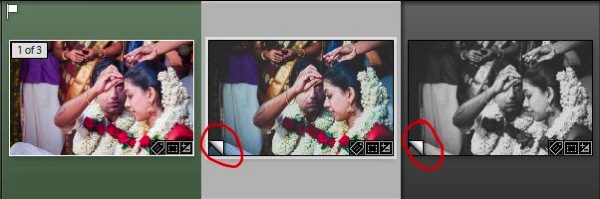
In Lightroom’s develop module you can have any number of something called Virtual copies. The advantage is that each copy can use a different arrangement of settings to make the image look different; thus you can compare several options to see which gives the best results.

Virtual copies are not a copy of the original image, but a set of instructions copied from the original file, to which further instructions are added. It is not a duplicate image file; it is only the instructions written previously on the original, copied, and kept as a separate instructional file format, very tiny in size. You can backtrack and start over, or you can continue editing where you left in the current virtual copy you are editing.

To create a new virtual copy Click Ctrl + ‘ on PC (Command + ‘ on Mac) OR right click the image thumbnail and choose “Create Virtual Copy”

In essence it is different instructional files acting on one single original image, to produce different images as per the different processing strategies you apply (you then need to export each to create separate final files). Virtual copies are an intelligent way to try out different things without duplicating your originals, and consuming hard disk space.

Lightroom hidden treasures tips 01

This screen shot from filmstrip shows the Virtual Copies. The page flip symbol
(circled in red) on the bottom left corner of each image is the sign for Virtual Copy.

2. Soft Proofing

This has been one of the most sought after features in Lightroom for long time. Press “S” on your keyboard as you work in the Develop module and your working image’s background turns into paper white (you can change that as well). The photograph will appear as if it is on paper, and a notification shows “Proof Preview” on the top right of the image area.

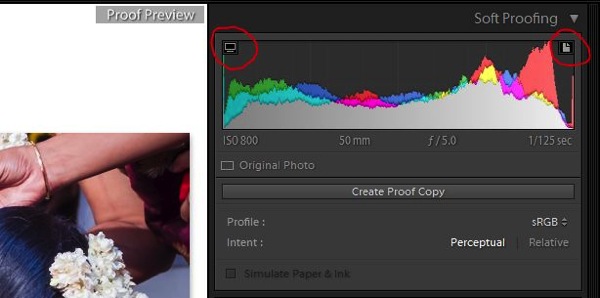
To check if your image has any colour problems, take a look at the histogram. The clipping indicators are turned into two symbols; one on the right corner is a print colour warning, and the left one is a monitor colour warning. Too much of a particular colour in your image will give you a warning on the same histogram (click the paper and monitor symbol), that those colour regions are unable to make it into print medium. This means you have to reduce the colour intensity of that particular colour.

Lightroom hidden treasures tips 02

This screen shot shows the paper symbol on top right and the monitor symbol on top left of the soft proofing window (both are circled in red).

By clicking “Create Proof Copy” you will be able to create a Virtual Copy of the present settings and after the correction you can compare it to the changes after correcting the colours. You can apply colour profiles too based on the printer you are using. Press “S” again to exit Soft Proofing mode.

3. Smart Previews

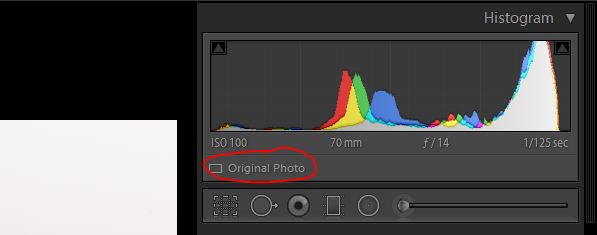
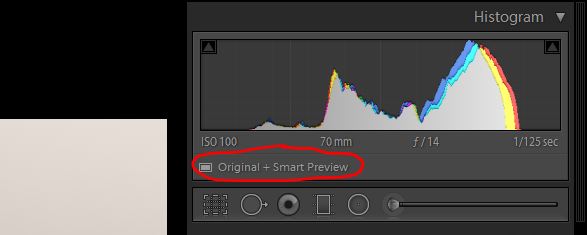
Smart Preview, as the name suggests, is a smarter way of working when you have hard drive space constraints (say you are working on your laptop but your files are in the external harddrive). Smart Preview creates high res – low size file which can be used for working purposes. The moment you want to export the photographs, connect your external hard drive and export it from the original.

This tool will be highly useful for people who have already accumulated a lot of files, and utilized hard disk space. The moment you import, the option will be there. If you click the tick box to create Smart Previews, Lightroom will create and store them in a separate folder where your working instructions (your LR catalog) will be stored. The moment you connect your external drive, you will have an option to discard the smart preview files. Before discarding, the instructions will all be written on to the original files.

Lightroom hidden treasures tips 03

This screen shot shows the original file without Smart Preview

Lightroom hidden treasures tips 04

This shows the screen for the same file with Smart Preview (circled in red)

4. Lights Out

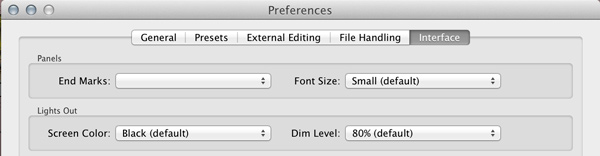
One of the least used tools in Lightroom; comes with a simple shortcut. Simply press “L” on your keyboard and the entire screen dims (80% dim), except the image area. Press “L” again and the screen will go to pitch black except your image portion. The smart thing about this is that when you first press the “L” you can continue working with the 80% dimly lit, panel sliders. You can also set what percentage you want for your Dim Level by going to your Preferences settings (see below).

Lightroom-hidden-treasures-tips-08

Set your Dim Level percentage in Preferences, here

When you press “F” for full screen you have to wait for resizing the image to full screen. But when you press “L” for lights off it is done in a snap.

5. Target Adjustment Tool (TAT)

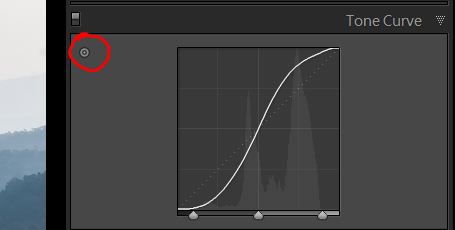
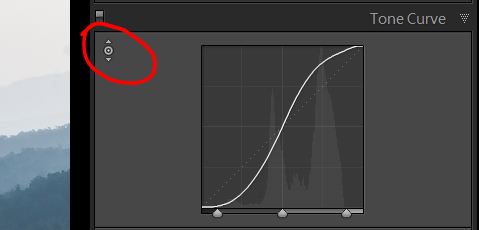
This tool is available in the Develop module’s Tone Curve and Colours sections. This is one intelligent tool to adjust the tonal values directly on the image, when you do not know which sliders to adjust. You pick the tool from the panel and adjust the image directly by pressing and holding the mouse button, while you drag up or down as you may wish. The changes appear instantly as you drag.

It is available in the colour section as well, where you can adjust the colour values (Hue, Saturation & Luminance). Click the tool from the panel, place it over the image where you want to make adjustments, while pressing and holding the your mouse button. In B&W conversion you can also adjust the black, grey and white values by adjusting the tones darker or lighter, in a similar manner as you did for colour.

Lightroom hidden treasures tips 05

This shows where to find the Targeted Adjustment Tool in the Curves panel

Lightroom hidden treasures tips 06

When the tool appears with up and down arrow marks, as seen here, it means the tool is activated.

6. Visualize Spots

As you use your camera, with the passage of time, the sensor tends to accumulate dust over itself. The dust spots become visible on your image and reduce its quality and appeal. As there may be any number of reasons for not cleaning the camera sensor, every time you see a spot there is a tool in Lightroom to clean them, at the image level.

You are probably aware of the cloning and healing tool, which is on the top of the Develop module – second tool from the left, below the Histogram. You can use this tool for obvious reasons and also for correcting the sensor dust spots. Press “Q” (keyboard shortcut) to activate the tool and look at the bottom of the image (see below).

Lightroom hidden treasures tips 07

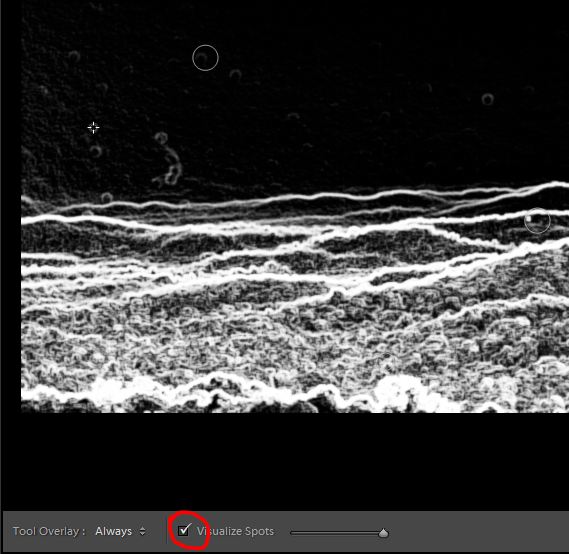
This screen shot shows the image after the tool is activated

Click the check box adjacent to Visualize Spots and the image turns into an inverted monochrome one which show the dust spots more clearly (if you do not see the toolbar or that option press “T” to show the Toolbar). You can adjust the intensity of the brightness to find the dust spots using the slider next to Visualize Spots, on the toolbar. This is an easy way to find the dust spots and correct them by cloning the nearest best place.

Do you have any other Lightroom tips or hidden treasures that you use? Please share in the comments below.

For more on Lightroom check these articles:

  • Why Lazy Photographers Should Use Lightroom Smart Collections
  • 3 Uses for the Radial Filter Tool in Lightroom 5
  • 4 Not-so-Secret Tricks to Speed up Your Lightroom Workflow

The post 6 of Lightroom’s Hidden Treasures by Navan Viswa appeared first on Digital Photography School.


Digital Photography School

 
Comments Off on 6 of Lightroom’s Hidden Treasures

Posted in Photography


Lightroom 5 Tips – Hidden Gems

19 Jan

Lightroom_iconAdobe Photoshop Lightroom instructor Julieanne Kost goes over some of the lesser known, yet less exciting features and some Lightroom 5 tips. If you haven’t upgraded from Lightroom 4 yet this will be a little preview. I would personally highly recommend that you do upgrade to LR5 if you haven’t yet.

Some of my favourite LR5 new features are:

  • the Radial Filter
  • that the heal/clone tool is paintable now and not just a dot
  • the auto correct for perspective to correct buildings and tilted images
  • the BOOK module is greatly improved for ordering Blurb books
  • Smart Previews which I didn’t think I’d have a use for but have used a few times now

What are your favourite new features?

Do you have any other hidden gems that aren’t covered in this video? If so please share with us in the comments!

For more Lightroom 5 tips and learning check out these articles:

  • Lightroom Tips for the Develop Module – the Magic Alt Key
  • 3 Lightroom History Tips
  • 4 Quick Tips For Getting The Most Out of Lightroom Presets
  • How to use the new Radial Filter Tool in Lightroom 5

The post Lightroom 5 Tips – Hidden Gems by Darlene Hildebrandt appeared first on Digital Photography School.


Digital Photography School

 
Comments Off on Lightroom 5 Tips – Hidden Gems

Posted in Photography