RSS
 

Posts Tagged ‘GALAXY’

Just posted: Samsung Galaxy Note II review

23 Mar

DSC05758b.jpg

We’ve just posted our review of the Samsung Galaxy Note II on connect.dpreview.com. The Note II comes with a large 5.5-inch screen but is it just a phone for users who like it big or can it offer advantages over its smaller-sized siblings in the mobile imaging context? We did some finger stretches and then put the Note II to work as both an image capture and editing tool. Click through to go to the full review.

News: Digital Photography Review (dpreview.com)

 
Comments Off on Just posted: Samsung Galaxy Note II review

Posted in Uncategorized


Samsung Galaxy Review

21 Mar

GALAXY Camera_6.jpg

As a fan of the Mac I find it hard to avoid news of the constant sniping, litigation and general blazing that is going on between Apple and Samsung over alleged patent infringements, new developments, new products and amazing improvements to existing iDevices.

However, in a way, I see the Apple vs Samsung barney as a good thing, with the eventual outcomes arriving as radical new devices and/or useful advances in many products.

So, it is in this environment that I am reviewing a newcomer from the Dark Side! Move over Microsoft, there’s a new boy in town.

GALAXY Camera_4.jpg

GALAXY Camera_3.jpg

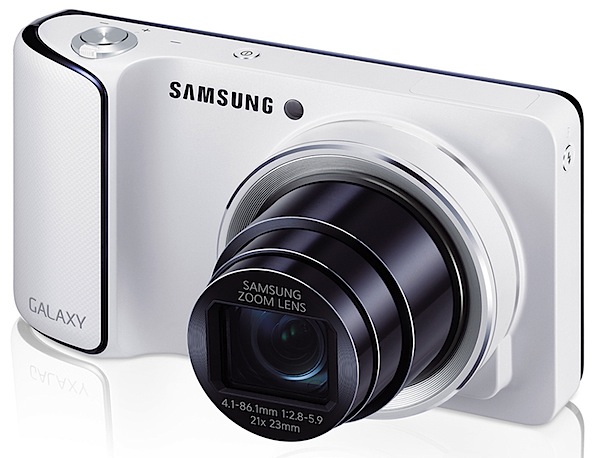
As Samsung says: This is the first Galaxy Camera, featuring Wi-Fi connectivity and Android 4.1 (Jelly Bean) software. It combines high performance photography with mobile technology ….

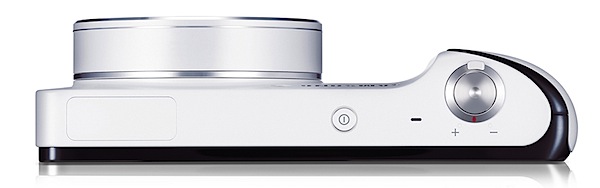
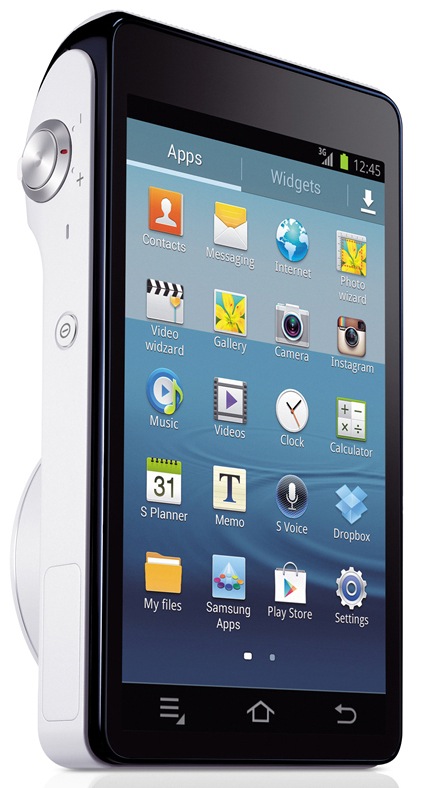
Straight out of the box, the camera is simply gorgeous in its all-white livery, with dramatic relief as you turn it around to show the enormous 12.2cm rear screen in black (with power off!). Very Apple!

Whilst it’s pocketable, it is much larger than many compact digicams.
GALAXY Camera_2.jpg

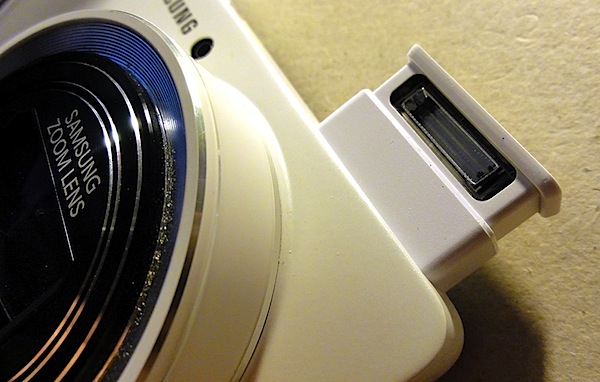
If you’re not a patient screen tapper you may find the comprehensive touch screen interface a bit of a challenge at first: you go nowhere unless you tap! External controls are minimal: tiny power button on top, nearby is the shutter button and zoom lever; left edge is where you tap a button to raise the onboard flash cell.
Flash.jpg

The camera’s right edge houses a mini HDMI port; beneath the camera is a latch which, when raised gives access to the battery, memory card and SIM card.

Re the touch screen: once familiar with it I found life to be trés trés easy and much better than many cameras’ convoluted menus.

To begin with, you must encounter the main screen which has icons for virtually all your needs: apps such as Paper Artist, Instagram and Photo Wizard can be triggered here.

I immediately went to Camera which took me to the exposure options I needed to run the camera.

Three on screen options: Auto, Mode and Video.

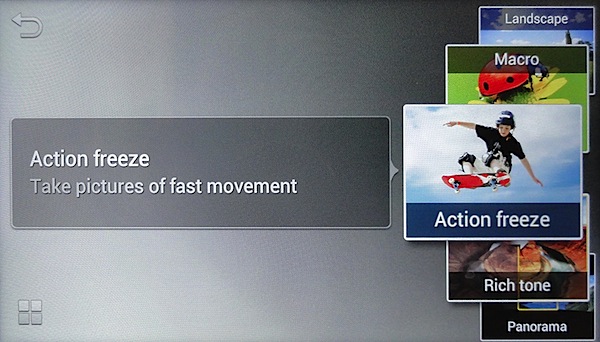
Mode was my next stop; in this department I could select Auto (again), Smart and Expert. Smart gave me on screen visual examples of image treatments that could impart such effects as Beauty Face, Continuous (a burst of shots), Macro, Rich tone, Light Trace, Panorama etc.
Expert 1.jpg

Expert 2.jpg

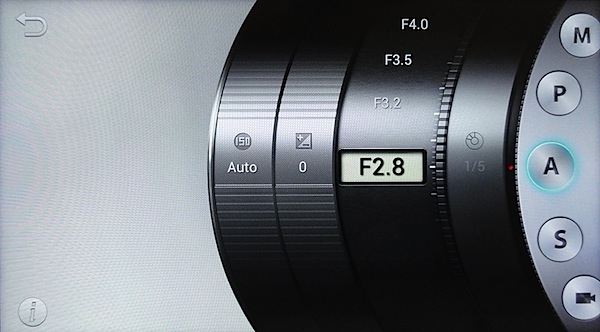
The Expert option was obviously my next stop if I was to raise my skills above auto shooting: here I could choose Program AE, shutter or aperture priority, manual exposure and video (again). An interesting display: a lens barrel showing choices of ISO setting, exposure compensation and aperture selection.
Car park full wide 3.JPG

Car park full tele 3.JPG

Samsung Galaxy Features

The maximum lens aperture is f2.8, which shrinks to f5.9 when the 21x zoom is extended to its ultimate 35 SLR equivalent of 481mm.

Maximum image size is 4068×3456 pixels, leading to a print size of 34x29cm

Shop manikin head 1.JPG

Sunflowers 2.JPG

Video can be shot in MPEG4 at 1920×1080 or 720×480 res. I found the Galaxy camera to be excellent as a video camera: it smoothly helped auto focus to sharpen up on subjects as I moved around; the large screen, even held at waist height, made it an excellent viewfinder when on the move.

There’s a whole heap of fun awaiting for you when you get into the software side of the camera: users can browse the Web and download applications from Google Play or the Samsung Apps stores.

Voice commands.jpg

Built in voice control allows you to tell the camera what to do! What a party starter! Simply call out Smile! Shoot! Zoom in! and other commands to get the camera to perform under your control. And it works!

I did discover that settings such as voice operation on/off, lens aperture setting and ISO and are cancelled after a restart.

Startup Time

About 23 seconds before I could fire off the first shot. This possibly because it’s booting the Android operating system.

Distortion

No problems at the wide and the tele end of the zoom.
Dust on sensor.JPG

Dust Spots

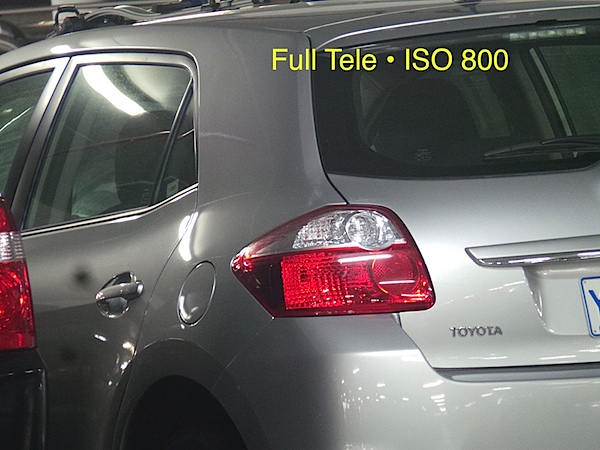
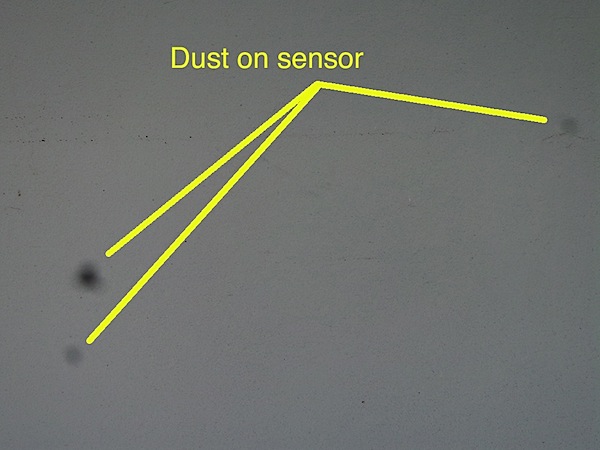
Hopefully, it was only this camera, but I did find that dust spots appeared when the lens was set at full tele.

ISO Speeds
Samsung Galaxy ISO 100.JPG

Samsung Galaxy ISO 400.JPG

Samsung Galaxy ISO 800.JPG

Samsung Galaxy ISO 1600.JPG

Samsung Galaxy ISO 3200.JPG

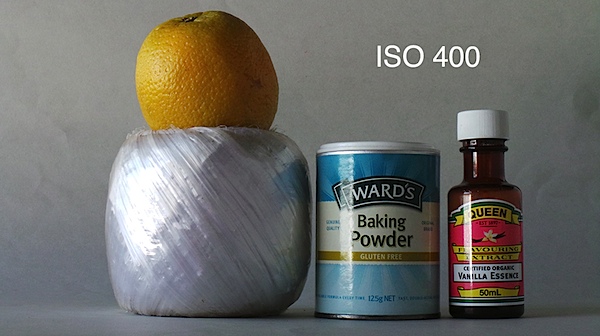
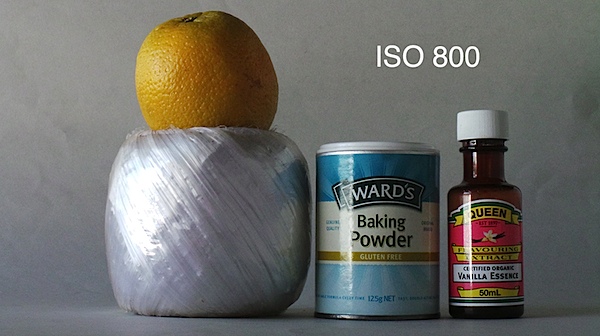
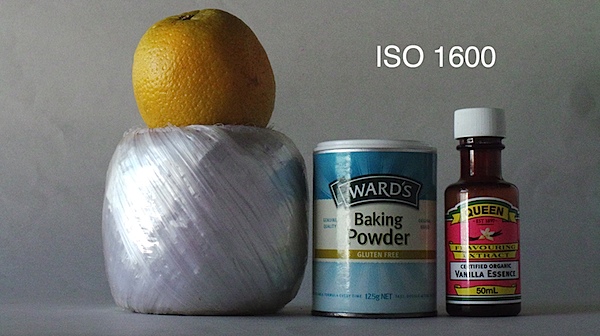
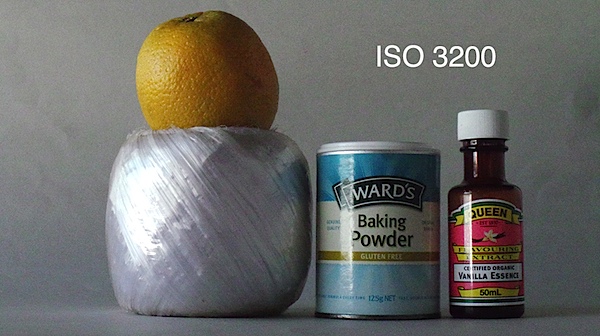
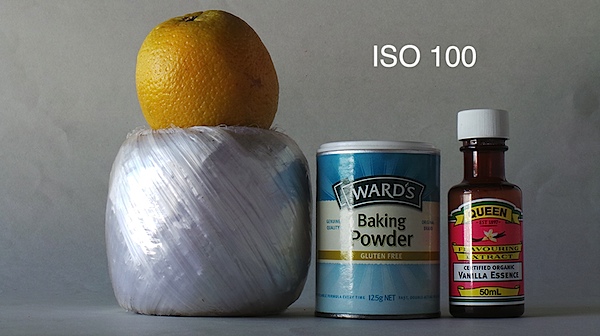
At ISO 400 a drop in sharpness and a lift in noise is apparent; by ISO 800 these are even worse; by ISO 3200 these problems make the image unusable.

Samsung Galaxy Review Verdict

Quality: about average; no more.
Why you would buy the Samsung Galaxy: it’s the latest iDevice.
Why you wouldn’t: expensive for a camera; despite its glamorous Android and Wi-Fi trappings it’s no more than a point-and-shoot digicam; you hate touch screens.

My experience with the Galaxy camera was a positive one. Thrown upon the seeming ‘rocks’ of a totally touch screen menu with no external controls left me with no scars … in fact, it gave me a glimpse of a possible future for digicams totally equipped this way: large screens, no external controls, touch screen operation.

A few hangups:

Startup 1.jpg

Startup 2.jpg

From a cold start, the camera seemed to take an eternity to get to operational readiness: as I’ve already mentioned, it took about 23 seconds to get going, after a series of glam startup screens.

The leaflet tucked into the camera box is totally inadequate; go to www.samsung.com/us/support/owners/product/EK-GC100ZWAATT to download a useful 134 page PDF manual.

Be careful you don’t load a memory card into the SIM slot by accident; it can be difficult to remove.

If you have difficulty saving images to the memory card, try re-formatting the card. It saved my day!

Let the fun continue!

Also in black.

Samsung Galaxy Specifications

Image Sensor: 16.3 million effective pixels.
Sensor Size: 11mm CMOS.
Lens: f2.8-5.9/4.1-86.1mm (23-481mm as 35 SLR equivalent).
Image Stabiliser: Optical.
Metering: Multi, centre-weighted, face detection.
Shutter Speed: (Auto) 1/8 to 1/2000; (Manual) 16 to 1/2000 second.
Continuous Shooting: 20 shots at 3.8 fps.
Memory: micro SD, micro SDHC, micro SDXC cards plus 8GB internal memory.
GPS Location Tagging: Yes.
Image Sizes (pixels): 4068×3456 to 1024×768.
Movies: 1920×1080 and 1280×720 (both 30fps); 640×480 (30 and 60fps) and 320×240 (30fps) and 768×512 (slo mo 120fps).
Viewfinder: 12.2cm LCD.
File Formats: JPEG, MPEG4, AAC, WAV etc.
ISO Sensitivity: Auto, 100 to 3200.
Interface: USB 2.0, HDMI mini, Wi-Fi, GPS equipped, DC.
Power: Rechargeable lithium ion.
Dimensions:129x71x19 WHDmm.
Weight: Approx. 305 g (inc battery).
Price: Get a price on the Samsung Galaxy Camera on Amazon.

Post originally from: Digital Photography Tips.

Check out our more Photography Tips at Photography Tips for Beginners, Portrait Photography Tips and Wedding Photography Tips.

Samsung Galaxy Review


Digital Photography School

 
Comments Off on Samsung Galaxy Review

Posted in Photography


Hands-on with the Samsung Galaxy S4 smartphone

15 Mar

samsunggalaxys4.png

We had a close look at the the much-anticipated Samsung Galaxy S4 smartphone at the New York launch event and have put together a brief hands-on report detailing the device’s overall design and software features. We’ll be updating our story shortly with information about the S4’s 13MP camera and photographic features. Read about our first impressions at connect.dpreview.com

News: Digital Photography Review (dpreview.com)

 
Comments Off on Hands-on with the Samsung Galaxy S4 smartphone

Posted in Uncategorized


Samsung Galaxy S4 expected to be announced on March 14th

01 Mar

shared:Samsung_Logo_1.png

Samsung is expected to unveil the Galaxy S4, its next flagship Android smartphone on March 14 at a press event in New York. The company took to its Twitter account this morning to tell followers to be ready ‘4’ the next Galaxy. Read more at connect.dpreview.com

News: Digital Photography Review (dpreview.com)

 
Comments Off on Samsung Galaxy S4 expected to be announced on March 14th

Posted in Uncategorized


Samsung announces Wi-Fi-only version of Galaxy Camera

19 Feb

samsung_galaxycamera.png

Samsung has announced a Wi-Fi-only version of its Galaxy Camera. It shares the same feature-set as the 3G and 4G versions announced last August, including a 21x, 23-481mmm equivalent zoom lens on the front with a 4.8″ touchscreen on the back. It runs Android 4.1 (known as Jelly Bean), the latest version of the operating system. There is currently no information on price or availability.

News: Digital Photography Review (dpreview.com)

 
Comments Off on Samsung announces Wi-Fi-only version of Galaxy Camera

Posted in Uncategorized


Pro Evolution Soccer 2012 for Android on Samsung Galaxy S i9000 High Definion 720p

15 Feb

Pro Evolution Soccer 2012 for Android on Samsung Galaxy S i9000 PES2012 gameplay, video taken on Nikon D7000 + Nikkor 35mm 1,8 G 720p HD video Samsung Galaxy S i9000 – android 2.3.5 custom ROM – 1GHz processor 4″ Super Amoled display
Video Rating: 4 / 5


CES 2013 | Samsung: 110-inch 4K TV, World’s First Curved OLED TV, Galaxy Camera, & more!

15 Feb

HOW TO GET FREE ITUNES/AMAZON GIFT CARDS FOR FREE: bit.ly Retweet this video: clicktotweet.com FOLLOW ME FOR UPDATES HERE: Twitter: www.twitter.com Facebook: www.facebook.com Subscribe to my vlog channel: www.youtube.com Blog: www.SenseiPhone.com About SenseiPhone SenseiPhone covers the latest iPhone jailbreaks, tweaks, apps, firmware, latest iOS news, and more! We are mastering iPhone from all aspects. We bring everything about iPhone to our readers (you) in an easy and interesting way. Our goal is to make you a master of iPhone, like us. Intro visual done by: YouTube.com Intro Music done by: YouTube.com Music provided by: YouTube.com Equipment Used to Produce this Video: Camera: Nikon D5100 Lens: Nikon DX AF-S NIKKOR 18-55mm Mic: Blue Snowball Editing Software: Final Cut Pro X Lighting: Cowboy Studio Lighting Kit
Video Rating: 4 / 5

Retweet this video: clicktotweet.com Works on iOS & Android devices! **Start getting FREE Gift Cards: tinyurl.com FOLLOW ME FOR UPDATES HERE: Twitter: www.twitter.com Facebook: www.facebook.com Subscribe to my vlog channel: www.youtube.com Blog: www.SenseiPhone.com About SenseiPhone SenseiPhone covers the latest iPhone jailbreaks, tweaks, apps, firmware, latest iOS news, and more! We are mastering iPhone from all aspects. We bring everything about iPhone to our readers (you) in an easy and interesting way. Our goal is to make you a master of iPhone, like us. Intro visual done by: YouTube.com Intro Music done by: YouTube.com Music provided by: YouTube.com Equipment Used to Produce this Video: Camera: Nikon D5100 Lens: Nikon DX AF-S NIKKOR 18-55mm Mic: Blue Snowball Editing Software: Final Cut Pro X Lighting: Cowboy Studio Lighting Kit


Just posted: Samsung Galaxy Camera review

07 Feb

leading.jpg

We’ve just posted our review of the Samsung Galaxy Camera on Connect. The Galaxy Camera takes components from Samsung’s WB850F long-zoom compact camera and its flagship smartphone, the Galaxy S3, and combines them in one device. The result of this fusion of technologies is a compact superzoom camera with a 23mm wideangle, 21x zoom lens and pop-up flash that offers the ability to edit images on the go. You can also share images via Wi-Fi or 3G/4G data connectivity and install a plethora of apps from the Google Play Store. Click through to go to the full review.

News: Digital Photography Review (dpreview.com)

 
Comments Off on Just posted: Samsung Galaxy Camera review

Posted in Uncategorized


Caustic for Android, Demo on a Galaxy Tab 7″

23 Dec

This is a small demo song I did in a few minutes with Caustic for Android on a Galaxy Tab 7″ Finally Android gets high quality music software. Get it here: market.android.com I am not involved with the developer, just a fan! Sorry for the moire pattern in this clip, I filmed with a Nikon D90 😉

Halo Combat Evolved Walkthrough: The Truth and Reconciliation – Mission 3 Part 7 of my Let’s Play series from Halo Combat Evolved. This is a re-upload due to the fact that I forgot to edit out some audio from the previous time I rendered the footage. I would really appreciate if you guys could rate this video whatever you feel it deserves as a rating either way goes a long way! Follow me on Twitter – www.twitter.com Playlist- www.youtube.com


Connect Review: Shooting with the Galaxy Camera

14 Dec

samsung_galaxycamera4g.png

The Samsung Galaxy Camera is the the most serious attempt anyone’s yet made to build a truly connected camera. It’s essentially a hybrid of the company’s WB850F compact superzoom and its Galaxy SIII smartphone – combining the zoom range and larger sensor of the camera with the powerful processor, touch screen and Android operating system of the ‘phone. But how much extra capability does this bring? Mobile photographer Oliver Lang takes a look.

News: Digital Photography Review (dpreview.com)

 
Comments Off on Connect Review: Shooting with the Galaxy Camera

Posted in Uncategorized