 Well, it’s here! Version 7 of onOne’s Perfect Photo Suite has got to be the most anticipated release from onOne in this review we’ll see if it lives up to the hype. One rule I have for reviews is that I won’t review stuff that I don’t use on a regular basis. Well, I’ve been using onOne Software since I got my first copy of Photoshop (CS3 I believe) so I’d say I use it pretty regularly! I should note that I don’t get paid for doing these reviews, I do them purely because I want to review things that I use and and want to pass that on to you the reader if you’re trying to make a choice to buy something to advance your photography. So with all that said, let’s get to the review. And at the end we will do a giveaway. Yeehoo!
Where onOne Software Has Been And Where It’s Going
onOne used to cater exclusively to Photoshop users. They made Photoshop plugins and they were even great back then. If you didn’t have Photoshop, you were out of luck for the most part. That wasn’t uncommon, pretty much all software companies for photographers existed as plugins to Photoshop. Over the past couple of years however, onOne has started to slowly pull away from exclusivity with Photoshop and has now blown the doors wide open for Lightroom and Aperture users and even people who have none of the above. Not all of us can buy every new camera that comes out, have a bag full of L series lenses or own every new and groundbreaking piece of software that comes out. A lot of photographers do this stuff part time. Some photographers have full time jobs that have nothing to do with photography so buying every piece of software out there really isn’t a big priority. Some photographers simply are short on cash and can’t afford everything that’s available.
When onOne announced Perfect Layers, they quite literally turned the photography industry upside down. Not only is Perfect Layers included in their Perfect Photo Suite, it’s also free for anybody to use! It’s a free program that give us access to things like layers, masking, brushes, filters and more without having to buy an expensive program like Photoshop. When you combine Perfect Layers with the other programs that onOne offers, the pot really starts to get sweeter. Perfect Layers ties all of onOne’s products together in one nice program and it really becomes a one stop shop for just about all your editing needs. In a lot of cases, it can completely replace programs like Photoshop and Lightroom. If you don’t have $ 700 for Photoshop, if you don’t shoot thousands of images a week and need Lightroom for cataloging everything, then onOne’s Perfect Photo Suite 7 might just be the best option for you. If you have $ 700 and are ready to spend it, then I’d still suggest buying Lightroom and onOne’s PPS7 every time. You’ll even have some money left over (about $ 250 as a matter of fact) to pay bills. On top of all that, they just added a new and long awaited program into the mix with the release of Perfect Black & White. It’s easy to see that onOne is becoming a serious competitor in the photography industry as not just a supplement to other programs but as a stand alone software program that is much more powerful than some people realize.
What’s New In Perfect Photo Suite 7?
Well first of all, if you haven’t taken a look at onOne in a while, the price for the entire suite dropped significantly about a year ago. Their pricing actually used to closely resemble Photoshop but they decided to drastically drop their pricing to make their products available to more people, realizing that not everyone has $ 700 to drop on software. If you buy each product included in the Perfect Photo Suite a la carte, that’s about what you’ll spend. But if you buy the suite you’ll only pay $ 299.95. That’s pretty cheap considering all the different programs included. There are a lot of new features in PPS7 and if you want a whole list you can visit onOne’s website, but here are the ones that stuck out to me the most.
New Interface and Options
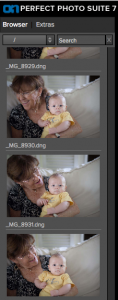 I wasn’t a huge fan of the interface in PPS6. It wasn’t terrible by any means, it just wasn’t as sleek as it could have been. I think they really improved things in PPS7 both in looks and functionality. Where PPS6 was clunky and bulky, PPS7 is smooth and versatile. Instead of having to import every single photo into the suite, you now have access to all your computers files on the left side. You can scroll through any folder or use the search bar to type in a specific file. This feature alone should save a LOT of time and makes the program that much more of a standalone solution.
Moving between modules is quick and painless. In past versions there was a lot more waiting around so things have definitely improved in the speed department. Preset image previews used to run along the bottom and seemed to be a bit of a distraction. They used stock images from various photographers to show what a preset did and if you wanted to see a preview with your image, you’d have to hover over the preset and wait for it to pop up. Now the presets run along the left side in the same place as the the files and there’s no more stock images. In PPS7, your image is used for each preset automatically so no more need to hover and wait.
Perfect Black and White
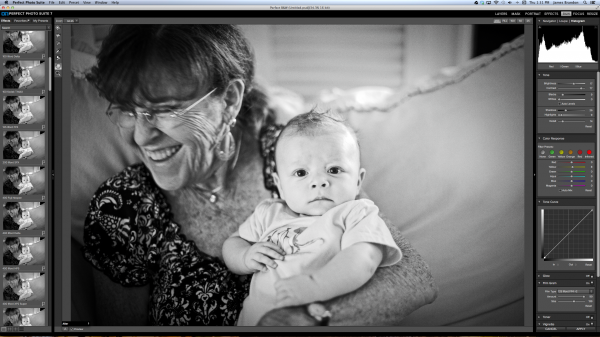
I’ve been waiting for onOne to come out with a Black & White program for quite a while now. So I was pretty happy to see it included in PPS7. I wouldn’t necessarily say that Perfect B&W is drastically different or more powerful than any other Black & White program. After all, converting an image to monochrome can only be so complicated, right? But there are things you can do in Perfect B&W that you can’t do in Lightroom or Photoshop alone. For example, in Perfect B&W you can add borders to your images (a remnant of the late Photo Frame software) without having to switch modules or export the photo anywhere (not available in LR or PS). You can add a blend mode on top of the image and then reduce its brightness (not available in LR). You can split tone the image like in LR but Perfect B&W also has presets readily available right in the toner drop down. And if you’re feeling really creative, you can simply take the photo into another onOne program like Focal Point with just one click. See how many clicks that takes in LR or PS! Here’s a quick video of Perfect B&W in action..
Improved and Expanded Presets Library
Using and creating presets in Perfect B&W (or Perfect Effects) couldn’t be easier. For the record, I love presets. To create a new preset once you have an image where you want it, just hit “shift > command > s” or go to the menu bar and choose “Presets > Save Preset” and a dialogue will pop up to walk you through the rest. Unlike Lightroom, in PPS7 you can add a creator and description to each preset which really comes in handy if you want to sell your presets online or give them out. Having presets readily available is great. You can always go back to ones you love to maintain a consistent look to your images, or you can use one preset and apply it to an entire photo shoot or series to really tie it all together. It’s good to see that onOne loves presets as much as I do. The litany of presets included in the PPS7 is exhaustive to say the least. That’s a good thing though. There are more presets, textures, brushes, borders and frames than I think I’ll ever fully know what to do with and that’s a lot better than having too few.
Say Goodbye To PhotoFrame
Yep, it’s true. PhotoFrame had a good run. It was the first onOne program that I ever purchased and now it’s been absorbed into the suite. You’ll find its remnants in Perfect Effects, Perfect Layers and Perfect B&W. It’s sad to see it go but that’s the way technology goes…
Start To Finish Video of Perfect Photo Suite 7 In Action
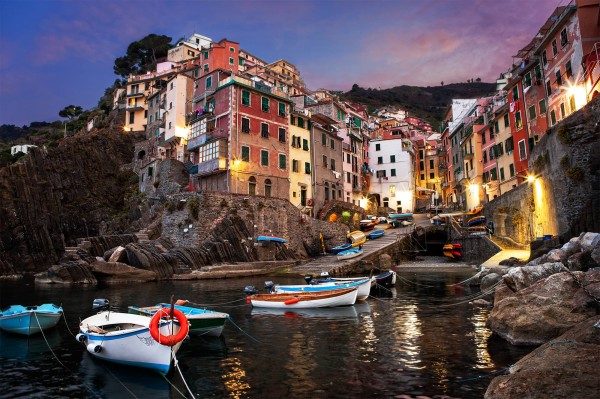
Here’s an in-depth video (about 45 minutes) of me editing an image from Italy using Lightroom, Perfect Photo Suite 7 and Photoshop. This is a long one, from start to finish, but if you want to see how I work through an image (unscripted) and see how seamless it is to work between these programs this should be an interesting watch for you. To watch even more videos on PPS7, be sure to visit onOne’s website and check out the Perfect Inspiration series from by good bud Brian Matiash or the countless videos available at any time at the onOne University.
Finished Image
Conclusion And Giveaway
I seriously am in love with this software. It’s incredibly versatile and it helps me out in so many ways from day to day. Whether it’s using Perfect Resize to prepare all of my gallery and fine art prints, dropping a photo into Focal Point to add some sweet blur or jumping into Perfect Mask when precision is needed; onOne’s Perfect Photo Suite has taken up permanent residence in my post processing workflow.
For a chance at winning a free copy onOne’s Perfect Photo Suite 7, here’s what you need to do: Leave a comment below telling us why/how you’d benefit from having PPS7. That’s it! And bonus point for following us all on Twitter!
We’ll choose the winner in one week from this post going live – midnight on 17 November US Eastern time.
@jamesdbrandon
@digitalps
@ononesoftware
Post originally from: Digital Photography Tips.
Check out our more Photography Tips at Photography Tips for Beginners, Portrait Photography Tips and Wedding Photography Tips.
onOne Perfect Photo Suite 7 Review and Giveaway