Blog

  • Earn Money With Digital Photography—Promote Your Skills

    This guest post was written by Laura Charon. Laura is an avid photographer who has been taking pictures for years–first with an old brownie camera and more recently with a Canon Digital Rebel XTi. You can read more of Laura’s posts at Beyond Megapixels. Contact me if you are interested in guest writing for Photodoto. -John

    Congratulations! You’re ready to take the next step with your digital photography, and start earning some money with it! There are two avenues you can pursue — you can sell the photographs that you take, or you can provide your photography skills as a service to other people. Either way you go, earning money with your photography is challenging and rewarding in this highly competitive field.

    lineup2 by Snerkology

    In this article we’re going to talk about promoting your photography skills.

    Create a portfolio — The first important step in selling your photographs is to establish a portfolio. Create a collection of the work that you are the most proud of, or that is the most applicable to the type of photography you will be performing (portraits, product photography, interiors, etc.). Click here for an an article I have written on how to develop a portfolio.

    Establish rates — Next you need to figure out how much you’re going to charge people. This can be tricky — charge too little and your work is undervalued; charge too much and you’ll be passed over for a photographer who is less expensive. Conduct some research into what kind of rates the industry currently supports. Review the rates of your local competition or photographers in your type of genre, and weigh their rates against how much you need to make per hour, per project, per photo, etc.

    Get business cards — When people see you with a camera, they tend to be interested in your work. Most of my “advertisement’ has come from people who have attended the events and venues that I am photographing. They ask me who I am and what I do, and I am able to produce a business card that has all of my contact information and website URL. Word of mouth is a powerful tool in the photography industry, so make sure you’re prepared at a moment’s notice to get your name out there!

    Volunteer your services for free — Experience and practice and vital to garnering customers for your photography business. You don’t want to go in cold to your first “gig’, so gather some experience by volunteering for some photography projects for free. This will allow you to gain the experience you need, bulk up your portfolio, and establish potential future paying customers. Ask friends and family members to pose for portraits. Attend events and venues similar to those whose business you’d like to receive. Offer free examples of your work on CD’s or in print to showcase your talents.

    Buy some basic gear — In order to be sure that you’ll be ready for whatever requirements come your way during your photo shoots, be sure that you have some basic gear to get you by. A good prime lens, a fast telephoto lens, a quality wide angle lens, and a quality macro lens are a good starting collection. Also consider a softbox for portable lighting, neutral colored drapes or drop-cloths for backgrounds, a tripod, a remote shutter release, and a remote off-camera flash.

    Get the word out — The final concern is how to get the word out about your photographs. You can’t sell anything if people don’t know about your work, right? Consider printing and framing some of your photos — put them in your own home for your friends and family to see, or give them as gifts to friends and family members, so that they will be seen by their own visitors. Approach local establishments (businesses, restaurants, libraries, etc.), and ask them if they will allow you to hang your work on their walls. Often, if it’s of no cost to them, a business owner will be happy to showcase quality work and decorate their store or office. Be sure you leave some method of contact – a business card tucked inside the frame, for instance – and make it clear that the photos on the walls are for sale, and that there’s plenty more where they came from!

    Photo credits (all): Snerkology Media, http://snerkologymedia.com/

    Photodoto

  • Photo Compilation – Incubus ; Aqueous Transmission

    Photos I have taken over the years accompanied by “Aqueous Transmission” by Incubus. All photos were taken by me and with my Kodak CX7525 or Canon Digital Rebel XT.
    Video Rating: 4 / 5

  • Bing Search Engine – Return More Desirable Search Results by Adding Ignore Words

    Tired of web pages containing particular words or phrases appearing in a Bing search? Create search queries that ignore them.

    When performing searches with Bing involving words or phrases that have multiple meanings, you might wish to prevent the results from including certain types of pages. Perhaps a word or phrase has a popular meaning but you want pages related to the alternate one.

    Another example is searching for a word or phrase that matches the name of a TV show, sports team, movie, etc. These popular culture references may result in pages in which you have no interest. For example, searching for “bones” may show results relating to the TV show, restaurants, a movie, or other non-anatomical subjects….

    Read more at MalekTips.
    New Computer and Technology Help and Tips – MalekTips.Com

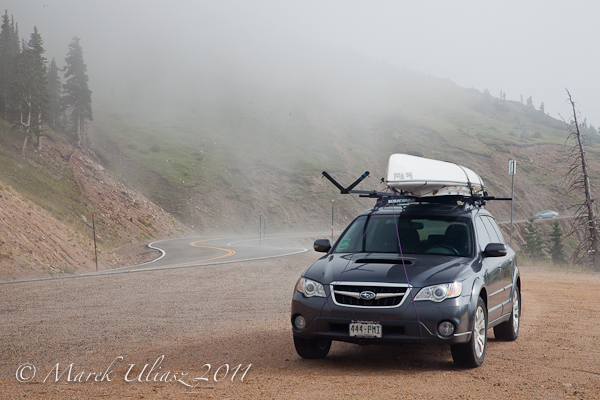
  • Sea Wind Canoe on the Loveland Pass

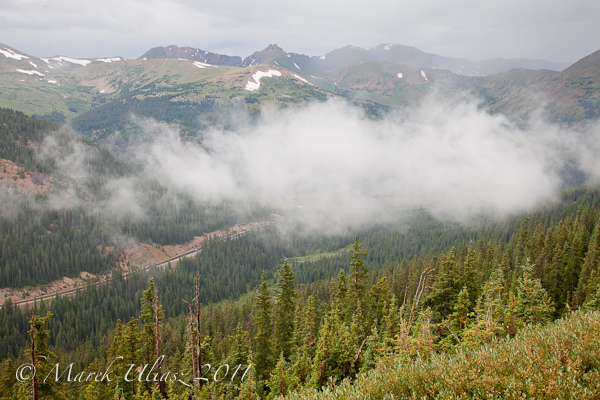
    Last Sunday, when returning from the Colorado River Race in Glenwood Canyon, I drove over the Loveland Pass to avoid delays in the Eisenhower Tunnel. It didn’t help much. I was still stuck in a traffic below the tunnel. However, I enjoyed a few stops at highway 6 at and below the Loveland Pass. It was foggy, cloudy and mysterious. Time to time I could see the slow traffic on the Interstate 25 below.

    This year, I paddled my Sea Wind Canoe in the Colorado River Race. I got a really good workout there. The race was dominated by SUPs (stand-up paddlers). You can find some pictures from the race and more commentary on the Fitness Paddling blog.

    Loveland Pass

    Loveland Pass


    ch_client = “mmuliasz”;
    ch_type = “mpu”;
    ch_width = 550;
    ch_height = 120;
    ch_color_title = “3c78a7”;
    ch_color_site_link = “3c78a7″;
    ch_non_contextual = 4;
    ch_vertical =”premium”;
    ch_sid = “Chitika Premium”;
    var ch_queries = new Array( );
    var ch_selected=Math.floor((Math.random()*ch_queries.length));
    if ( ch_selected < ch_queries.length ) { ch_query = ch_queries[ch_selected]; }

    Related posts:
    Colorado River 2011 Race Dominated by SUPs (Stand-Up Paddlers)
    Slide show: Colorado River Race
    10 Mile River Race in 60 Seconds – Thunderbolt Kayak in the Glenwood Canyon

    Colorado River Race - SUP start


    paddling with a camera

  • Sony DSC HX100V 16.2MP superzoom samples added to studio comparison tool

    Just Posted: Studio comparison shots from the Sony DSC-HX100V. We’ve just got hold of Sony’s latest superzoom, the 16.2MP HX100 and shot our standard test scene with it. It’s built around the latest 1/2.3" (6.17 x 4.55mm) back illuminated CMOS sensor and offers a vast 27-810mm equivalent 30x zoom. Being Sony’s top-of-the-range superzoom, it features a manual control ring that can be switched between controlling zoom and or manual focus. We also have one of its main rivals – the Panasonic DMC-FZ150 in the studio and will add that to the comparison tool as soon as we can.
    News: Digital Photography Review (dpreview.com)

  • Panasonic gives details of power zoom-enabling firmware v1.1 for GH2, G3, GF3 and GF2

    Panasonic has provided details of a firmware update for its recent G-system cameras to provide full compatibility with the newly-announced Lumix X power zoom lenses. The firmware, which will be available at ‘the beginning of October’ will work with the DMC-GH2, G3, GF3 and GF2, and will provide several additional options for how the powered zoom is controlled. By a process of elimination, it seems reasonable to assume these are the functions that won’t be available to older G-series users (G1, GF1, GH1, G2, G10), and possibly Olympus PEN users.
    News: Digital Photography Review (dpreview.com)

  • Red vs. Blue Season 9 Trailer

    Get the musical score on iTunes! bit.ly PUMPED FOR NEW RVB? FAVORITE THIS VIDEO! Episodes are NOW ONLINE only at RoosterTeeth.com. Watch the trailer in HD at http PAX East panel about trailer: www.youtube.com Copyright 2011 Rooster Teeth Productions LLC. Copyright 2011 Microsoft Corporation. All Rights Reserved. Microsoft, 343 Industries, Halo, Microsoft Game Studios, Xbox, and the Xbox 360, are trademarks of the Microsoft group of companies. All rights reserved. Based on Halo by Microsoft Corporation.

  • How to make 3d anaglyph pictures using photoshop

    learn how to make 3d red cyan/ blue cyan photos using photoshop
    Video Rating: 3 / 5

  • Microsoft Word 2010 – Fancy Up Your Text with Reflections and Tweak the Effects

    Have certain text in a Word 2010 document appear to reflect on a shiny surface.

    One way to have text stand out in a Microsoft Word 2010 document is to make it appear to be placed on top of a glassy surface.

    The “Text Reflection” effect is easy to use and you can select from one of nine default reflections. Or, spend all day configuring the reflection size, distance from the actual text, transparency, and blur. …

    Read more at MalekTips.
    New Computer and Technology Help and Tips – MalekTips.Com

  • JPEGMini promises smaller files – PetaPixel shows Photoshop quality quirk

    Technology company ICVT has developed an method to optimize JPEG compression. The company’s JPEGMini system analyses each image to assess the maximum compression that can be applied to an image without loss of perceptible quality. The company says you can expect a 50-80% reduction in filesize over a JPEG that hasn’t been intelligently optimized. At present the system can only be used via the company’s online service. Meanwhile, the news has prompted blog PetaPixel to reiterate the little-known quirk of Photoshop’s JPEG quality slider that means your images may be better saved at quality 6 than 7. (via PetaPixel)
    News: Digital Photography Review (dpreview.com)