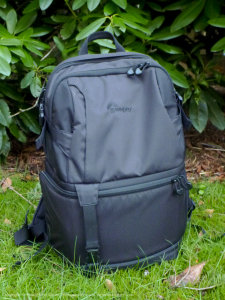
 The DSLR Video Fastpack 350 AW is a new addition to the Fastpack line from LowePro. I was curious when the bag arrived as to what I would find. I don’t shoot a lot of video, but I do at times. Would the bag work well for a ‘regular’ still shooter like myself? Which features did LowePro pack into the bag to make it useful for shooting video with an DSLR? And please tell me they improved the zippers.
The answers to those questions became clear as I took the bag on a number of trips over the course of four weeks, mostly shorter trips around town as well as flights to LA, San Francisco and Portland form my base in Seattle. One thing became clear; this bag is not for everyone. It does not attempt to please all who use it and that’s a good thing. While I know, marketing-wise, it’s best to go after the lions share of the buying public, it is refreashing to see LowePro concentrate on specific photographer needs, such as video DLSR videographers.
Specifications
From LowePro’s site:
Size(Interior):
10.2W X 5.5D X 8.9H in./
26 X 14 X 22.5 cm |
Size(Exterior):
13.8W X 9.8D X 19.3H in./
35 X 25 X 49 cm |
Camera Compartment Inner Dimensions:
10.2W X 6.7D X 9.6H in./
26 X 17 X 24.5 cm |
Notebook Compartment Inner Dimensions:
12W X 1.4D X 16.1H in./
30.5 X 3.5 X 41 cm |
Front Compartment Inner Dimensions:
6.7W X 0.8D X 9.4H in./
17.0 X 2.0 X 24.0 cm |
Outer fabric:
300D POLY DOBBY PUX2; 600D Polyester |
Interior Fabric:
200D POLY W/PU |
Weight:
4lbs/1.8kg |
Use In Real Life
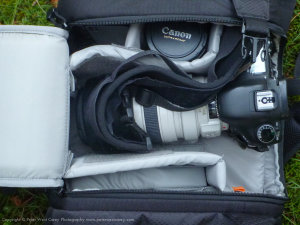 I know those numbers often don’t mean a lot without real world use. I’ve tested a number of LowePro and other packs and my expectation for this pack as that I could carry my main body with power grip and longer lens plus a couple of lenses. When I inspected the bags camera compartment, it was clear I would only be able to fit the camera and two lenses. Then there was this longer section on the left side of the camera, where other packs would store additional lenses. I’m not a guy who carries five lenses with him at all times so this appealed to me and I quickly realized I could fit a flash on that side.
The bag is also deep in the camera compartment, meaning my Canon 7D with grip had room to spare, height-wise. This also left space under the flash on the left for additional storage, such as for a smaller microphone. 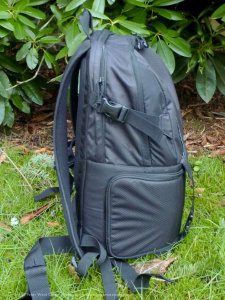 That side compartment has a unique bit of divider that creates a false bottom and it’s good thinking of LowePro’s part because if it was not there, the spot for the flash would have wasted space above it. Or maybe they realized there are people like me that would pile additional gear on top anyway, and decided to maximize the usable area (although you do have to rip through velcro to get to that extra space underneath.
The Fastpack capability of this pack is the same as others; drop the bag off your right shoulder and swing it around on your left shoulder. This brings the side opening the bag into play and makes for easy removal of the camera. If you want to grab another lens, it is best to put the bag down and open it up fully. Here there is a slight hitch because of the size. Take a look at the photos and you will see that the spare lens compartments have a bit of overhang of fabric. In other bags this has been more out of the way, but in the 350 it is fairly stiff (at least when new) and rubs against lenses or knuckles. It makes things a trite bit annoying to remove. 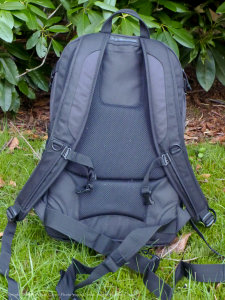 Not horrible, but slightly annoying.
The laptop compartment is pretty standard with room for a 17″ laptop in a padded sleeve. It works well but the two compression straps, when buckled, make removing a laptop slightly pinched. Again, not bad by any means, and when the straps are released you can fit a whole hand into the compartment, but just a note. With those straps in place it doesn’t open as fully as other bags I’ve tested. But I do understand why those straps are there and they do help make the pack feel more secure on my back.
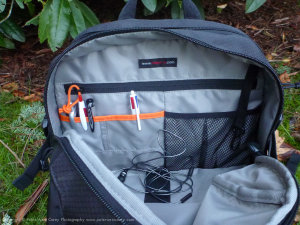
Inside the top compartment is a good bit of organization. There is an elastic strap in the bottom to hold down a portable drive. There is a strap near the top especially to hold up headphones used for audio recording and I think this was very considerate. A zippered pocket and some mesh and other pockets make for simple organizing. I noticed, compared to other LowePro packs, that this bag lacks some of the more basic “office” pockets, such as pen holders and a cell phone slot. 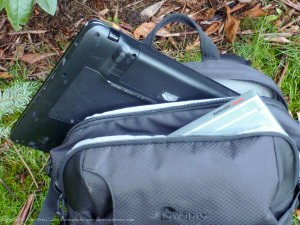 It does have the all important key-keeper strap (thank you!) and a spot for a single business card in case your bag goes missing.
The biggest addition to the bag is an accessory wallet built for video production. It’s not extensive, but I can see how useful it will be. The bag holds cables and cords in place and has room for two remote transmitters (handy for those using something like the PocketWizard for regular still photography or lav mic for video). It’s thoughtful and useful. On the outside there is a hidden tripod boot to hold a small to medium/large tripod or video rigging gear. The all important rain cover has its tucked away location on the bottom of the pack but is still not removable. It fits well and has kept my bag dry more than once. And lastly, the water bottle holder is available and handy of not employing a tripod on the right side.
 For comfort, I found the bag in the middle of the road and it works well for the weight it should hold. The waist strap is meant to hold the bag close more than hold weight and is a bit high for my longer torso. The shoulder straps have enough adjustment to keep the bag comfortable for a few hours, but I would want more adjustment available if I were to wear the bag all day on a hike. The padding is ample and comfortable.
Conclusions
 While I don’t shoot video and don’t carry around the normal rigging as such, I did find this bag useful. It is smaller sized than the Fastpack 350 Compu-Photo bag I review before and I like that, because it felt more maneuverable. While it was not as wide as the other 350, the additional depth was welcome as it fit a full sized DSLR and longer lens (think 70-200mm f/2.8) better. If you only need a couple of lenses with you, this bag works.
Oh! And the zipper question; yes. Yes, LowePro is using better zippers and this bag does not suffer from the I-must-use-two-hands-to-close-the-main-compartment problem of bags in the past. The zipper speeds around the corners and doesn’t bind up like its predecessors did. 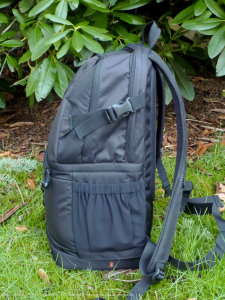 One other big bonus? The blacked out name/logo on the back. I like a bag that doesn’t completely scream “Camera Bag!” and that subtle change is appreciated.
Photographers with a smaller torso might find the 350 size to be a bit tall, but LowePro makes other bags in this range with the same features that will fit better. I wasn’t planning on liking this bag at first, but it’s growing on me. The main drawback, for me, is pulling out those spare lenses in the cramped side compartment of the main camera storage area. If I can get over that, this bag will be a daily use bag for me.
More details on the pack and a decent video can be found on LowePro’s site.
Post originally from: Digital Photography Tips.
Check out our more Photography Tips at Photography Tips for Beginners, Portrait Photography Tips and Wedding Photography Tips.
LowePro DSLR Video Fastpack 350 AW [REVIEW]


Digital Photography School