Blog

  • Watch time-lapse video of Shuttle Endeavour’s voyage across L.A

    Screen_Shot_2012-10-17_at_9.58.44_AM.png

    The L.A. Times has posted a fascinating time-lapse video, showing the progress of retired space shuttle Endeavour across Los Angeles to its new home in the California Science Center, in Exposition Park. The video spans the entire length of the journey from Los Angeles International Airport, which started on Thursday night and due to delays caused by maintainance issues and obstacles along the route, finally ended 16 hours late, on Sunday afternoon. Click through for a link to the video. 

    News: Digital Photography Review (dpreview.com)

  • Gone to Seed: 9 Green Plant-Sprouting Product Designs

    [ By Delana in Design & Products & Packaging. ]

    Once a product’s primary function has been served, most of us choose to either throw away or recycle whatever is left. An increasing number of products, though, are meant to be reincarnated as beautiful, growing plants. When their first lives are over, these products can be placed into the ground to be reborn.

    (images via: Democratech)

    A group of MIT design students wondered what would happen if, instead of throwing away their pencil stubs, they could do something constructive with them. Thus the Sprout pencil was born – a pencil that can be used just like any other, but when it becomes too little to use it can be planted in a bit of soil. A small capsule on the end contains a seed that will sprout and grow, providing enjoyment far beyond the initial usefulness of the pencil itself.

    (images via: Yanko Design)

    The To Be Nature chopstick is a similar concept that contains a seed in a starch capsule at one end. When your meal is over, you can plant the chopstick in soil and water it to activate the seed. The new plant will use the stick as a support as it grows up tall and strong. As intriguing as the concept is, however, it seems like an odd design oversight to place the seed capsule on the end of the chopstick that comes into contact with food.

    (images via: Lifebox)

    A revolution in packaging, the Life Box turns a serious environmental offender – the cardboard box – into a positive for the environment. After it has carried its cargo to its destination, the box can be torn up and soaked to activate the many seeds embedded in the cardboard. Each Life Box contains enough tree seeds to grow an entire forest ecosystem, with all of the species contained in the boxes approved as non-invasive in the United States.

    (images via: Jamie Wieck)

    Nearly everyone gives out business cards, so it makes sense to make them memorable and relevant to your line of work. Designer Jamie Wieck came up with this brilliant idea for a sprouting business card. The card is actually an envelope containing alfalfa or watercress seeds. When moistened per the instructions it develops into a lush miniature garden that, as an added humorous touch, doubles as a head of green hair for the face printed on the front of the card.

    (images via: BLDGBLOG)

    Landscape architects Tur & Partner certainly got plenty of business by handing out these miniature landscape business cards. At first the image on the front looks like simple plans for an outdoor garden, but once you introduce water and sunlight the seeds embedded in the card’s paper begin to sprout, creating a surreal little garden right on the card’s surface.

    (images via: Struck)

    Advertising creative firm Struck took a slightly different tactic with their business card for lawn company Lush; this business card is actually a tiny envelope containing a handful of grass seeds. There is no need to destroy the business card to grow the grass, which is probably best for long-term exposure. The recipient is encouraged to spread the seeds and then contact the lawn care company in order to care for the brand new ground cover plants.

    (images via: RecycledIdeas)

    Etsy seller RecycledIdeas has come up with something new and brilliant in the arena of wedding favors: plantable skeleton keys that blossom into beautiful, colorful wildflowers. The keys act as novel decorations and weights for table markers during the reception. After the wedding is over, the seed-impregnated keys go home with guests and into the soil – with some sun and some water, the joy of the wedding day can go on long after the reception is over in the form of cheerful blooms.

    (images via: Yanko Design)

    Designer Joon Kim thinks that it’s really a shame to throw away disposable cups after the coffee that came in them is all gone. The Y in Cup concept would give the cup a new purpose once your latte has been drained. The bottom of the cup contains a small seed packet along with growing instructions. When you fill the cup with soil and plant the seeds inside, the cup becomes a desktop flower pot. The design would be much more effective if the cup were biodegradable so that it could be simply placed into the soil outside once the plant gets big enough, but as this is only a concept at this point and not an actual product, there is still time for improvements to the idea.

    (images via: Bloomin)

    Bloomin was a pioneer in the seed paper market, being the first company to introduce a commercial printable, biodegradable, seed-impregnated paper that will actually grow plants when placed into soil and cared for. Their product line includes everything from greeting cards and journals to calendars, coasters, wine glass tags and gift wrap – all with tiny seeds embedded in the paper, just waiting to grow into herbs, vegetables or flowers.


    Want More? Click for Great Related Content on WebUrbanist:

    15 of the World’s Most Brilliant Business Card Designs

    Not all business cards are boring pieces of paper. Some are awesomely creative, memorable and even intimidating.
    43 Comments – Click Here to Read More »»


    What if the Package Were Part of the Product? 5 Innovative Industrial Designs for Ecological Living

    What if you could simply reuse packaging as part of a product rather than sending away for disposal or recycling?
    30 Comments – Click Here to Read More »»


    Share on Facebook


    [ By Delana in Design & Products & Packaging. ]

    [ WebUrbanist | Archives | Galleries | Privacy | TOS ]


    WebUrbanist

  • Vuzix WRAP 920 AR Review

    This is a review of the WRAP 920 AR augmented reality system by Vuzix.
    Video Rating: 4 / 5

    Canon has finally gone tapeless and the wait was worth it. Tim Smith shows us the new Canon XF300 and XF305 HD cameras that record 1080p 4:2:2 in multiple frame rates and stores the files in Compact Flash (CF) cards.

  • Nikon-Walkley Photographic Awards 2009

    The Nikon-Walkley Photographic Awards are the most prestigious competition for press photographers in Australia. Nikon proudly sponsors awards in five categories including daily life, sport, news and photographic essay. The coveted 2009 Nikon-Walkley Press Photographer of the Year was awarded to Renee Nowytarger from The Australian, for her body of work which the judges praised as rounded and versatile. Her stand out photograph on an exhausted and forlorn Malcolm Turnbull was singled out for especial praise, along with her emotional coverage of indigenous affairs. ::: AWARD WINNERS ::: Nikon-Walkley Press Photographer of the year: Renee Nowytarger, The Australian Daily Life / Feature Photography: Kirk Gilmour, Illawarra Mercury & The Sydney Morning Herald: Batten Down the Boogie Boards Sport Photography: Phil Hillyard, The Daily Telegraph: Sports Light News Photography: Justin McManus, The Age & The Sydney Morning Herald: Black Saturday Body Photographic Essay: Jason South, The Age: Papua Birth See more @ My Nikon Life: mynikonlife.com.au
    Video Rating: 4 / 5

  • Antim Monastery, Bucharest, Romania

    Some cool visual art images:

    Antim Monastery, Bucharest, Romania
    visual art
    Image by cod_gabriel

    The church of Antim Monastery, Bucharest, Romania
    visual art
    Image by cod_gabriel

  • You Suck at Photoshop – Select Color Range

    MORE: www.MyDamnChannel.com Follow us on Twitter: www.twitter.com Like us on Facebook: www.facebook.com Donnie’s self-discovery vacation heats up. By the megaton. 2008 Webby Award Winner Best How-to Series Best Comedy Series – People’s Voice Best How-to Series – People’s Voice
    Video Rating: 4 / 5

    This Photoshop Lightroom tutorial describes how to work with the Crop tool in and out of the Develop module. Watch more at www.lynda.com This specific tutorial is just a single movie from chapter seven of the Photoshop Lightroom 4 Essentials: Enhancing Photos with the Develop Module course presented by lynda.com author Chris Orwig. The complete Photoshop Lightroom 4 course has a total duration of 5 hours and 32 minutes, and guides photographers through the process of improving images with creative color, sharpening, and other effects in the Lightroom Develop module. Photoshop Lightroom 4 Essentials: Enhancing Photos with the Develop Module table of contents: Introduction 1. Getting Started with the Develop Module 2. Develop Module Workflow Tips 3. Working with Color Temperature and White Balance 4. Masking Basic Tonal Adjustments 5. Improving Vibrance, Saturation, and Clarity 6. Basic Panel Workflow Reflections 7. Cropping and Composing 8. Retouching Tools 9. Using the Graduated Filter 10. Making Localized Adjustments 11. Modifying the Tone Curve 12. Changing HSL and Color 13. Converting to Black and White 14. Creative Color with Split Toning 15. Noise Reduction and Sharpening 16. Making Lens Corrections 17. Adding Vignette and Grain Effects 18. Using the Camera Calibration Controls Conclusion

  • HDR Time Lapse in HD

    HDR time lapse sequences made from 7.545 shots. HDRs batch edited in Photomatix. Video made with Quick Time Pro and Adobe Premiere Elements. Check out my tutorial: www.flickr.com
    Video Rating: 4 / 5

    How to use the Live View and Video functions on the Nikon D300s Digital SLR Camera

  • Vancouver Translink New Flyer E60LFR articulated trolleybus

    Enjoy your ride on Vancouver’s brand new articulated electric trolleybus! #2501, a New Flyer E60LFR, was delivered to Translink in January 2007. This is the pilot bus, part of the order made up of a total of 40 articulated electric trolleybus for Translink, the Greater Vancouver Transportation Authority.
    Video Rating: 4 / 5

    My Nikon D80 one day just started to give trouble. Began to throw open the error but still went some time after a couple of minutes, no longer able to take pictures at all, I think it could be a problem in the mirror I want to know your opinion whether I am right. Thanks.
    Video Rating: 4 / 5

  • euronews cinema – Katy Perry voice of Smurfette in 3D feature

    Pop-sensation Katy Perry has made her film debut in the new 3D Smurf movie, which premiered in New York. The live actors all got the blue carpet treatment to celebrate the adventures of the little people in party hats…. www.euronews.net
    Video Rating: 3 / 5

    3D Movie Trailers: s3dmovies.blogspot.com Best of Youtube 3D: yt3dblog.blogspot.com
    Video Rating: 4 / 5

  • Sharing Your Photography On The Web

    A Guest Post by Anne McKinnell

    Wading through the sea of options to get your photographs seen online

    Most of us start out in photography because we love to make images, it gets us outdoors, and helps us explore our creative selves. We do it for ourselves because it makes us happy.

    But there is different side of photography that adds another dimension to the experience: sharing images with others. It’s one of the most popular things to do on the internet.

    We do it to share experiences with our families and friends, get feedback from other photographers, and attract customers or clients.

    There are three steps to making a big impression online:

    1. Selecting images for your online portfolio

    So, you want to put all of your images online for everyone to see, right? That’s a really bad idea. Not putting them online – the bad part is putting *all* your images online.

    Imagine you are looking at a photographer’s portfolio and they have hundreds of images. Some are architecture, some are seascapes, some are portraits, some are still life. You’re going to see a lot of these. Hundreds of photographers will all blend together in your mind because they are indistinguishable from each other.

    On the other hand, let’s say you look at a photographer’s work and they have 20 images all of which are black and white seascapes. He becomes the “black and white seascape guy”. Or let’s say they are all dog portraits. She becomes the “dog portrait woman” in your mind.

    That doesn’t mean that if you are the dog portrait woman you cannot make images of architecture. You don’t have to choose right at the beginning what kind of photographer you want to become. Just choose one selection of your images to show the world right now. That will make you stand out in people’s minds and you will grow a bigger following because people can identify with you.

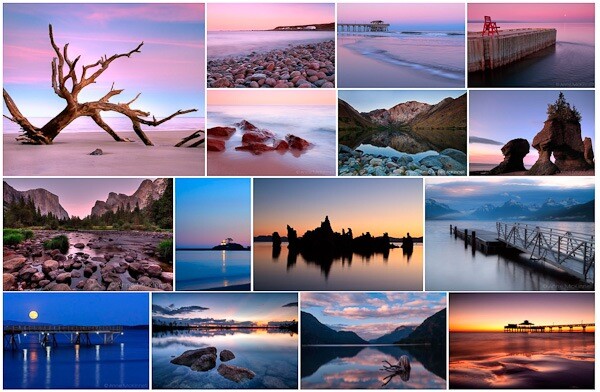
    Pick a theme to work on. My first theme was seascapes at twilight.
    twilight.jpg

    Notice how all the images have a certain look to them. They fit together as a group. And there are less than 20. That’s what you need to do.

    2. Creating your web gallery

    Now that you have a great set of images to share with the world you need to choose a method for getting them online.

    But … where to start? There are so many options!

    So many that I could never summarize the pro’s and con’s of every available alternative but I will share what I have learned so you can get going quickly and easily. And I’m only going to suggest sites where your photos are sure to look great (sorry Flickr that leaves you out)!

    The first thing is to determine what your goals are right now.

    • Do you want to share with your family and friends with no intention to sell?
    • Do you want to share and sell your images?
    • Do you want to have a blog where you can share stories with your images?
    • Are you ready to have your own website with your own domain name and either take on the technical aspects of this or hire someone to do so?

    Let’s look at these options one step at a time.

    You want to share with your family and friends with no intention to sell

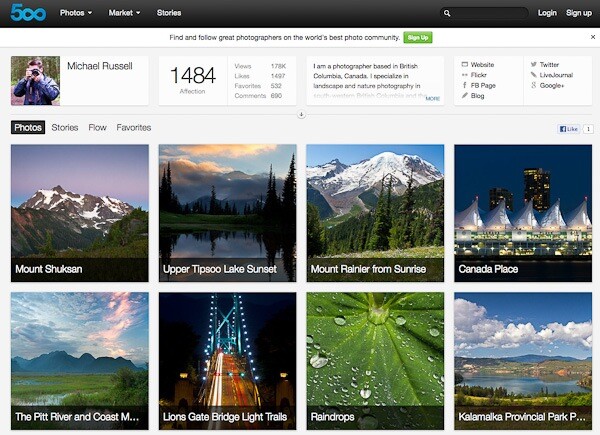
    500px is the best option for you. Images look absolutely stunning on the site and it is free if you upload fewer than 10 images per week. For only $ 20 per year you can upload as many as you like.
    michael 500px.jpg

    This screenshot is from Michael Russell‘s page on 500px.

    Note that you can sell digital downloads on 500px too. The only print product you can sell is a fixed price canvas print which just doesn’t cut it if you are interested in selling print products.

    You want to share and sell

    SmugMug, Redbubble, DeviantArt, Photoshelter, Photocrati, Snapfish, Twitpic, Zenfolio – the options are endless and you could research forever before being able to make a decision.

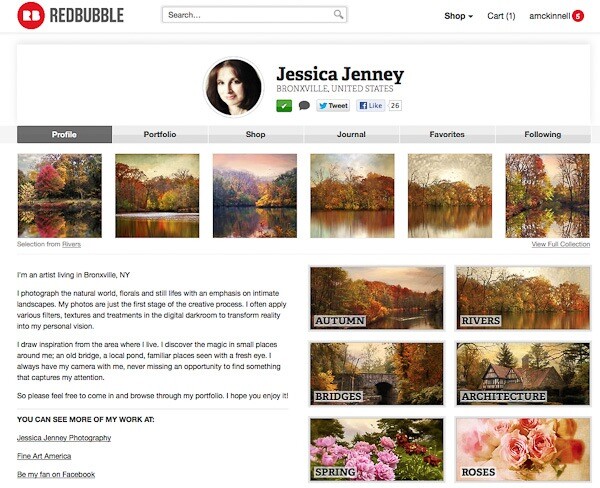
    I’ve tried many of these services, some paid, some free, and I’m going to tell you which one is super easy, looks great, and is totally free. It’s Redbubble.
    jessica redbubble.jpg

    This screenshot is from Jessica Jenney’s page on Redbubble.

    Redbubble offers lots of different products. I have ordered many of them myself and am always impressed with the quality. You can set your own prices and Redbubble makes a small commission from any sales. The only drawback is that you cannot sell digital downloads – only products.

    If you want to sell both products and digital downloads take a look at Zenfolio.

    You want to have a blog where you can share stories or articles

    The two big players in this field are Blogger and WordPress.

    Blogger is very easy to setup and adding content is straightforward but there are fewer options for design and custom features than WordPress offers.

    WordPress has a steeper learning curve but if you are going to have a blog you probably want it to have a really nice design and some customizable functions. And it’s way easier to just start with WordPress than it is to try to move a blog from Blogger to WordPress later.

    You can start a WordPress blog at wordpress.com or you can start a WordPress blog on your own website with WordPress.org.

    The bottom line is that Blogger is a better option if you want your blog to be super simple to set up and add content and you don’t need a lot of bells and whistles. WordPress is a better option if you want more advanced features and customization.

    Both options are free and both have plugins that allow you to display your gallery.

    You want to have your own website

    If you are already really serious about your photography and you want to have your own website with your own domain name and have a blog and a gallery in the same place, and perhaps sell products and advertising, then get ready to roll up your sleeves or get out your wallet! (Probably a bit of both.)

    You might want to hire someone else to set up the website for you if you’re not tech-savvy and then all you have to do is add blog posts and new images.

    If you want to take it on yourself you need to choose to a webhost, buy a domain name (yourname.com) and a web hosting package. If you want to blog you will need to install WordPress and find a theme you love and install that.

    Next you will need to choose a method for displaying your image gallery:

    • if you just want to display your gallery without selling and do not have a blog, check out jAlbum. I have used it on a number of website and found it easy to use, it looks great, and it’s free;
    • if you have a blog and just want to display your images without selling, you can use a WordPress plugin such as NextGEN or Lightbox;
    • if you have a blog and also want to sell images from your gallery, and have the same design for both, you should check out a premium service like SmugMug, Photocrati or Photoshelter.

    Creating your own website is a huge topic so if you are going to delve into it you have some researching to do.
    ken photoshelter.jpg

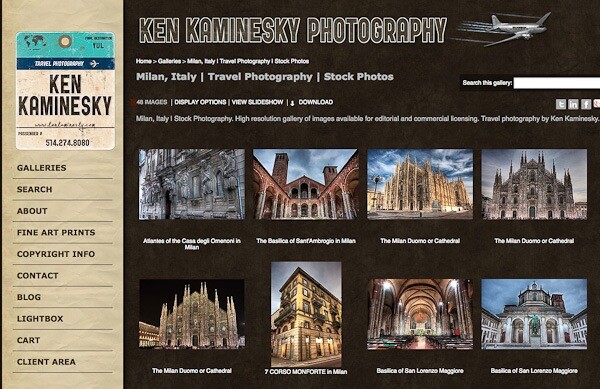
    This screenshot is from Ken Kaminesky’s website built with Photoshelter.

    For my own website, I use WordPress with a theme from Graph Paper Press and Photoshelter for my gallery.

    3. Building your audience through social media

    If you want to promote your photography beyond your family and friends you should start building your audience right away. Using social media is the best and fastest way to find people who love to look at your images and might become customers or clients in the future. As well, they will be your marketing department by helping to spread the word about your photography.

    There are so many different social networks out there. Again it is a learning curve just to figure out which ones will work best for you and how you should use them. So let me give you a quick primer on the five social networks that have worked best for me.

    Twitter

    Twitter is my favourite social network and the first one I started. A “tweet” has a maximum of 140 characters so it is quick to sift through a lot of information to find what you are interested in.

    Most photographers post links to their images and their blog posts. If you are interested you click, if not you move on.

    If you want to grow your audience on twitter it is important to promote other people’s work as well as your own.

    Google+

    Google+ is the social network that was designed for photographers. In many ways it is the opposite of twitter because people tend to post very long posts and have conversations in the comments section.

    Because of this engagement within G+, people rarely click links which makes it difficult to drive traffic to a blog. But if you put your whole blog post on G+ you might get more interaction and comments there than you do on your blog.
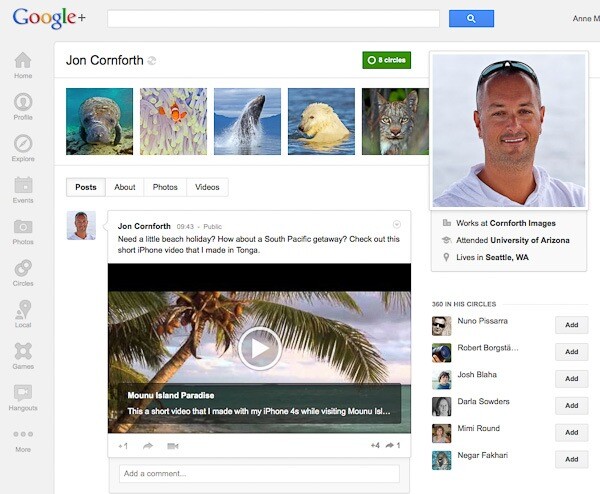
    jon gplus.jpg

    This screenshot is from Jon Cornforth’s page on Google+.

    StumbleUpon

    StumbleUpon is a bit like rolling the dice. You have no idea what it is going to land on but it will be something interesting to you. The idea is that you follow people who have similar interests and when you “stumble” you see the pages that they like. Or you can stumble certain topics like photography or travel.

    The difference here is that you are not supposed to stumble your own links and you get penalized if you do it too often. It’s really better to put a StumbleUpon button on your website or blog and hope that other people stumble it. When they do you will get a huge spike in traffic.

    Pinterest

    Do you like scrap booking or collecting things? This social network is the one for you.

    In Pinterest you have boards where you pin groups of images you like, just like pinning an image you cut out of a magazine on a cork board. It’s a great place for collecting images that inspire you, or places you want to go, or whatever you are interested in.
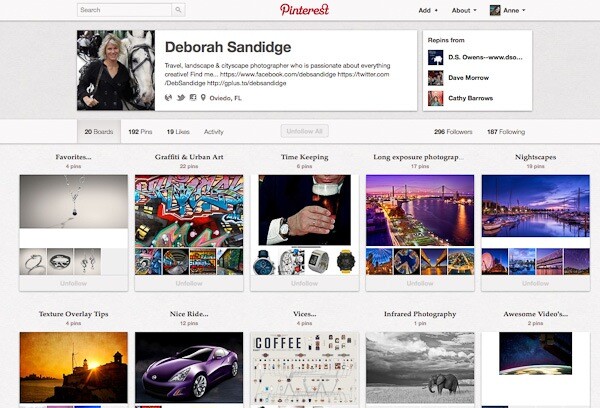
    deb pinterest.jpg

    This screenshot is from Deborah Sandidge’s page on Pinterest.

    When you follow someone you will see the images they pin on their boards. If you like an image and want to add it to your collection you simply re-pin it to one of your boards. You can pin your own images too and people who follow you will see them.

    Facebook

    I hate to say it but I do get a lot of traffic from Facebook and it would be negligent of me to leave it out. Even though it is the most difficult, confusing, frustrating and sometimes outright stupid system to use. But because it was first almost everyone is on it.

    Unfortunately, I don’t have the power to make everyone stop using it so it’s one of those “if you can’t beat them, join them” kinds of things. Regardless of my opinion, Facebook will generate traffic and help you build your audience.

    In Short …

    If you do not yet have a gallery of images or a blog and you just want to get some stuff online quickly and easily, start with Redbubble. It is free, easy to use and comes with a great community of photographers. It’s a great place to get your feet wet.

    Anne McKinnell is a photographer, writer and nomad who travels around North America in an RV photographing beautiful places. You can read about her adventures on her blog. She is also the author of several eBooks on photography. This post contains excerpts from her latest eBook “8 Ways To Accelerate Your Photography.”

    Post originally from: Digital Photography Tips.

    Check out our more Photography Tips at Photography Tips for Beginners, Portrait Photography Tips and Wedding Photography Tips.

    Sharing Your Photography On The Web


    Digital Photography School