Blog

  • Turn your doodles into Google satellite images with Land Lines

    Looking for a moment of zen? We suggest spending a couple of minutes playing with Land Lines, a game that draws on Google’s satellite images of Earth.

    So maybe it’s not quite a ‘game.’ Its creators Zach Lieberman and Matt Felsen call it an experiment, one that analyzes basic scribbles (zig zags and curves, nothing fancy) and finds a satellite image of Earth with matching features. It runs on either a mobile or desktop web browser.

    Lines that you draw with your finger or a mouse become roads, shorelines and runways before your eyes, almost instantaneously. It runs seamlessly, and it’s oddly soothing. Give it a try and learn more about how it all came together.

    Articles: Digital Photography Review (dpreview.com)

  • DJI’s special Chinese New Year edition Phantom 4 celebrates the Year of the Rooster

    $ (document).ready(function() { SampleGalleryV2({“containerId”:”embeddedSampleGallery_0261901675″,”galleryId”:”0261901675″,”isEmbeddedWidget”:true,”standalone”:false,”selectedImageIndex”:0,”startInCommentsView”:false,”isMobile”:false}) });

    DJI is celebrating the Chinese New Year with a brightly colored, special edition Phantom 4. The drone features bright red body work and propeller blades, which may prove easier to see against a bright sky than the regular white Phantom 4. The drone and controller also feature vivid artwork from designer and illustrator Martin Sati, with a phoenix as the symbolic centerpiece.

    Pricing starts at $ 1,199. The special edition drone will only be sold during Chinese New Year, so now’s the time to order one if it strikes your fancy.

    n celebration of Chinese New Year, DJI invited renowned illustrator and designer Martin Sati to customize the Phantom 4, adding colors and his imagination to this flagship DJI product. Sati’s design features the phoenix as the centerpiece, a symbol of good fortune and happiness in Chinese mythology. He also drew inspiration from the four basic elements of nature – air, fire, water and earth – and reflected each of these elements in his design.

    The Phantom 4 Chinese New Year Edition houses the same on-board intelligence that make piloting and shooting great shots simple through features like its Obstacle Sensing System, ActiveTrack and TapFly functionality. With 4K video recording, 3-axis camera stabilization, advanced computer vision and sensing technology, aerial imaging has never been so easy. The Phantom 4 also has DJI’s signature Lightbridge video transmission system onboard, allowing users to see what their camera sees in HD and in real-time at a distance up to 5 kilometers (3.1 miles). The Phantom 4 can achieve up to 28 minutes of flight time.

    The Phantom 4 Chinese New Year Edition’s U.S. retail price is USD1,199 and will be sold exclusively at Apple Stores, DJI Flagship Stores (except Korea), DJI Online Store and Tmall DJI Store. The product will start shipping from January 23.

    For more info, visit: http://store.dji.com/product/phantom-4-chinese-new-year-edition

    Articles: Digital Photography Review (dpreview.com)
  • Fujifilm unveils Graphite Silver X-Pro2 and X-T2

    As it did with the X-T1, Fujifilm is now offering a new ‘graphite silver’ color for the X-Pro2 and X-T2, produced using a multilayered coating. The X-Pro2 will come bundled with a matching XF23mm F2 R WR lens and hood. 

    The graphite silver X-Pro2 and X-T1 will ship in late January for $ 2299 and $ 1799, respectively.

    New FUJIFILM X-Pro2 Body with XF23mmF2 R WR Lens and Lens Hood Kit, Graphite Edition

    The new FUJIFILM X-Pro2 Graphite Edition boasts an all-new color to the X Series lineup. The X-Pro2 Graphite Edition has a rich, metallic texture due to a specialty multilayer coating. This edition will include the compact and lightweight FUJIINON XF23mmF2 R WR and LH-XF35-2 lens hood in the same unique Graphite color as the body, achieving high resolution performance and a fast and silent AF system. The new FUJIFILM X-Pro2 Graphite Edition maintains the features of the current X-Pro2, adopting an extremely high-grade graphite color created through a multilayer coating process for the exterior of the camera body. By increasing the amount of black pigment component of the top coating, the camera achieves a more rich metallic texture. The package will be released as the FUJIFILM X-Pro2 Body with XF23mmF2 R WR Lens and Lens Hood Kit, Graphite Edition in late January 2017. 

    New FUJIFILM X-T2 Body, Graphite Silver Edition

    Building on the popularity of the elegant Graphite Silver version of the X-T1, Fujifilm introduces the new FUJIFILM X-T2 Graphite Silver Edition which will be supplied with tailor-made accessories including a premium leather strap, aluminum hot shoe cover and matching EF-X8 hot-shoe mount flash. The X-T2 Graphite Silver Edition is treated with a multi-layer coating that is triple baked to produce an elegant and tactile finish. The first layer is a matte black undercoat, applied to the magnesium top cover. This undercoat delivers deeper blacks in shadow areas to make highlights stand out. The second layer uses Thin-film Multilayer Coating Technology to apply graphite silver for an incredibly smooth finish with a luxurious shine. The third layer is a clear varnish for a glossy finish. The new X-T2 Graphite Silver Edition will be released in late January 2017.

    Availability and Pricing

    The FUJIFILM X-T2 Graphite Silver Edition will be released in late January 2017 in the U.S. and Canada for USD $ 1,799.95 and CAD $ 2,199.99.

    The FUJIFILM X-Pro2 Graphite Edition will be released in late January 2017 in the U.S. and Canada for USD $ 2,299.95 and CAD $ 2,899.99.

    Articles: Digital Photography Review (dpreview.com)
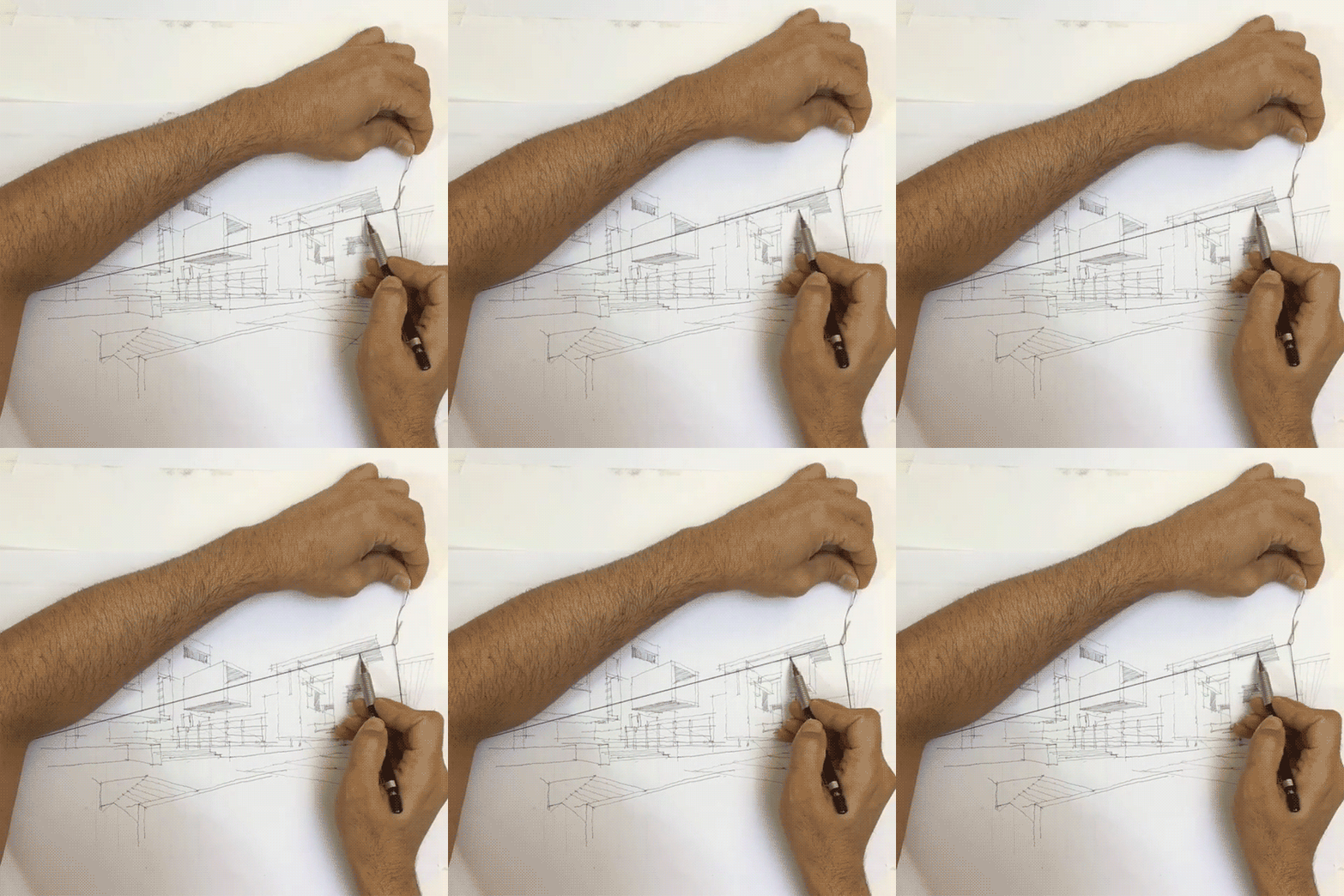
  • Vanishing Points: Simple Architectural Drawing Hack Puts Art in Perspective

    [ By WebUrbanist in Art & Drawing & Digital. ]

    trickshot

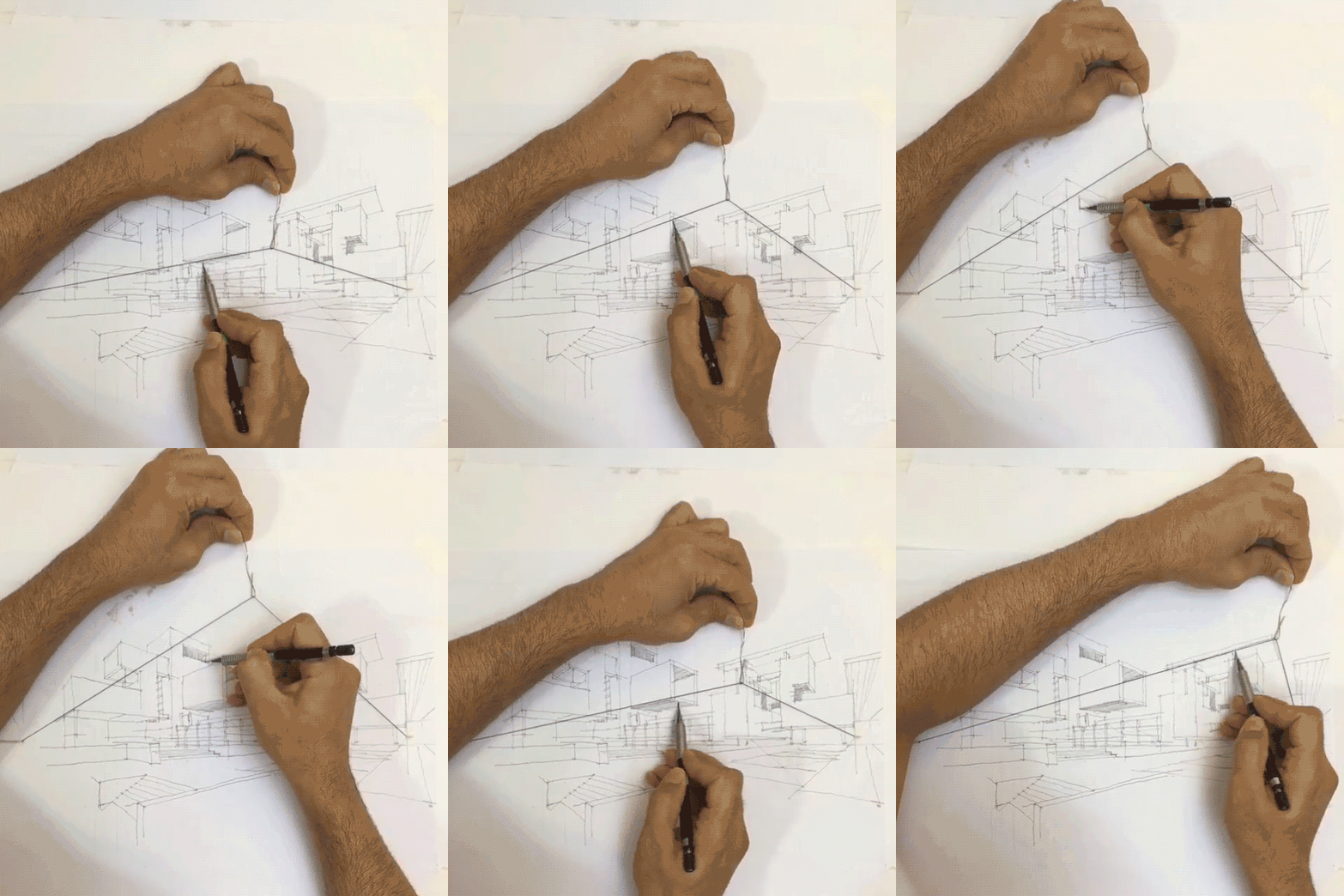
    Architectural drawings have long used geometrical tricks to convey scale, depth, distance and other three-dimensional aspects of realities on two-dimensional surfaces. In a two-vanishing-point drawing, the artist aligns their ruler with a point on one side or the other and draws a line along the edge (or employs another modular straight-edging tool).

    drawing-hack

    The same came be accomplished much more quickly, however, using this simple technique: pin a flexible string to both points along the horizon line and slide a hook along the center. The results will naturally be a bit less than precisely linear, but for many architectural artists a wavy line is typical or even desired (it gives the piece a less rigorously complete look).

    four-point-perspective

    Of course, it will only work for a traditional two-point perspective – in cases where the artist wants to include a third vanishing point (for instance, to emphasize verticals in looking up at a skyscraper or create a fish-eye effect) a straight-edge is still required. That, or a free-handed approach based on a picture, presumably the basis of the drawing above.

    Share on Facebook


    [ By WebUrbanist in Art & Drawing & Digital. ]

    [ WebUrbanist | Archives | Galleries | Privacy | TOS ]


    WebUrbanist

  • Open source Lightroom plugin Focus Point Viewer highlights active focus points

    Joshua Musselwhite, an underwater photographer and software developer, has launched a free, open source Adobe Lightroom plugin called Focus Point Viewer. With this plugin, Lightroom users can view the active focus point of their photos, a feature similar to the one offered by now-defunct plugin Show Focus Points. 

    Musselwhite details his new software on Reddit’s photography subreddit, where he explains that Focus Point Viewer was created as a way to easily see whether the focus points in his underwater images were the ones he had intended to use. The software is currently only mapped for his camera, a Nikon D7200, but because it is made freely available anyone can take the time to map the plugin to their own camera.

    Explaining how to perform the mapping, Musselwhite said:

    You’ll need to map each of the focus points. The best way I knew how to was take 51 photos at each focus point and determine the x,y pixel location for each from the top left using photoshop. I searched and searched for a focus point map for my camera but couldn’t find any … The process is a little time consuming, but it only takes a couple of hours, and is described how in the README file in Github.

    The Github README file with the full explanation can be viewed here, and the entire project is available here. Musselwhite has also shared a small gallery showing both the focus points in action and the metadata submenu.

    Via: PetaPixel

    Articles: Digital Photography Review (dpreview.com)

  • Extreme Architecture: 15 Structures Built to Withstand the World’s Coldest Places

    [ By SA Rogers in Architecture & Public & Institutional. ]

    extreme-cold-architecture-main

    You might say that the kinds of built structures you find in either Antarctic research stations or the coldest permanently inhabited place on Earth (located in Russia) are polar opposites: some are high-tech, capable of elevating themselves above the accumulating snow or departing to warmer climes via helicopter, while others are as humble as it gets. But people have learned how to survive in these harsh places, whether by keeping coal fires burning around the clock or burrowing into the earth for warmth, and even polar bears have some secrets to share with architects on surviving amidst all that ice.

    Monte Rosa Hut, Switzerland

    extreme-cold-architecture-monte-rosa-hut-1

    extreme-cold-architecture-monte-rosa-hut-2

    extreme-cold-architecture-monte-rosa-hut-3

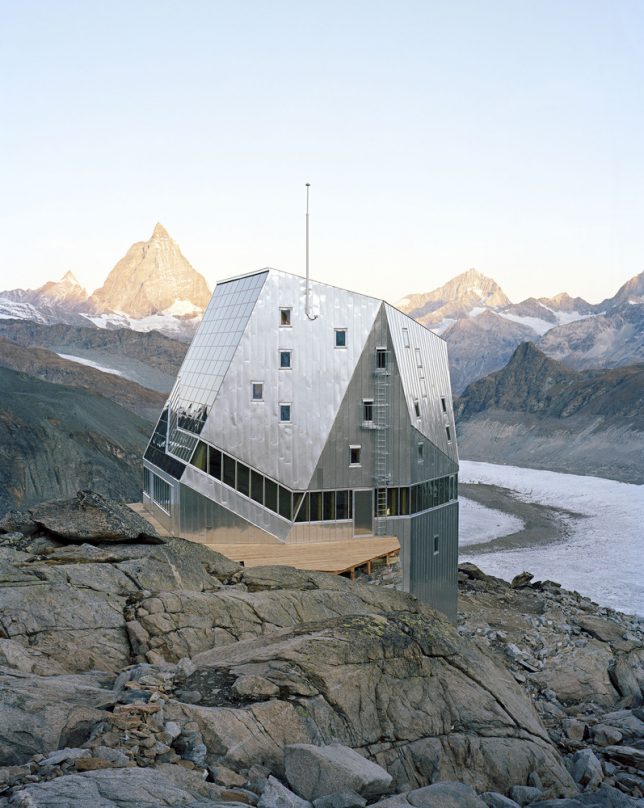
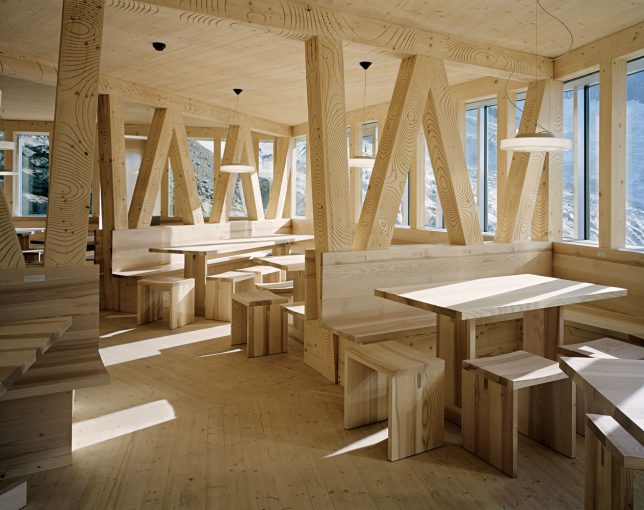
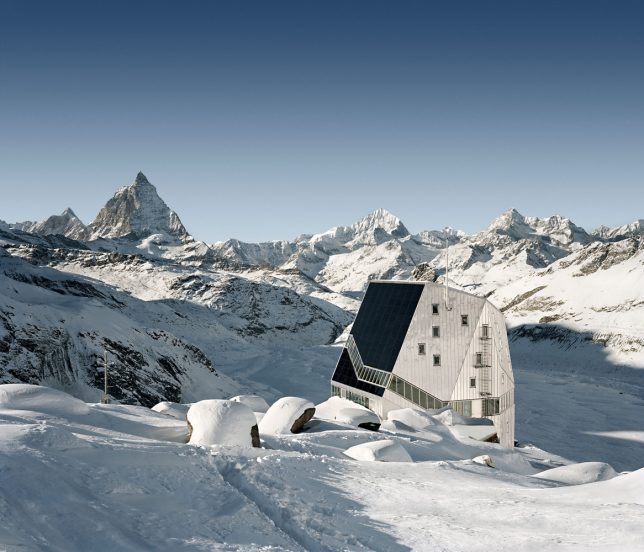
    This five-story wooden structure on Switzerland’s Corner Glacier by Bearth & Deplazes Architekten has an exterior look befitting its environment, making it seem morel like a research facility than an ‘alpine hut’ for adventurers.

    Memu Meadows Experimental House, Hokkaido, Japan

    extreme-cold-architecture-meme-meadows-1

    extreme-cold-architecture-meme-meadows-2

    extreme-cold-architecture-meme-meadows-3

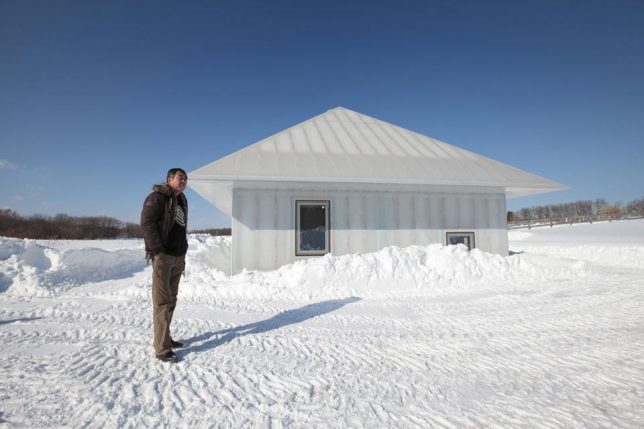
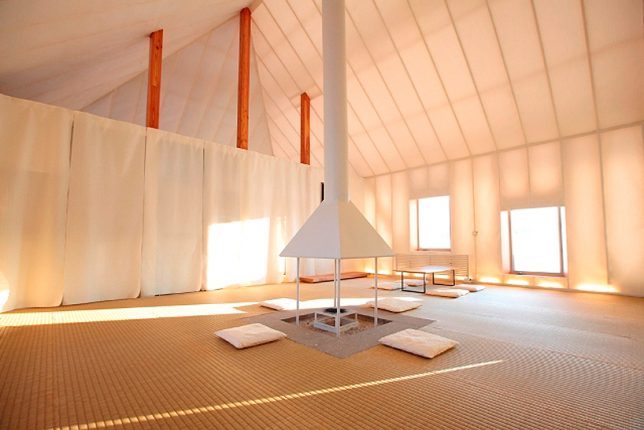
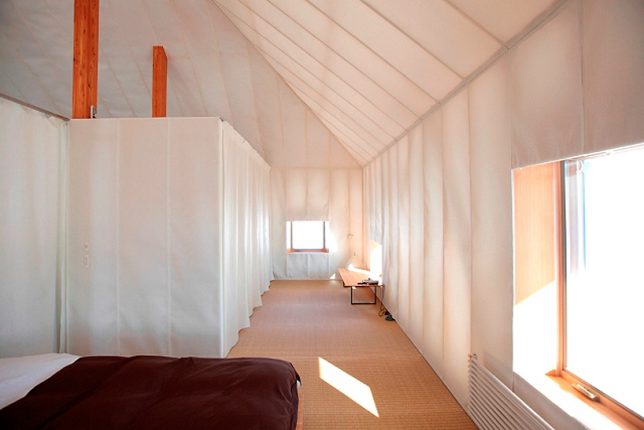
    An experiment by architect Kengo Kuma, the translucent ‘Memu Meadows’ house was designed to test the limits of domestic architecture in extreme cold conditions. It’s a modern spin on the traditional homes of the indigenous Ainu, whose buildings used bamboo grass exteriors to hold in the heat of a central fireplace that remains burning all the time. Kuma’s version replaces grass with insulation and polycarbonate cladding but remains cheap and accessible, and allows the house to glow like a lantern after dark.

    Halley VI, World’s First Mobile Research Station, Antarctica

    extreme-cold-architecture-halley-vi-1

    Ocean Waves Crashing on Seawall

    extreme-cold-architecture-halley-vi-4

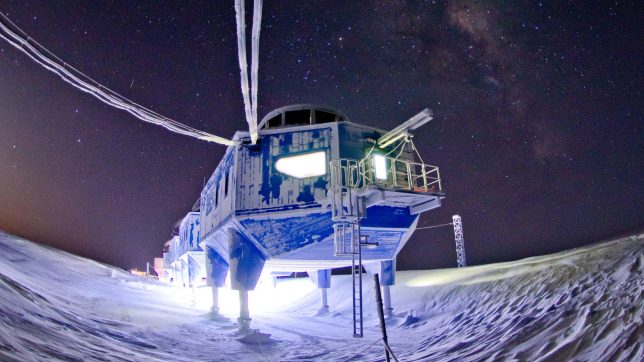
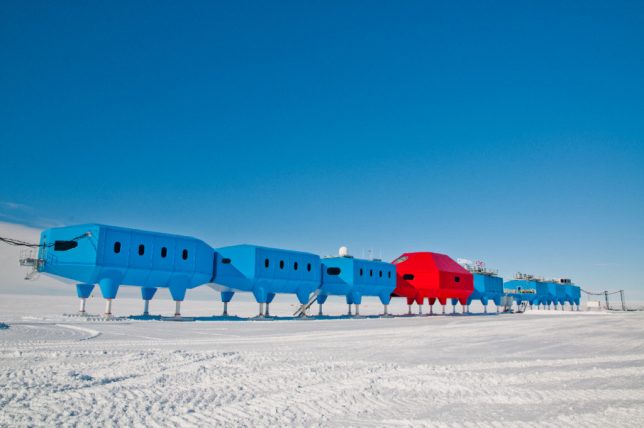
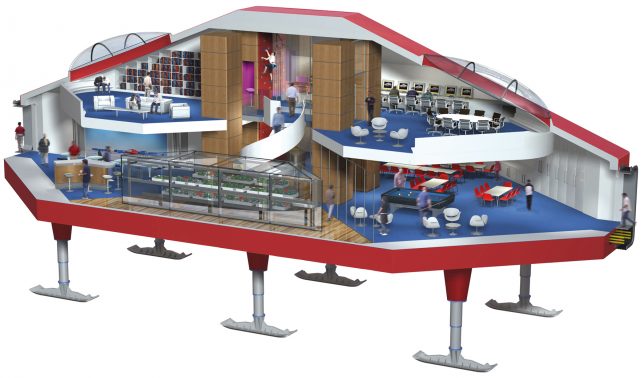
    Halley VI by Hugh Broughton Architects stands up to some of the most extreme conditions on earth, serving as a mobile home base for Antarctic expeditions. It’s located on the floating Brunt Ice Shelf and can be transported on its ski-like feet, while hydraluic rams allow it to be raised above the snow as it accumulates. Seven interlinking blue modules offer offices, bedrooms, labs and energy plants while the central two-story red module contains social space for 16-32 crew members.

    Arctic Adaptations: Concepts Reflecting Indigenous Canadian Traditions

    extreme-cold-architecture-arctic-adaptations

    extreme-cold-architecture-arctic-adaptations-2

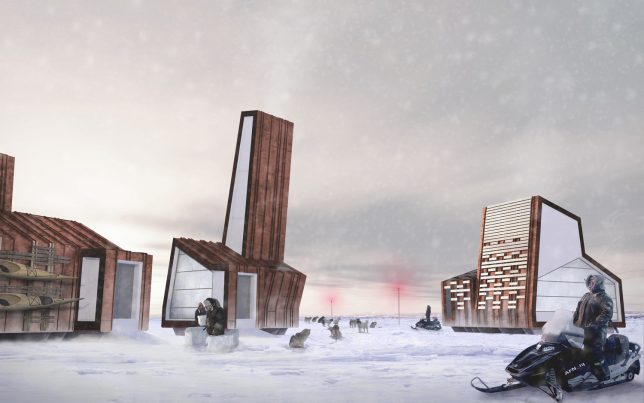
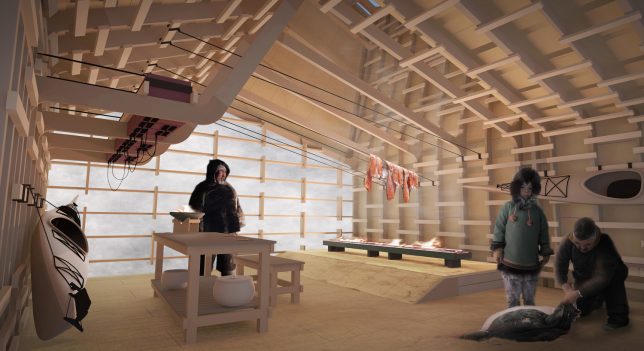
    Canada commissioned Lateral Office to curate its Nunavut-inspired exhibition at the 2014 Venice Biennale, entitled ‘Arctic Adaptations: Nunavut at 15.’ The project proposes how architecture could improve the development of cohesive communities even as the environment and the world around them rapidly changes.

    Trollstigen Tourist Route, Norway

    extreme-cold-architecture-trollstigen-1

    extreme-cold-architecture-trollstigen-2

    extreme-cold-architecture-trollstigen-3

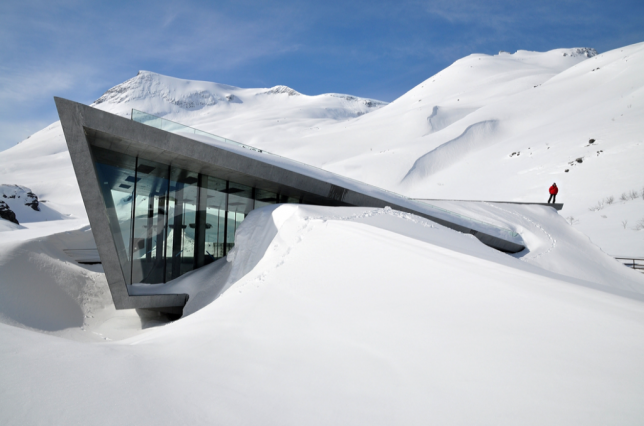
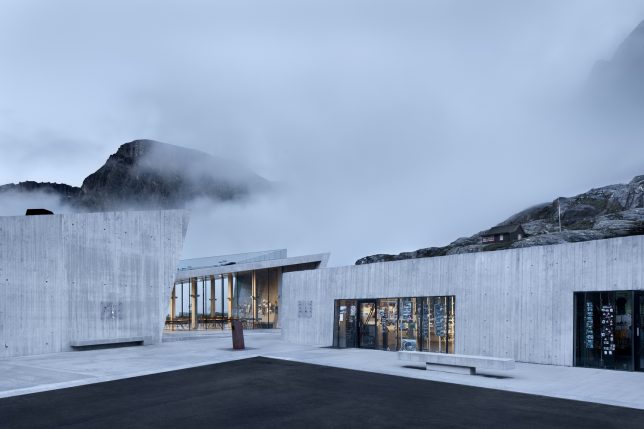
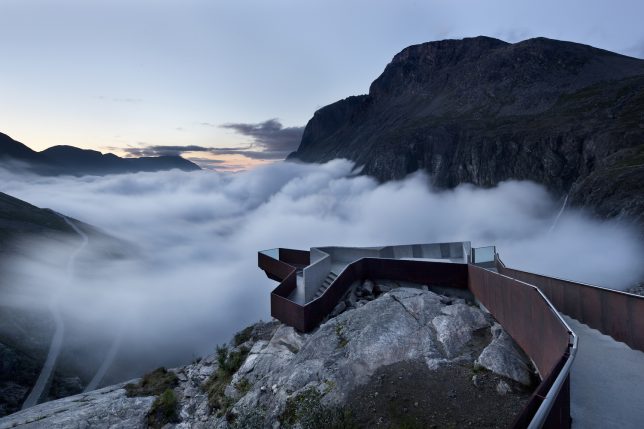
    Set along the Trollstigen national tourist route in Norway, this visitor center and overlook by Reiulf Ramstad Architects gazes out onto a mountain pass that’s lush and green in the summer and formidably snowy in the winter. The overlook is particularly dramatic when the snow starts to accumulate.

    Next Page – Click Below to Read More:
    Extreme Architecture 15 Structures Built To Withstand The Worlds Coldest Places

    Share on Facebook


    [ By SA Rogers in Architecture & Public & Institutional. ]

    [ WebUrbanist | Archives | Galleries | Privacy | TOS ]


    WebUrbanist

  • Nikon brings its D5600 DSLR to the US

    $ (document).ready(function() { SampleGalleryV2({“containerId”:”embeddedSampleGallery_5883354817″,”galleryId”:”5883354817″,”isEmbeddedWidget”:true,”standalone”:false,”selectedImageIndex”:0,”startInCommentsView”:false,”isMobile”:false}) });

    Nikon’s D5600 digital SLR, announced globally in November of last year, is now coming to the US. The D5600 builds on the strengths of its predecessor, adding ‘SnapBridge’ (Wi-Fi + Bluetooth + NFC), improved touchscreen operation and a time-lapse feature.

    The D5600 will be sold in several kits. It will be available body-only for $ 699, with the AF-P 18-55mm F3.5-5.6G lens for $ 799, with the 18-140mm F3.5-5.6G lens for $ 1199, and with the 18-55 and AF-P 70-300mm F4.5-6.3G lenses for $ 1149. All of these kits will be available this month.

    IGNITE THE ARTIST WITHIN: CAPTURE CREATIVELY, SHARE EASILY WITH THE NEW NIKON D5600

    The Nikon D5600 is a Compact Creative Companion that Delivers Stunning Clarity, Impressive Performance and the Ability to Share via Nikon SnapBridge 

    LAS VEGAS, NV (January 4, 2017 at 10:01 A.M. EST / 7:01 A.M. PST) — Today, Nikon Inc. announced the U.S. availability of the compact and lightweight Nikon D5600, a connected DSLR camera for those ready to step up their photography and unleash their inner artist by creating captivating images that deserve to be shared. The 24.2-megapixel D5600 features Nikon SnapBridge1, which allows users to easily and automatically transfer images directly from their camera to a compatible smart device, making it simple to share amazing images with friends and family. 

    “The Nikon D5600 is the latest camera in Nikon’s popular D5000 series — a camera line that represents a stepping stone for photographers who want to further explore their creative boundaries,” said Kosuke Kawaura, Director of Marketing and Planning, Nikon Inc. “Now with Nikon SnapBridge, users can easily upload and share images with their friends and family, showcasing what and who they love. With the introduction of Nikon’s D5600, Nikon demonstrates our commitment to providing an attainable and highly capable camera option for photographers of all skill levels.”

    The Nikon D5600 offers users the creativity and performance benefits of DSLR photography, including amazing image quality, the ability to isolate foreground from background, full manual controls, incredible low-light performance and a class-leading autofocus (AF) system. For those looking to travel the world or capture their child’s birthday party, the Nikon D5600 offers a full suite of creative effects, robust features and controls, a touchscreen Vari-angle LCD monitor and enhanced video features.

    • Seamless Connectivity Through Nikon SnapBridge: Nikon SnapBridge makes it easier than ever to share photos wirelessly through Bluetooth® Low Energy (BLE) technology2. By establishing a constant connection between the Nikon D5600 and a compatible smart device, images can be sent from the camera automatically, ready to share. SnapBridge also makes it possible to seamlessly upload images to the cloud (Nikon Image Space) via compatible smart device. Additionally, SnapBridge connectivity allow users to shoot remotely or easily transfer movies to a compatible smart device by leveraging the camera’s built-in Wi-Fi3
    • Performance that Keeps Pace with Creativity: The 24.2-megapixel high-resolution CMOS sensor helps deliver excellent image quality and sharp images with color and clarity that blow away images taken with a mobile device, while the EXPEED 4 image processor offers powerful performance and prolongs battery life. Continuous shooting at 5 frames-per-second (fps) and a 39-point autofocus system helps capture fleeting moments and fast moving subjects with ease. The Nikon D5600 is a great companion for those looking to capture and share life’s special moments, especially when combined with the distinct perspective of NIKKOR lenses.
    • Amazing Low-Light Performance: The Nikon D5600 also provides users the capability to shoot in challenging light with an expanded wide 100-25,600 ISO range. The ability to use higher shutter speeds with minimal illumination gives users the tools to capture brighter, sharper images.
    • Creative Features: From down to a child’s perspective to a shot above a crowd, it’s easy to compose from any angle with the 3.2-inch 1.037k-dot touchscreen Vari-angle LCD. Various in-camera shooting and special effects modes, manual controls and a new time-lapse mode allow users to take creativity to a new level and help capture a special moment with ease.

    Price and Availability

    The Nikon D5600 will be available in the U.S. in January 2017 for the suggested retail price (SRP)* of $ 799.95 with the AF-P DX NIKKOR 18-55mm f/3.5-5.6G VR lens. It will also be available in a two-lens kit option, including the AF-P DX NIKKOR 18-55mm f/3.5-5.6G VR and AF-P DX NIKKOR 70-300mm f/4.5-6.3G ED lenses, for $ 1,149.95 SRP*. Additionally, the Nikon D5600 will be sold as a body only for $ 699.95 SRP* or with a AF-S DX NIKKOR 18-140mm f/3.5-5.6G ED VR lens for $ 1,199.95 SRP*. For more information on the Nikon D5600 as well as the latest Nikon products, please visit www.nikonusa.com.

    Nikon D5600 specifications

    Price
    MSRP €820 body only, €930/£800 w/18-55 AF-P, €1090 w/18-105, €1140/£990 w/18-140
    Body type
    Body type Compact SLR
    Body material Composite
    Sensor
    Max resolution 6000 x 4000
    Other resolutions 4496 x 3000, 2992 x 2000
    Image ratio w:h 3:2
    Effective pixels 24 megapixels
    Sensor photo detectors 25 megapixels
    Sensor size APS-C (23.5 x 15.6 mm)
    Sensor type CMOS
    Processor Expeed 4
    Color space sRGB, Adobe RGB
    Color filter array Primary color filter
    Image
    ISO Auto, 100 – 25600
    White balance presets 12
    Custom white balance Yes
    Image stabilization No
    Uncompressed format RAW
    JPEG quality levels Fine, Normal, Basic
    File format
    • JPEG (Exif v2.3)
    • Raw (Nikon NEF, 12 or 14-bit)
    Optics & Focus
    Autofocus
    • Contrast Detect (sensor)
    • Phase Detect
    • Multi-area
    • Center
    • Selective single-point
    • Tracking
    • Single
    • Continuous
    • Touch
    • Face Detection
    • Live View
    Autofocus assist lamp Yes
    Manual focus Yes
    Number of focus points 39
    Lens mount Nikon F
    Focal length multiplier 1.5×
    Screen / viewfinder
    Articulated LCD Fully articulated
    Screen size 3.2
    Screen dots 1,037,000
    Touch screen Yes
    Screen type TFT LCD monitor
    Live view Yes
    Viewfinder type Optical (pentamirror)
    Viewfinder coverage 95%
    Viewfinder magnification 0.82×
    Photography features
    Minimum shutter speed 30 sec
    Maximum shutter speed 1/4000 sec
    Exposure modes
    • Auto
    • Program
    • Shutter priority
    • Aperture priority
    • Manual
    Scene modes
    • portrait
    • landscape
    • child
    • sports
    • close up
    • night portrait
    • night landscape
    • party/indoor
    • beach/snow
    • sunset
    • dusk/dawn
    • pet portrait
    • candlelight
    • blossom
    • autumn colors
    • food
    Built-in flash Yes (Pop-up)
    Flash range 12.00 m (at ISO 100)
    External flash Yes (Hot-shoe)
    Flash modes Auto, On, Off, Red-eye, Slow sync, Rear curtain
    Flash X sync speed 1/200 sec
    Drive modes
    • Single frame
    • Continuous (low, high)
    • Quiet shutter release
    • Self-timer
    • Interval timer
    Continuous drive 5.0 fps
    Self-timer Yes (2, 5, 10 or 20 sec)
    Metering modes
    • Multi
    • Center-weighted
    • Spot
    Exposure compensation ±5 (at 1/3 EV, 1/2 EV steps)
    WB Bracketing Yes (3 frames in either blue/amber or magenta/green axis)
    Videography features
    Resolutions 1920 x 1080 (60p, 50p, 30p, 25p, 24p), 1280 x 720 (60p, 50p)
    Format MPEG-4, H.264
    Microphone Stereo
    Speaker Mono
    Storage
    Storage types SD/SDHC/SDXC
    Connectivity
    USB USB 2.0 (480 Mbit/sec)
    HDMI Yes (mini-HDMI)
    Microphone port Yes
    Headphone port No
    Wireless Built-In
    Wireless notes 802.11b/g/n with Bluetooth 4.1 LE and NFC
    Remote control Yes (MC-DC2 (wired), WR-1/WR-R10 (wireless))
    Physical
    Environmentally sealed No
    Battery Battery Pack
    Battery description EN-EL14a lithium-ion battery & charger
    Battery Life (CIPA) 970
    Weight (inc. batteries) 465 g (1.03 lb / 16.40 oz)
    Dimensions 124 x 97 x 70 mm (4.88 x 3.82 x 2.76)
    Other features
    Orientation sensor Yes
    Timelapse recording Yes
    GPS Optional
    GPS notes Optional GP-1/GP-1A

    Articles: Digital Photography Review (dpreview.com)

  • Pulse: Extreme weather in black and white

    Mike Olbinski has captured some pretty amazing footage over the past year; you may remember this video that we posted back in October and this one from July. Needless to say, he had a busy 2016. For his latest project, he decided to do something a bit different by presenting the entire 4K time-lapse film in black and white.

    This type of treatment definitely comes with its own set of challenges, but we think it showcases the drama and unpredictability of thunderstorms in a refreshing way. Make sure to enjoy this one in HD with volume turned up and the lights turned down.  

    Song by Tony Anderson: “The Way Home” (Licensed through The Music Bed)

    Articles: Digital Photography Review (dpreview.com)

  • 18 of the Most Popular Portrait Articles on dPS in 2016

    Earlier this week we shared some other popular articles from 2016. Check those out here:

    • Top Gear Related Articles of 2016
    • 15 of the Most Popular Landscape Photography Articles of 2016

    To continue on with the best of, let’s take a look at portrait articles. Here are some of the most-read to help you with your portrait photography.

    18 of the Most Popular Portrait Articles on dPS in 2016

    1. 11 Steps for Basic Portrait Editing in Lightroom; A Beginner’s Guide
    2. How to Avoid Fake Smiles in Your People Photography
    3. Good Crop Bad Crop; How to Crop Portraits
    4. How to Make Colors Pop in Your Portraits; Without Using Photoshop
    5. 24 Portrait Lighting Setups [Cheat Sheet]
    6. How to Pose and Angle the Body for Better Portraits
    7. How to Create Awesome Portrait Lighting with a Paper Bag an Elastic Band and a Chocolate Donut
    8. 5 Tips for Taking Better Portraits in Nature
    9. How to Use Portrait Angles More Creatively: A Visual Guide
    10. How to Find Great Backgrounds for Outdoor Portraits
    11. 5 Secrets for Finding Great Indoor Portrait Locations
    12. 10 Tips for Doing Your First Family Portrait Session
    13. How to Do a One Light Portrait Setup and Use it as Your Back-up Plan
    14. Tips for Taking Candid Portraits of People
    15. Comparing a 24mm Versus 50mm Lens for Photographing People
    16. 8 Tips to Help Make People Comfortable for Their Portrait Session
    17. Photographing People: To do Styled Portraits or Not?
    18. 10 Tips to Help You Create Unique Storytelling People Photos
    portraits_makingtheshot_1200x628px

    You can also look at our ebook by dPS author Gina Milicia – Portraits Making the Shot. Or grab the entire portrait collection by Gina including hours of video training for 76% off(until 31st Dec only!). Click here for the ebook or here for the bundle.


    googletag.cmd.push(function() {
    tablet_slots.push( googletag.defineSlot( “/1005424/_dPSv4_tab-all-article-bottom_(300×250)”, [300, 250], “pb-ad-78623” ).addService( googletag.pubads() ) ); } );

    googletag.cmd.push(function() {
    mobile_slots.push( googletag.defineSlot( “/1005424/_dPSv4_mob-all-article-bottom_(300×250)”, [300, 250], “pb-ad-78158” ).addService( googletag.pubads() ) ); } );

    The post 18 of the Most Popular Portrait Articles on dPS in 2016 by Darlene Hildebrandt appeared first on Digital Photography School.


    Digital Photography School

  • Some of the Best Beginner Photography Tips of 2016

    Earlier this week we shared some other popular articles from 2016. Check those out here:

    • Top Gear Related Articles of 2016
    • 15 of the Most Popular Landscape Photography Articles of 2016
    • 18 of the Most Popular Portrait Articles on dPS in 2016

    Now it’s time to take a look at some photography basics. These are some of the best beginner photography tips we ran on dPS in 2016. If you just got your camera recently, or even for Christmas, these will be a good place for you to dig in and get started.

    some-of-the-best-beginner-photography-tips-of-2016

    • How To Find Your Lens’ Sweet Spot: A Beginner’s Guide to Sharper Images
    • How to Understand the Mysteries of ISO for Beginners
    • Beginner’s Guide to Water Droplet Photography
    • Histograms for Beginners
    • How to Photograph Sun Flares: 14 Tips for Beginners
    • A Beginner’s Guide to Doing Black and White Photography
    • 5 Tips for Getting Started with Wildlife Photography for Beginners
    • 13 Snow Photography Tips: A Beginner’s Guide
    • Beginner’s Guide to Doing DSLR Video Clips
    • An Exercise to Learn and Practice Shutter Speed at Home
    • 12 Common Newbie Photography Mistakes to Avoid
    • 10 Things Nobody Tells Photography Newbies
    • Common Photography Mistakes Newbies Make and How to Avoid Them
    • Camera Modes Explained for Newbies
    • How to Overcome 6 Common Newbie Photography Fears
    • How to Use Exposure Compensation to Take Control of Your Exposure
    • How to Use the Zone System to Learn about Metering and Exposure Compensation
    • Do These 5 Quick Exercises to Learn What Your New Camera Can Do
    • Your Next Purchases After You Get a New Camera


    nutsbolts_1200x628px

    You can also check out our ebook for beginners: Photo Nuts and Bolts.

    OR our online course Photo Nuts and Bolts here.

    day-05-nut and bolts

    That’s a lot of reading for you. Tomorrow I’ll dig up some post-processing tips if you think you’re ready to tackle that subject.

    googletag.cmd.push(function() {
    tablet_slots.push( googletag.defineSlot( “/1005424/_dPSv4_tab-all-article-bottom_(300×250)”, [300, 250], “pb-ad-78623” ).addService( googletag.pubads() ) ); } );

    googletag.cmd.push(function() {
    mobile_slots.push( googletag.defineSlot( “/1005424/_dPSv4_mob-all-article-bottom_(300×250)”, [300, 250], “pb-ad-78158” ).addService( googletag.pubads() ) ); } );

    The post Some of the Best Beginner Photography Tips of 2016 by Darlene Hildebrandt appeared first on Digital Photography School.


    Digital Photography School