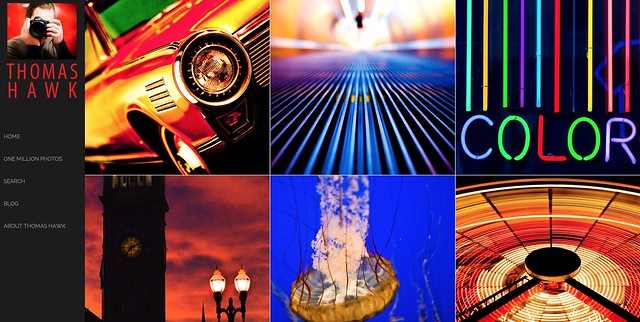
SmugMug, widely regarded as one of the best internet sites on the web for amateurs and pros alike to share, and especially sell, their photos, unveiled an entirely new SmugMug this morning.
I’ve had early access to the new site redesign and have been playing around with it for the past few weeks — I’m a huge fan.
The new SmugMug brings fresh, updated, design and functionality to the service and is probably the most significant upgrade to the service since it started.
Most significantly, the new SmugMug brings a new line up of beautifully designed templates that allow even the most basic internet user the ability to have a photo commerce site up within minutes.
As much as I enjoyed the old SmugMug as a place to sell my prints, one of the negatives of the old site was that it could be complex and complicated to get a attractive looking interface up. The old SmugMug offered the ultimate in customization, but many photographers are not web design experts and it could be challenging to do it yourself. While you could hire outside pros to customize your site, this added a layer of cost and complication to the equation.
While the new SmugMug still allows advanced users an incredible amount of customization, they also now offer a series of basic templates that are pretty much plug and play. The new templates are stunning right out of the box and you can easily use a new series of tools to do minor edits to add in basic elements that you want to use to present your photos uniquely.
These new templates have been optimized to look good on the three basic interfaces, web, tablet and mobile. They have also added custom links that can be added to your blog, Facebook, Google+ and Twitter as part of any design interface.
In addition to the new design choices, SmugMug also rolled out today a new photo organizer that allows some of the most advanced functionality in photo sharing today.
When Flickr redesigned their site earlier this year, some users were disappointed that Collections lost visibility on the site. The primary way that Flickr manages photos is with sets. Sets can be one dimensional though. Sometimes you need sets of sets. Sometimes you even need sets of sets of sets. The new SmugMug allows seven layers of photo organization.
So if you want to have a page of American photos organized by states you can do that. If you want to be able to drill down into each state and look at the various cities, you can do that too. If you want to drill down even further and look at the various neighborhoods in each of the cities, you can do that.
More control over hierarchy was the number one feature request that SmugMug users had asked for in their user forums.
The new SmugMug organizer also offers lots of ways to bulk edit your photos, allowing you to batch add keywords, delete files, apply custom captions, etc.
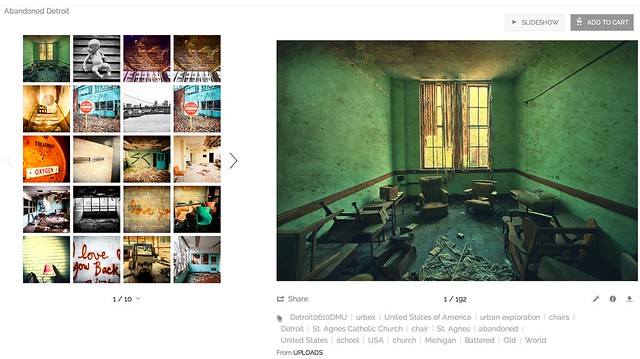
Personally, I do 99% of my metadata work at the file level in Lightroom, but here is where SmugMug offers me one of my favorite features, Smart Galleries. Smart Galleries are not something new with this release, but Smart Galleries allow you to build highly customized automated galleries based on keywords. If I want to build an album of all of my photos of abandoned buildings in Detroit, I can do this simply by building a set that includes any of my photos keyworded with abandoned AND detroit. Now anytime I upload any new photos to the site that have these keywords, they will automatically be added to that album.

One of the problems with redesigning photo sharing sites is it doesn’t matter how good a job you do at it, there will always be naysayers from the “who moved my cheese” crowd who will moan about it. It doesn’t matter how much better you make something, some people just love to complain. Haters gonna hate, gators gonna gate, tators gonna tate, all that stuff. One of the smart things that SmugMug did with this redesign is that they gave control over the new site to the user. If you are already a SmugMug user and *don’t* want to opt into the new site design, you don’t have to.
From SmugMug:
“Unlike many other services, we’re not forcing you to ditch your existing site. You’ll have your very own secret preview mode that contains all your galleries, so that you can personalize it and get familiar with the new features. While it sounds scary, migration simply copies your website contents into a virtual sandbox that only you can see. When you’re ready, YOU unveil your changes and make it public.”
I’m sure that there will *still* be some who complain, even though they get their *choice* over new or old SmugMug, but this should go a long way towards the inevitable backlash that comes with every redesign.
Also, the pricing is staying the same for the service and they are even adding unlimited video uploading to all levels of account with no price increase. At present SmugMug’s pricing remains: Basic: $ 5/month or $ 40/year, Power: $ 8/month or $ 60/year, Portfolio: $ 20/month or $ 150/year, Business: $ 35/month or $ 300/year.
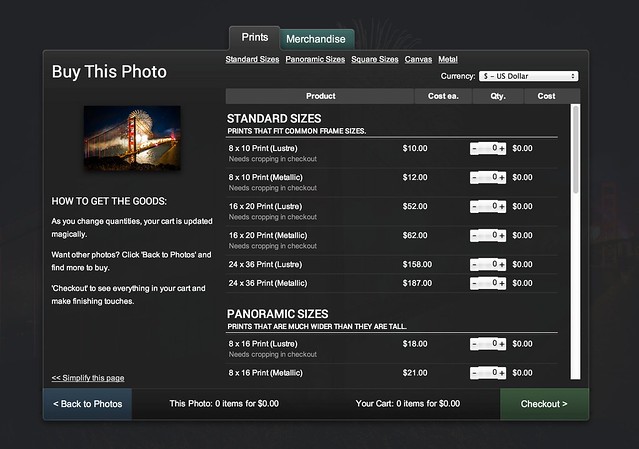
If you are a photographer who has thought about selling your photos on the web, but has held back, now is the time to jump in. With the new SmugMug today, you can easily have a professional looking photo commerce site up and running within minutes. SmugMug offers a generous 85% payout on all sales and gives you a great place to send people to who want to buy your prints.
I’ll be on a special episode of the Trey Ratcliff show tonight where we’ll talk about the new SmugMug — 7pm PST.
There is a live vidcast of the new designs with SmugMug CEO Don MacAskill at 10:30am PST today here.
If you want to check me out on my SmugMug, you can find me here. I’m in the process of adding several thousand new photos to my SmugMug. Feel free to buy a print if you’d like. 
More from SmugMug on the new design here.
Two new videos about the new SmugMug here and here.
More from David Pogue at the New York Times here.
Thomas Hawk Digital Connection


