Tag: pages

  • Studio scene comparison pages added to Pentax MX-1 preview

    pentax_mx1.png

    We’ve just added three studio comparison pages to our previously-published preview of the Pentax MX-1. The MX-1 is Pentax’s flagship compact camera, and something of a departure for the manufacturer, offering a fast F1.8-2.5 zoom lens, full manual control and a high-class, metal body, to compete with more established peers like Panasonic’s LX7. Click through to go to the new pages in our preview, and see for yourself how the MX-1 compares to its rivals.  

    News: Digital Photography Review (dpreview.com)

  • Static Flip Books: 360-Degree Scenes in Panoramic Pages

    [ By WebUrbanist in Art & Drawing & Digital. ]
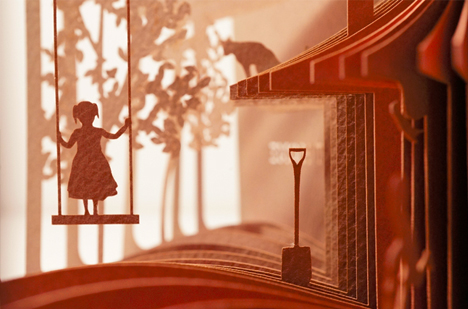
    3d book art

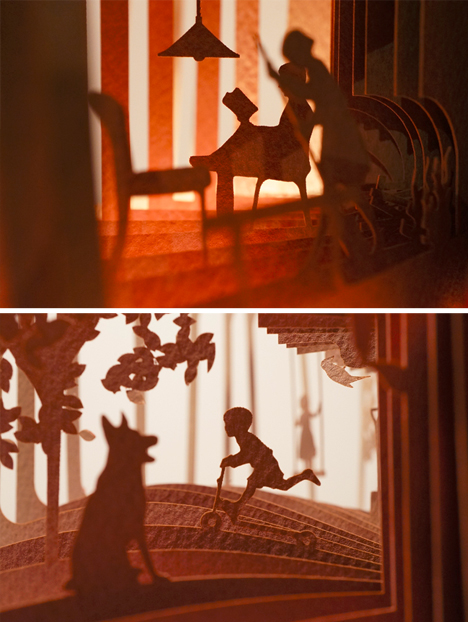
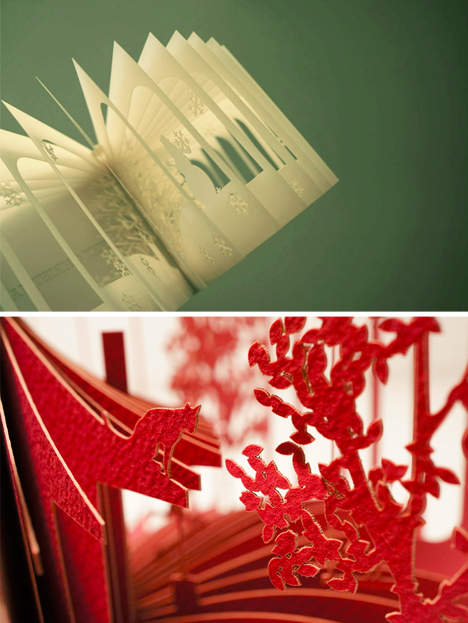
    Like a flip book, there is no text, and each page of these volumes contains a slightly different scene. Except instead of paging through them rapidly to reveal the story, the ‘reader’ unfolds the entire book at once into a dynamic panorama.
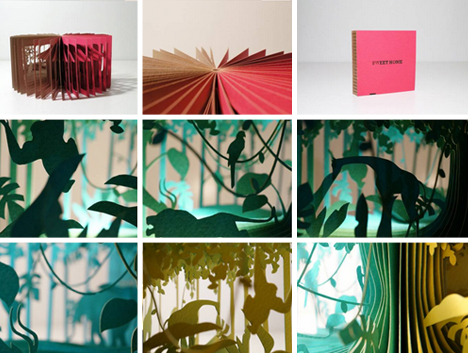
    3d panorama story books

    Artist Yusuke Oono has a whole series of these 360-degree books telling stories of daily home life, remote jungle adventures, and everything in between.
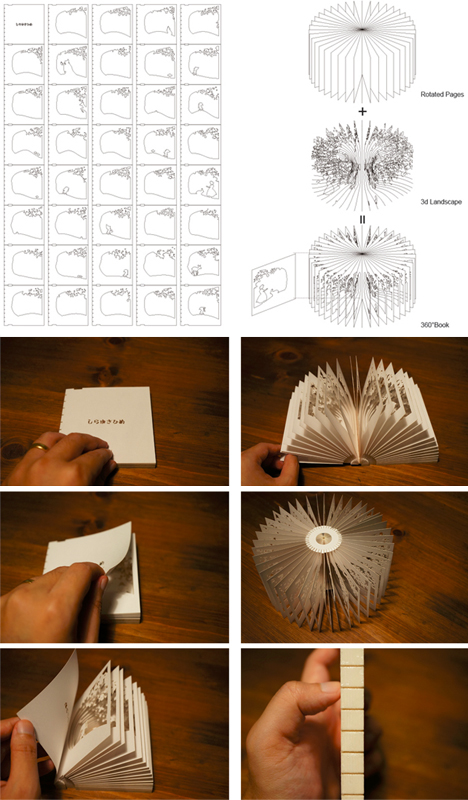
    3d flip book diagrams

    Each one unfolds into a three-dimensional scene, created using CAD-derived designs and laser-cutting programs, completed with a splash of color.
    3d static flip book

    The resulting negative space allows viewers to see through pages and visualize scenes, assembling them from the two-dimensional information on each layer – like rotational cut-outs of some miniature reality (or slices of life, if you like).
    3d silent story boks

    Ground, trees, walls and roofs provide the context – small figures of women, men and children tell silent stories that change with perspective and light. Each page is both a moment in space and in time. Brilliant, beautiful, simple.

    Share on Facebook


    [ By WebUrbanist in Art & Drawing & Digital. ]

    [ WebUrbanist | Archives | Galleries | Privacy | TOS ]


    WebUrbanist

  • Nikon Coolpix A Preview updated with studio comparison pages

    specs-1.jpg

    We’ve just updated our preview of the Nikon Coolpix A with a full set of studio shots, showing image quality in both JPEG and RAW capture modes. This is in addition to a gallery of real-world samples, and first impressions of our initial findings from shooting with the camera both in and out of the studio. The Nikon Coolpix A features a 16MP CMOS sensor, and a fixed, 28mm equivalent F2.8 lens. Click through for a link to our preview, which now includes our studio comparison pages. 

    News: Digital Photography Review (dpreview.com)

  • Studio comparison pages added to Fujifilm X100S Preview

    fujifilm_x100s.png

    We’ve just added three pages of studio test data to our preview of the Fujifilm X100S, following the publication of a gallery of real-world samples, last week. The X100S is the successor to the popular X100, and offers a fixed 35mm (equiv.) F2 lens, and a version of Fujifilm’s APS-C format X-Trans sensor with hybrid phase-detection AF. A host of other, smaller improvements should make the X100S a considerably more appealing camera than its predecessor. Click through for a link to the updated preview to see for yourself how it compares to its peers in our studio. 

    News: Digital Photography Review (dpreview.com)

  • Stories Jump Out of the Pages with 3D Book Sculptures

    [ By Steph in Art & Sculpture & Craft. ]

    Fiction favorites, from Gone with the Wind to Treasure Island, literally leap off the pages in three dimensions in Jodi Harvey-Brown’s imaginative book paper sculptures. Harvey-Brown illustrates figures from the stories, cuts them out and sets them on top of the open books among paper trees, waves, castles and dragons.

    The top sculpture is from ‘Knight and Dragon’, a book from the Dragonlance series. Harvey-Brown wired the knight and dragon through the book for extra stability. Above, a ship rises from the waves in the book ‘Kidnapped.’

    Huck Finn and Tom Sawyer relax on a raft in the Mississippi.

    Bambi and his mother explore the peaceful meadow just before tragedy strikes in one of the book’s most poignant scenes.

    Pirates are poised above a chest full of gold and jewels in Treasure Island. See more of Harvey-Brown’s book sculptures, many of which are for sale, at the artist’s website.


    Want More? Click for Great Related Content on WebUrbanist:

    Gripping Book Art: 31 Sculptures Worth Reading About

    Society is in a digital age and paper books are being left behind. Artists are fighting the tide by bringing books into their own as gorgeous works of art.
    13 Comments – Click Here to Read More »»


    Book Sculpture by Jacqueline Rush Lee

    Artist Jacqueline Rush Lee takes papercraft to a new dimension with stunning, organic book art crafted from lovingly handled used books.
    5 Comments – Click Here to Read More »»


    Share on Facebook


    [ By Steph in Art & Sculpture & Craft. ]

    [ WebUrbanist | Archives | Galleries | Privacy | TOS ]


    WebUrbanist

  • iPad Photography App: Pages: Adorama Photography TV

    This week Mark Wallace discovered a great iPad application that is called Pages. Adorama Photography TV presents Pages for the iPad. This app has been completely redesigned for the iPad. Use multi touch gestures to lay out letters, flyers, brochures, reports, and more. You can start with a template or import an existing Pages or Microsoft Word document from Mail, your MobileMe iDisk, or a WebDAV service. Pages has everything you need to create and share documents, including Apple designed templates, easy to use formatting options, and advanced layout tools. Start with the perfect template or create your document from scratch using your choice of colors, fonts, and textures. To download Pages for iPad, and for related videos at the Adorama Learning Center, go here: www.adorama.com Visit www.adorama.com for more photography videos.
    Video Rating: 4 / 5

  • Nikon D600 Preview Updated with Resolution and Menu pages

    nikon_d600.png

    Updated: We’ve just added our resolution and menu pages to our hands-on preview of the Nikon D600. These latest pages have been added to the preview as we work towards the full review. Our final analysis of the D600’s image quality will come later, but for now, click through to see for yourself how Nikon’s newest 24MP DSLR performs against our resolution chart in both JPEG and Raw modes. 

    News: Digital Photography Review (dpreview.com)

  • [MODIFIED] Google Chrome – View Web Pages in Full Screen Mode and Switch Between Tabs with Keyboard Shortcuts

    Toggle full screen mode in the Google Chrome web browser. While tabs are hidden, switch between pages with keyboard shortcuts.

    This is a simple Google Chrome tip, but beginners may find it useful. Others still may learn a keyboard shortcut or two.

    When browsing a web page that you plan on staying at for awhile, such as a web-based electronic mail service such as Gmail, you might wish to temporarily hide everything else onscreen including Chrome’s address bar to view more of the page. …

    Read more at MalekTips.
    New Computer and Technology Help and Tips – MalekTips.Com

  • Microsoft Word 2010 – Remove White Space Between Pages in Print Layout View

    In Word 2010, if there is too much white space between pages when viewing documents in Print Layout View, here’s how to reduce it.

    When viewing Microsoft Word 2010 documents in “Print Layout” view, a small amount of space is added between pages, presumably to make the separation between pages more clear-cut onscreen.

    If you perform document editing where you need to look at the bottom of one page and the top of the next page, you might find these few pixels a waste of space, especially on smaller monitors. Thus there are a couple of ways you can reduce the space between pages to only a couple of pixels:…

    Read more at MalekTips.
    New Computer and Technology Help and Tips – MalekTips.Com

  • [MODIFIED] Mozilla Firefox – Misc – Start Mozilla Firefox with Multiple Home Pages

    Automatically open several webpages simultaneously when starting Mozilla Firefox.

    Do you often open the same set of web pages every day when first starting Mozilla Firefox such as a search engine, your social networking sites, and your favorite computer tips site? <grin>

    Instead of manually opening these pages, wish you could have them all visible every time you launch Firefox, each displayed in a separate tab? Here’s how!…

    Read more at MalekTips.
    New Computer and Technology Help and Tips – MalekTips.Com