Tag: Machine

  • The Apprehension Engine: Machine Makes Disturbing Horror Movie Music

    [ By SA Rogers in Design & Products & Packaging. ]

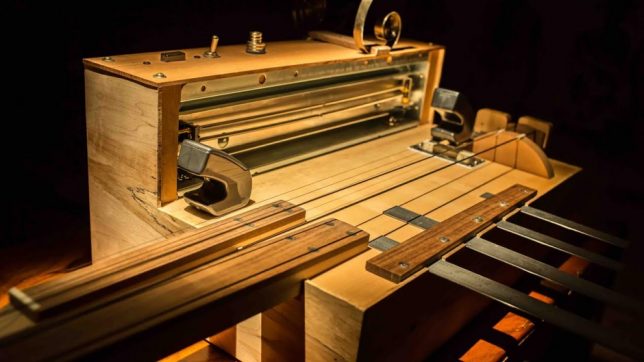
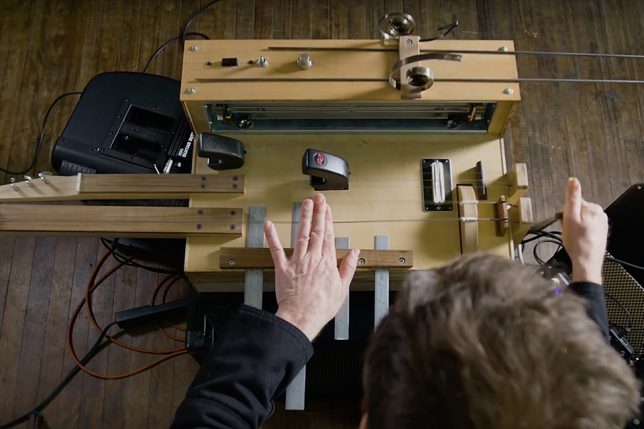
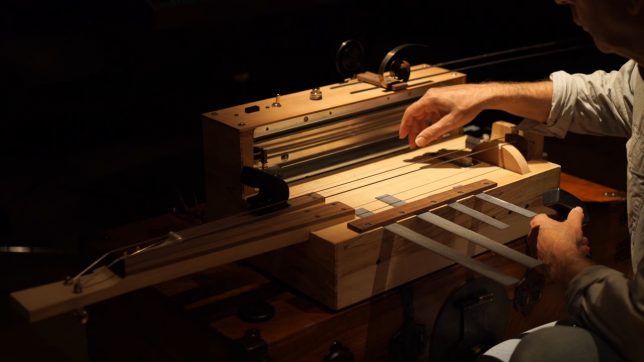
    Is this the most terrifying musical instrument ever made? If you just take a quick glance at it, you’ll likely say no – it’s an unassuming (albeit rather strange) jumble of strings, rods, reverbs and metal rulers attached to a boxy wooden base. But just you wait until composer Mark Coven, whose work includes the stunning score for the 2016 horror film The Witch, sits down at it and starts to play. The sounds that emerge from the ‘Apprehension Engine’ are designed to give you the creeps, and they’re quite effective.

    Korven, who has scored a number of feature films over the years, was sick of using the same old digital samples to get the signature scraping, creaking, squealing and rumbling sounds that help provide a hair-raising atmosphere. The world of creating analog sound effects in audio post-production is pretty fascinating, and foley artists use all sorts of weird objects to create many of the sounds you hear in an average movie or TV show.

    But Korven wanted something very specific, all together in a single instrument, so he turned to his friend Tony Duggan-Smith, a guitar maker, to help him craft it. In this video, Korven demonstrates to Great Big Story how the Apprehension Engine works as he plucks, wiggles, flicks, thumps and runs a bow across the various objects connected to the instrument.

    Share on Facebook


    [ By SA Rogers in Design & Products & Packaging. ]

    [ WebUrbanist | Archives | Galleries | Privacy | TOS ]


    WebUrbanist

  • World’s Largest “Car Vending Machine” Dispenses Real Bentleys & Ferraris

    [ By WebUrbanist in Design & Guerilla Ads & Marketing. ]

    Combining architecture, advertising and technology, this car dealership lets users punch in numbers to bring their vehicle of choice down a 15-story showroom looming above in full view. The tall lit-up facade of Autobahn Motors acts as a billboard and show space, letting fans scope out a Lamborghini from a distance then take it out for a test drive on the streets below.

    The design responds in part to the lack of surface real estate in this space-crunched island city-state, but it also serves as great marketing for the business. While not the first such automobile-vending tower in the world, it is the largest, and it works quickly: a user-selected vehicle can be brought down in just two minutes from the floors far above. Given land scarcity in cities, this unusual-looking typology makes a lot of sense, and could start to spring up in other places as well.

    Meanwhile, for those in the United States: Carvana has smaller versions located in Austin, Texas and Nashville, Tennessee. These are less a response to density issues and more driven by marketing and novelty.

    And while the towers aren’t quite as tall the effect is still pretty neat – modular platforms provide vehicles on demand from an array of sports cars, hatchbacks, minivans and trucks.

    As a bonus for fans of quirky interactivity: their system operates even more like a vending machine – users are given a giant coin to insert, which lets them bring down the vehicle of their choice from the display racks above.

    Share on Facebook


    [ By WebUrbanist in Design & Guerilla Ads & Marketing. ]

    [ WebUrbanist | Archives | Galleries | Privacy | TOS ]


    WebUrbanist

  • Sony releases machine vision sensor capable of 1000 fps object tracking

    Sony has released a new machine vision CMOS sensor, and though it’s destined for assembly lines and robots, it’s still interesting to us. Like the chip in the RX100 V, the IMX382 is a stacked, backside-illuminated chip capable of 1000 fps imaging. And, like that sensor, its stacked design includes signal processing circuitry in the chip. Unlike the RX100 V’s sensor, though, the 1.27MP IMX382 conducts video processing and subject recognition in parallel, so that it outputs both a ‘viewing’ stream and a ‘sensing’ stream simultaneously.

    The sensing processing uses color and brightness information obtained from the sensor, enabling incredibly fast subject identification and tracking at 1000 fps. You can see what that looks like in the video below:

    At a little over 1 megapixel this sensor is not destined for a smartphone or camera. And of course those applications get more complicated since they also have to re-focus a lens to keep up with a moving subject, but it’s interesting to see what levels of recognition and tracking possible when you bring signal processing to the chip itself.

    Articles: Digital Photography Review (dpreview.com)

  • Panasonic Lumix DC GX850 review: Lean selfie machine

    The Panasonic Lumix DMC-GX850 (known as the GX800 and GF9 in some regions) is the brand’s most compact interchangeable lens camera (as of Spring 2017) and uses the same 16MP Four Thirds sensor as several of its siblings. Sold kitted with a 12-32mm collapsible zoom, stand-out features include a 180-degree flip-up touch LCD, Panasonic’s excellent Depth-from-Defocus AF and 4K video capture.

    At its core the GX850 represents a combining of Panasonic’s style-oriented GF-line with the ultra-compact-oriented GM-line and replaces both the GM5 and GF8. However, its most similar sibling currently on the market is the larger, EVF-sporting GX85.

    Key features:

    • 16MP Four Thirds MOS sensor
    • 4K/30/24p video capture
    • 4K Photo mode for 8MP stills at 30 fps
    • 5 fps bursts with continuous AF
    • 3″ 1.04M-dot touch LCD flips ups 180 degrees
    • Wi-Fi

    Panasonic’s core customer for this camera is the casual user seeking a carry-everywhere-cam for documenting friends or family. This user is someone who prefers a selfie-screen to an EVF and favors ease-of-use and compactness. Since this ‘lifestyle’ camera buyer is likely to use the camera for a range of different types of photography, we’re going to see how it performs in a range of situations.

    The rivals

    Though the GX850 is Panasonic’s most entry-level camera, this segment of the mirrorless market has a lot of strong contenders to choose from. We’ve compared it to several of its most direct competitors below:

      Panasonic GX850 Panasonic GX85 Fujifilm X-A3 Fujifilm X-A10 Olympus E-PL8 Canon M10
    MSRP w/ kit lens $ 550 $ 800 $ 600 $ 500 $ 650 $ 600
    Sensor 16MP Four Thirds 16MP Four Thirds 24.2MP APS-C 16MP APS-C 16MP Four Thirds 18MP APS-C
    Image stabilization Lens-only 5-axis in-body + lens Lens-only Lens-only 3-axis in-body + lens Lens-only
    AF system Contrast-detect Contrast-detect Contrast-detect Contrast-detect Contrast-detect Hybrid AF
    Viewfinder n/a 2.76M-Dot 0.7x n/a n/a n/a n/a
    Screen 3″ 1.04M-dot 180° tilting touch 3″ 1.04M-dot tilting touch 3″ 920k-dot 180° tilting touch 3″ 1.04M-dot 180° tilting
    (no touch)
    3″ 1.04M-dot 180° tilting touch 3″ 1.04M-dot 180° tilting touch
    Number of control dials 1 2 2 2 1 1
    Hotshoe No Yes Yes No Yes No
    Burst rate w/ AF-C 5 fps 6 fps 6 fps 6 fps 3.5 fps 4.6 fps
    Video 4K/24/30p 4K/24/30p 1080/60/24p 1080/30/24p 1080/30p 1080/30/24p

    CIPA battery life

    210 290 410 410 350 255
    Dimensions 106.5 x 64.6 x 33.3 mm 122 x 71 x 44 mm 116.9 x 66.9 x 40.4 mm 117 x 67 x 40 mm 115 x 67 x 38 mm 108 x 67 x 35 mm
    Weight 269 g 426 g 290 g 331 g 357 g 301 g

    As you can see from the chart, the two areas the GX850 has an advantage over its direct competitors include 4K video capture and size/weight.

    The number of control dials is definitely a differentiator in this class. The GX850 has just one, located slightly awkwardly on the back. This view also shows its USB-charging and HDMI port.

    Social, portrait and pet photography

    The camera’s small size, touch capability and selfie screen make it an appealing choice for casually snapping images of friends, family and pets.

    The default exposure behavior in its full auto mode, which is called Intelligent Auto (iA), tends to be sensible: the camera tries to maintain a shutter speed that is one over the focal length or greater. However, if the camera senses subject movement in iA mode, it will automatically increase the shutter speed, at the expense of ISO sensitivity. And if the shutter speed drops too low because of a lack of light, the camera will warn you that the shot might have blur due to camera shake. The GX850 never deploys the pop-up flash though, unless the user does. 

    ‘The default exposure behavior in Intelligent Auto mode tends to be sensible’

    When shooting moving subject like kids or pets indoors, the GX850 does not always choose a fast enough mode to freeze the action, even if it senses movement. One way around this is to switch the camera into ‘Sport/Action’ mode, represented by a tiny running figure on the dial. However this mode still won’t always provide a fast enough shutter speed, but should be a better option than any of the other auto settings.

    This is a good camera for casual photos of friends. And if you take the time to process the Raw files, as we’ve done here, you can get some great results. Photo by Dan Bracaglia

    Face Detection is turned on by default out of the box (when using the iAuto mode) and is quite useful for documenting fellow human beings. In most cases, when Face Detect is engaged, the camera will lock focus on the most prominent person in one’s frame. Of course if the face is too small, obstructed, or there simply is not enough light, this mode will occasionally fail. And if no face is detected, the camera defaults to its 49-point area mode, which tends to focus on the nearest or most central object. 

    Most users of this camera will leave it in JPEG mode and be totally satisfied. However to get the most out of the GX850, we recommend shooting Raw. The above image was processed through Adobe Camera Raw and ‘pops’ significantly more than the out of camera JPEG. In general, we found JPEG color to be a tad washed out, and skin tone color can occasionally look a little off.

    You want a selfie screen? You’ve got a selfie screen.

    Selfie screens are par for the course in this entry level class of camera. By default, when you flip the screen up, the camera uses a 3 sec timer before a photo is taken, and a countdown is displayed to prepare you for the decisive moment (this can be switched off).

    There are also several ‘beautifying’ filters that can be applied to make your selfie sing, including a ‘Soft Skin’ and a ‘Slimming Effect’ filter. Both of these are adjusted via sliders ranging from 0-10. There is also a background defocus option that simulates a shallow depth-of-field. These options are fun to try, but mostly pretty silly.

    As selfie, with no beautifying effects applied. A selfie with ‘Slimming’ and ‘Soft Skin’ set to 10/10.

    Sharing images with the GX850 is also fairly straightforward. There are multiple ways to connect the camera to one’s device (you’ll need to download the Panasonic Image App first), though sadly the camera does not offer NFC to make life easier for Android users.

    The first time you connect you’ll need to pull up Wi-Fi in the main menu, located at the bottom of page 1 in the ‘wrench menu,’ and select ‘Wi-Fi Function.’ There you can generate a local Wi-Fi network and connect your smart device. The app also allows you to control the camera remotely.

    Sometimes you just have to share that delicious plate of pancakes with the world. The GX850 makes zapping photos from the camera to your smart device fairly painless, once you set up the connection. Photo by Allison Johnson.

    Articles: Digital Photography Review (dpreview.com)
  • Digital Knitting Machine: Kniterate is a 3D Printer for Custom Apparel

    [ By WebUrbanist in Gaming & Computing & Technology. ]

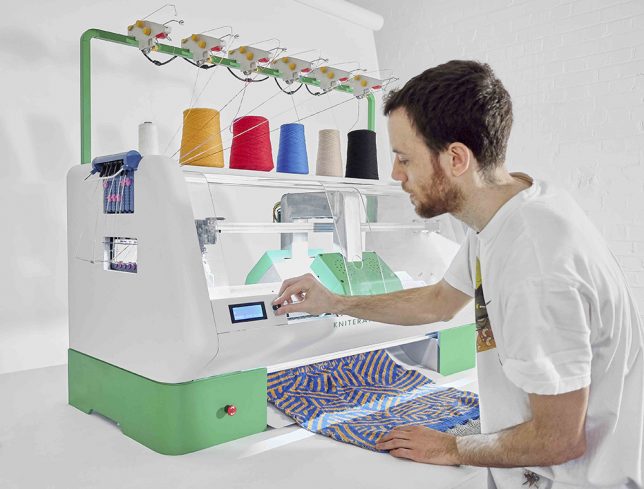
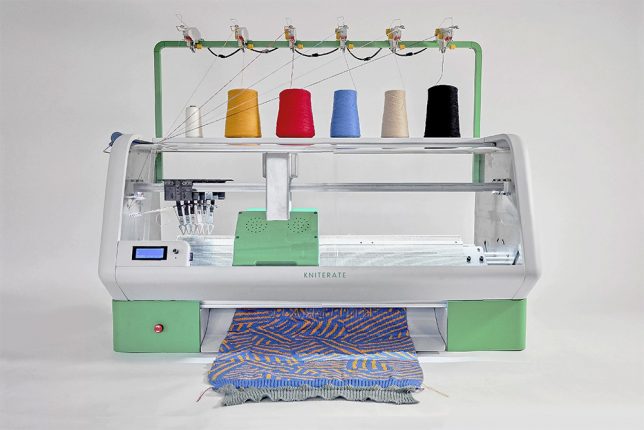
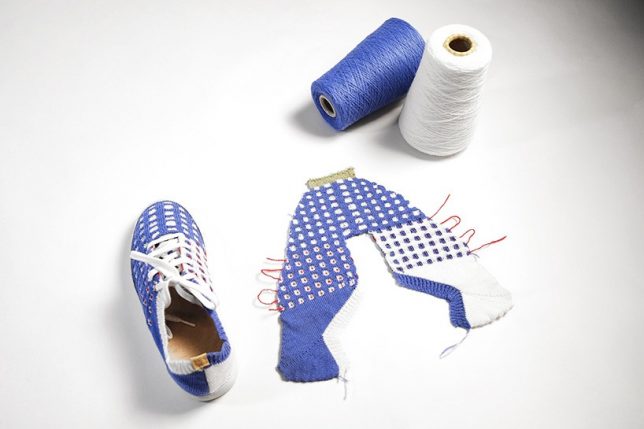
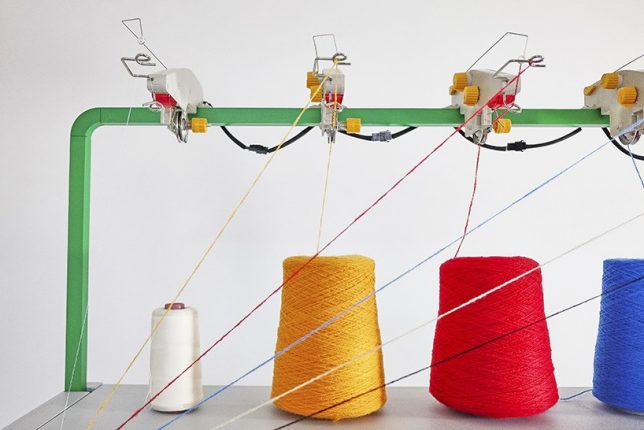
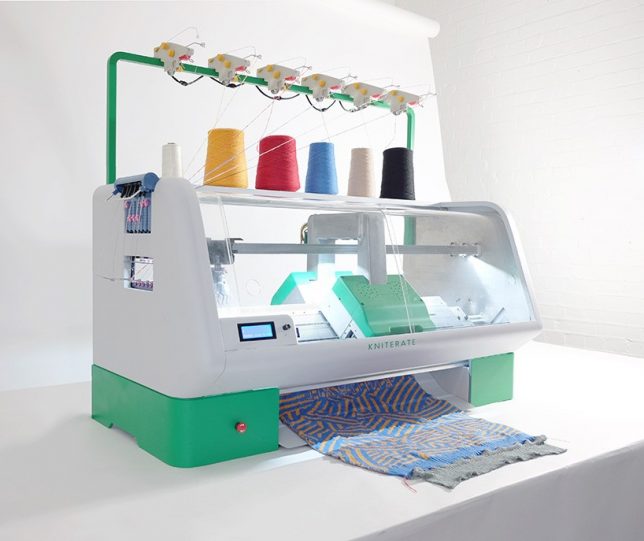
    Borrowing logic from the 3D printing industry, Kniterate lets users turn ideas and designs from digital files to one-off wearable garments in hours. Able to “print” shirts, scarves, sweaters, dresses and more, the machine is aimed at enabling customized creations as well as rapid prototyping.

    Compact, portable and affordable, the gadget itself links into computer and mobile apps – creatives can build out ideas in Photoshop, build them in Kniterate’s device-specific application, then send them to straight to production with the touch of a button.

    The application comes with a number of preset patterns that can be used but the intuitive interface is also designed to allow for easy from-scratch creations, even by people with limited digital design experience. Even in cases there the final product will be made via other methods or materials, this machine allows for iterative design experiments to test size, fit and styles.

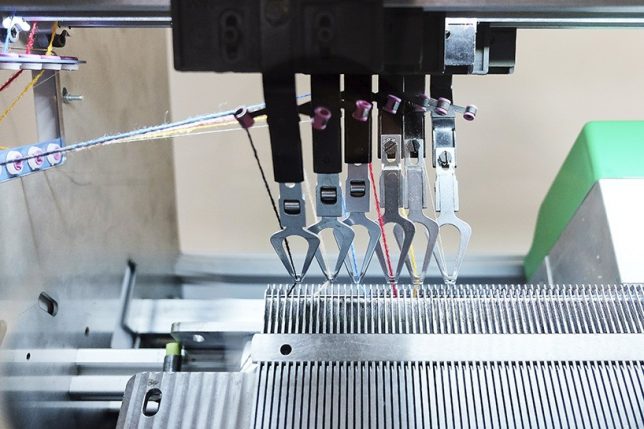
    The system is also designed to reduce waste from off-cut materials, printing with the exact amount of material needed to make a particular piece. The device can carry up to six yarns at a time to span an array of colors and materials – it is also made to be compatible with off-the-shelf yarns, making it more flexible and affordable than printers (often designed to make money from material sales rather than the machines themselves).

    Share on Facebook


    [ By WebUrbanist in Gaming & Computing & Technology. ]

    [ WebUrbanist | Archives | Galleries | Privacy | TOS ]


    WebUrbanist

  • Google RAISR uses machine learning for smarter upsampling

     Top: Original, Bottom: RAISR super-resolved 2x, Image: Google

    Upsampling techniques to create larger versions of low-resolution images have been around for a long time – at least as long as TV detectives have been asking computers to ‘enhance’ images. Common linear methods fill in new pixels using simple and fixed combinations of nearby existing pixel values, but fail to increase image detail. The engineers at Google’s research lab have now created a new way of upsampling images that achieves noticeably better results than the previously existing methods.

    RAISR (Rapid and Accurate Image Super-Resolution) uses machine learning to train an algorithm using pairs of images, one low-resolution, the other with a high pixel count. RAISR creates filters that can recreate image detail that is comparable to the original, when applied to each pixel of a low-resolution image. Filters are trained according to edge features that are found in specific small areas of images, including edge direction, edge strength and how directional the egde is. The training process with a database of 10000 image pairs takes approximately an hour. 

    Once RAISR has been trained it is capable of selecting the most appropriate filter for each pixel in a given low-resolution image to fill in new pixels in order to create a higher-resolution version. RAISR can also remove aliasing artifacts, such as moiré patterns or jagged lines in the low-resolution images when creating the larger version, something that linear methods are not capable of doing.

    Eventually, Google may be able to use the technology to upsample images that are sent at mobile bandwidth-friendly resolutions. More information on RAISR is available on the Google Research Blog.

     Left: Original, Right: RAISR super-resolved 3x, Image. Google

    Articles: Digital Photography Review (dpreview.com)
  • Adobe and UC Berkeley demonstrate image editing tool powered by machine learning

    Researchers with Adobe and the University of California-Berkeley have detailed a new AI-powered photo manipulation tool that enables sophisticated photo modification using ‘target images’ and/or crude user sketches. The end result is a realistically altered photo that has been machine-modified (or, in the case of blank images, completely machine generated) to match a target image without extensive ‘natural’ user editing.

    According to a newly published study detailing the technology, this tool involves a ‘generative adversarial neural network’ that works to modify images in near-real time. As one example demonstrated in the video below, drawing a general shape over a photo of a bag causes the software to automatically adjust the bag’s size to match the sketched shape without compromising its realistic nature. The software can also generate images based on crude user ‘scribbles’ – no artistic talent required.

    Articles: Digital Photography Review (dpreview.com)
  • Instagram profiles reveal user depression in new machine learning study

    A team of researchers with the University of Vermont and Harvard have published a new study detailing Instagram profiles and the hidden clues they may hold about the photographer’s mental state. Using machine learning, the team was able to identify signs of depression based off an Instagram profile’s photos, metadata, and things like facial recognition. The study looked at 43,950 photographs from 166 individual Instagram users, and had a 70-percent accuracy rate when identifying users with clinical depression.

    The artificial intelligence system ultimately proved more capable of detecting depression than general practitioners, which have been found to have somewhere around a 42% accuracy rate. Hints about the photographer’s mental state lie in many things the researchers refer to as ‘markers’: the type of lighting used in the photographs, for example, and the colors of filters applied to photos. 

    Dark and gray colors are often signs of depression, as well as gap in posting frequency which may indicate a depressed mental state. The number of times a photo is ‘liked’ and commented on, as well as the number of faces detected in the photos, are also notable markers. Interestingly enough, the study found that depressed Instagram users are less likely to use any photo filter, but if they do, they tend to go with ‘Inkwell.’

    Via: Digital Trends

    Articles: Digital Photography Review (dpreview.com)

  • Nemesis Machine: Cybernetic Cityscape Visualizes Surveillance Data

    [ By SA Rogers in Art & Sculpture & Craft. ]

    Screen Shot 2016-07-15 at 9.41.23 AM


    Activated by unspecified data transmissions, spinners whir and lights blink atop skyscrapers of computer parts arranged like a miniature city, visualizing information in real time as it’s collected – including your own movements as an observer. Your own face blinks back at you from a video monitor as you gaze at the many electronic parts cobbled together into a strange dystopian vision of a modern metropolis. ‘The Nemesis Machine’ by Stanza makes use of data that’s already being collected in London, including environmental monitoring and security-based technologies, representing “the complexities of the real time city as a shifting morphing complex system.”

    Screen Shot 2016-07-15 at 9.40.32 AM

    nemesis machine 2

    In that way, the machine becomes a sort of physical avatar of the city, reflecting its activity even when it’s assembled in another country altogether. The viewer becomes almost like a drone hovering over the miniature cityscape, observing all of those beeps, blinks, clicks and movements as they’re sent from the sensors in London, including temperature, humidity and motion. The installation asks the question, what will future cities look like as we move even further into the era of constant surveillance?

    nemesis gif

    Screen Shot 2016-07-15 at 9.38.24 AM

    nemesis machine 3

    “The Nemesis Machine is a mini, mechanical metropolis that monitors the behaviors,a activities, and changing information, of the world around us using networked devices and electronically transmitted information across the internet. The artwork reforms this information and data creating parallel realities. At the heart of this work lies an interest in the urban environment, the network of cameras and sensors to be found there, and the associated issue of privacy and alienation.”

    Screen Shot 2016-07-15 at 9.38.53 AM

    Screen Shot 2016-07-15 at 9.39.27 AM

    “The installation poses the question of who owns the data and speculates that virtual borders will soon create more systems of control. What I’m doing, which is sort of new ground, is that I’m hacking access to a network and re-appropriating the data and information, and I’m re-contextualizing it to give it a wider meaning. I want to show that you can do something positive with this data. And as I say data is the medium of the age. The real world is made virtual and then real again.”


    Share on Facebook


    [ By SA Rogers in Art & Sculpture & Craft. ]

    [ WebUrbanist | Archives | Galleries | Privacy | TOS ]


    WebUrbanist

  • Machine 3D-Paints ‘New’ Rembrandt After Studying the Master

    [ By WebUrbanist in Art & Drawing & Digital. ]

    remnant design diagram

    As part of The Next Rembrandt, a multi-year collaborative project, a team of engineers trained a computer not only to understand the works of this famous Dutch master but also to expand his portfolio. Ultimately, the machine created a portrait that is at once brand new and yet also looks (and feels) like a lost original work of Rembrandt Harmenszoon van Rijn.

    next rembrandt studied painting

    An incredible combination of both machine learning and 3D printing, the project involved digitally tagging data in scanned versions of the artist’s various known pieces. Resulting patterns were subsequently explored by computers, including: brush strokes, approaches to organic detail and uncanny ability to depict human emotions.

    next rembrandt new original lost work

    The result is an algorithmic creation that mirrors the style of the master and depicts a Caucasian male in his thirties, with facial hair, black clothes, a white collar and a hat, facing to one side.

    lost remnant detail view

    Humans input those general parameters, but did not have a say in the look or feel of the final print. A 3D texture was added to the work based on the height and depth of paint applied to Rembrandt’s actual works.

    next rembrandt

    The two-year project was a collaboration between Microsoft, financial firm ING, Delft University of Technology and two Dutch art museums – Mauritshuis and Rembrandthuis. A public exhibition of the portrait is planned and details of the display will be released at a later date.

    From the project creators: “It’s been almost four centuries since the world lost the talent of one its most influential classical painters, Rembrandt van Rijn. To bring him back, we distilled the artistic DNA from his work and used it to create The Next Rembrandt. We examined the entire collection of Rembrandt’s work, studying the contents of his paintings pixel by pixel. To get this data, we analyzed a broad range of materials like high resolution 3D scans and digital files, which were upscaled by deep learning algorithms to maximize resolution and quality. This extensive database was then used as the foundation for creating The Next Rembrandt.”

    Share on Facebook


    [ By WebUrbanist in Art & Drawing & Digital. ]

    [ WebUrbanist | Archives | Galleries | Privacy | TOS ]


    WebUrbanist