RSS
 

Posts Tagged ‘Giveaway’

Defrozo Giveaway: Comment for a Chance to Win Premium Ebook

27 Aug

Great news everyone! Today we’re starting a giveaway with which you have a chance to get one of Photodoto’s camera guides (normally priced at $ 9.99 each). Defrozo, our partners we have already told you about, are a new, awesome startup geared at both aspiring and pro photographers. Built by photogtraphers, Defrozo is an all-in-one platform that helps photographers better organize Continue Reading

The post Defrozo Giveaway: Comment for a Chance to Win Premium Ebook appeared first on Photodoto.


Photodoto

 
Comments Off on Defrozo Giveaway: Comment for a Chance to Win Premium Ebook

Posted in Photography


Cecilia Gallery Camera Strap Giveaway

03 Jul

Recently, FashionPhotographyBlog.com reviewed the unique camera straps from Cecilia Gallery. Well today, I’m going to share with you how you can claim one of these gorgeously crafted straps for your camera because thanks to Cecilia Gallery, we have one of their camera straps to give away to one of our subscribers to our blog. To decide who will receive this coveted prize we are going to hold a competition between now and the end of the month.

Fashion Photography Blog Reviews Cecilia Gallery Camera Straps (FashionPhotographyBlog.com)

The rules on how to enter the competition are simple:

1) Take a photo of your favorite item that you use as a photographer.

It does not have to be restricted to cameras; you can think outside of the box as much as you like. It can be an accessory, a piece of software, a tablet, computer or electronic equipment, a book or even an app just to name a few suggestions.  Feel free to be as creative as you like in the photo – you may even want to appear in the photo if you are comfortable being seen in it. Just make sure that we can clearly identify what the item is.

2) Write a brief description of at least 100 words telling us why it’s a favorite item of yours as a photographer. You can detail how it has benefited you or how useful it is in your photography. Let us know why you love it.

3) Send these to us via this email competition@fashionphotographyblog.com with your first and last name so we know whose entries are whose.

4) Photo entries and their descriptions will then be posted on our Facebook page where the public will VOTE on for their favorite photos.

The scoring of these votes will be weighted and by the total number of SHARES, followed by the total number of COMMENTS, then the total number of LIKES. In a nutshell, the most popular photo with the top points at the end of the competition period will be announced as the winner of the camera straps. YAY!

6) You can enter as many times as you like, just that each entry needs to be accompanied with a photo and description.

7) Competition starts at the beginning of this month and closes at the end of this month, July 31st Midnight.

So that’s how you can will one of these trendy camera straps. Here’s how you can make sure that you stay updated about the competition and hear when we announce the winner:

1) LIKE us on Facebook

2) Join our mailing list

Once again, we would like to thank Cecilia Gallery for supporting this competition and offering one of their hand-woven alpaca wool and leather camera straps as the prize. We are officially starting the competition and receiving entries.

Good luck everyone! (Although there can only be one winner)


PHOTO SOURCE:

Images courtesy of Cecilia Gallery


Fashion Photography Blog

 
Comments Off on Cecilia Gallery Camera Strap Giveaway

Posted in Uncategorized


The Epic Bundle and Another Giveaway Demand Your Attention

19 Jun

Remember Inky Deals? We’ve been telling you about them from time to time now, always when they have some type of amazing deal, bundle or giveaway for you. Hey, we wouldn’t waste your time in any case! Guess what time it is, this month? That’s right…it’s yet another too-good-to-be-true deal from Inky Deals. This time, Inky Deals doesn’t just have Continue Reading

The post The Epic Bundle and Another Giveaway Demand Your Attention appeared first on Photodoto.


Photodoto

 
Comments Off on The Epic Bundle and Another Giveaway Demand Your Attention

Posted in Photography


MotoCMS Giveaway Ended: Winners Announced

19 Sep

Yesterday, the MotoCMS Website Templates giveaway ended, and it’s time to announce the winners! Here they are: Congratulations to the winners! By now, you should have already received your winner confirmation email. If it didn’t happen, please get in touch with us via email: contact [at] photodoto.com. Name: Brent Spencer Link: Comment Name: Greg Sharpe Link: Comment Name: Paul Alabama Continue Reading

The post MotoCMS Giveaway Ended: Winners Announced appeared first on Photodoto.


Photodoto

 
Comments Off on MotoCMS Giveaway Ended: Winners Announced

Posted in Photography


MotoCMS Giveaway: Win 1×3 Professional Photography Website Template (Worth $139 Each)

11 Sep

Here on Photodoto, we know for sure what the biggest dream of every photographer is – it’s a professional, stunning portfolio website! Let your dreams come true! We’re pleased to announce a MotoCMS giveaway where all of you have a chance to win one of three premium website templates from our partners MotoCMS, spiced up with their powerful admin panel. Continue Reading

The post MotoCMS Giveaway: Win 1×3 Professional Photography Website Template (Worth $ 139 Each) appeared first on Photodoto.


Photodoto

 
Comments Off on MotoCMS Giveaway: Win 1×3 Professional Photography Website Template (Worth $139 Each)

Posted in Photography


Ultimate Time-Lapse Photography Giveaway Results

07 May

Last week was the conclusion of my Ultimate Time-Lapse Photography giveaway and today I’m happy to announce the winners.

A huge THANKS goes out to eMotimo and Dynamic Perception for donating the grand prize!  If you haven’t already please follow and thank eMotimo and Dynamic Perception on Facebook .  Thanks to BorrowLenses.com, GuraGear, and Lexar for providing great bonus prizes and most importantly everyone that took part.

By now I’m sure you’re itching to know who has won, so without further delay here are
the winners:

Adobe Photoshop CS6 Extended – Thomas O’Brien

Adobe After Effects CS6 – Michael Brown

Adobe Premiere Pro CS6 – Marc Donahue

Apple iPad 3 Retina Display (16GB WiFi) – Brittany Chasteen

Lexar 16GB 1000X CF Card – Jack Fusco

Gura Gear Camera Bag – Mehmet Yesiltas

$ 100 BorrowLenses.com Gift Certificates
Jimmy Arcade
Felicia Cracchiolo
Sean Parker

Grand Prize
eMotimo TB3 Black & Dynamic Perception Stage 0 Dolly System with a Quick Change 8 RPM & 21 RPM with MX2/AT2 Controller
Tim Clark

Thanks again to everyone for taking part and congratulations to the Tim Clark the grand prize winners.

Copyright Jim M. Goldstein, All Rights Reserved

Ultimate Time-Lapse Photography Giveaway Results

The post Ultimate Time-Lapse Photography Giveaway Results appeared first on JMG-Galleries – Landscape, Nature & Travel Photography.


JMG-Galleries – Landscape, Nature & Travel Photography

 
Comments Off on Ultimate Time-Lapse Photography Giveaway Results

Posted in Equipment


dPS: Now with 1 MILLION Subscribers [CAMERA BAG GIVEAWAY]

14 Nov

Note: we’re giving away some great photography bags below. Read on to find out how to win.

In April 2006 dPS launched as a site where I started to collate the things I’d been learning about digital photography.

As ‘that guy’ who always got asked to photograph his friends weddings, kids parties, conferences and other events I was also the guy that friends came to to ask for advice about how to use cameras better. So instead of telling friends the same tips over and over again I decided to write them down in a blog.

At the time of launching dPS I wasn’t sure what the future had in store for the site. I was passionate about the topic but dPS had no posts and no readers.

Fast forward six and a half years and I can hardly believe some days that dPS has grown into what it has become. Not only is it now a business that feeds my family and employs a team of people to run it – this week we passed a milestone – 1 million subscribers!

Screen Shot 2012 11 13 at 11 47 01 AM

Who would have thought!?

Note: That figure is made up of people who subscribe either to our weekly newsletter or our RSS feed (if you’re not subscribed yet you can learn about the options here).

My Heartfelt Thanks

What does one say or do at a time like this?

I’ve been wondering what to say for a month or so now (as the milestone has approached) and apart from pinching myself I’m not really sure what to do except to say thank you because the growth of dPS has been something that is more to do with others than myself.

Firstly thanks to our team. Working behind the scenes here at dPS are a number of dedicated core team members who look after customer service, community management, the production and marketing of our eBooks, the selling of ads. They help to make the site more useful and sustainable.

Secondly thanks to our writers – both those who create our daily tutorials (we’ve published almost 3500 since 2006) and to pure eBook authors (we have 11 now).

Thirdly thanks to our volunteer team. Much of what happens here at dPS is done by volunteers. Writers and forum moderators – without whom the site could not run.

Lastly thank to our readers and community – you. Without you visiting, subscribing, reading, sharing, commenting and interacting with one another we’d not be what we’ve become today. I’m grateful to you for your continued support and look forward to continuing to grow dPS together.

Win 1 of 4 Camera Bags from Acme Made

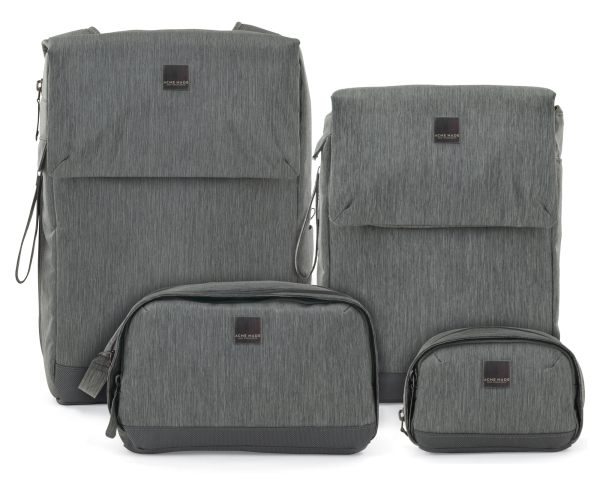
To celebrate our million subscriber milestone we asked one of our sponsors – Acme Made – if they would like to give a few of their camera bags away. They said yes – in fact they’ve given us 4 to give away from their Montgomery Street Collection!

These bags are stylish, versatile, and protective. The Montgomery Street Collection is made up of a Case, Kit Bag, Courier and Backpack. Each provides a unique solution to hold not just a camera, but other digital devices and essential accessories. The all-new FlexFold System provides a quick and easy way to collapse or expand the internal space for added versatility.

How to Win
Check out the Montgomery Street Collection and let us know in comments below which bag you like the most and why.

Four of you will be picked at random and will win the bag you like most!

This competition is open to our global audience – we’ll make sure the bag you win gets to you wherever you are!

The winners will be chosen randomly in 8 days time (at Midday on November 23nd – Melbourne Australia time).

Post originally from: Digital Photography Tips.

Check out our more Photography Tips at Photography Tips for Beginners, Portrait Photography Tips and Wedding Photography Tips.

dPS: Now with 1 MILLION Subscribers [CAMERA BAG GIVEAWAY]


Digital Photography School

 
Comments Off on dPS: Now with 1 MILLION Subscribers [CAMERA BAG GIVEAWAY]

Posted in Photography


onOne Perfect Photo Suite 7 Review and Giveaway

10 Nov

Well, it’s here! Version 7 of onOne’s Perfect Photo Suite has got to be the most anticipated release from onOne in this review we’ll see if it lives up to the hype. One rule I have for reviews is that I won’t review stuff that I don’t use on a regular basis. Well, I’ve been using onOne Software since I got my first copy of Photoshop (CS3 I believe) so I’d say I use it pretty regularly! I should note that I don’t get paid for doing these reviews, I do them purely because I want to review things that I use and and want to pass that on to you the reader if you’re trying to make a choice to buy something to advance your photography. So with all that said, let’s get to the review. And at the end we will do a giveaway. Yeehoo!

Where onOne Software Has Been And Where It’s Going

onOne used to cater exclusively to Photoshop users. They made Photoshop plugins and they were even great back then. If you didn’t have Photoshop, you were out of luck for the most part. That wasn’t uncommon, pretty much all software companies for photographers existed as plugins to Photoshop. Over the past couple of years however, onOne has started to slowly pull away from exclusivity with Photoshop and has now blown the doors wide open for Lightroom and Aperture users and even people who have none of the above. Not all of us can buy every new camera that comes out, have a bag full of L series lenses or own every new and groundbreaking piece of software that comes out. A lot of photographers do this stuff part time. Some photographers have full time jobs that have nothing to do with photography so buying every piece of software out there really isn’t a big priority. Some photographers simply are short on cash and can’t afford everything that’s available.

When onOne announced Perfect Layers, they quite literally turned the photography industry upside down. Not only is Perfect Layers included in their Perfect Photo Suite, it’s also free for anybody to use! It’s a free program that give us access to things like layers, masking, brushes, filters and more without having to buy an expensive program like Photoshop. When you combine Perfect Layers with the other programs that onOne offers, the pot really starts to get sweeter. Perfect Layers ties all of onOne’s products together in one nice program and it really becomes a one stop shop for just about all your editing needs. In a lot of cases, it can completely replace programs like Photoshop and Lightroom. If you don’t have $ 700 for Photoshop, if you don’t shoot thousands of images a week and need Lightroom for cataloging everything, then onOne’s Perfect Photo Suite 7 might just be the best option for you. If you have $ 700 and are ready to spend it, then I’d still suggest buying Lightroom and onOne’s PPS7 every time. You’ll even have some money left over (about $ 250 as a matter of fact) to pay bills. On top of all that, they just added a new and long awaited program into the mix with the release of Perfect Black & White. It’s easy to see that onOne is becoming a serious competitor in the photography industry as not just a supplement to other programs but as a stand alone software program that is much more powerful than some people realize.

What’s New In Perfect Photo Suite 7?

Well first of all, if you haven’t taken a look at onOne in a while, the price for the entire suite dropped significantly about a year ago. Their pricing actually used to closely resemble Photoshop but they decided to drastically drop their pricing to make their products available to more people, realizing that not everyone has $ 700 to drop on software. If you buy each product included in the Perfect Photo Suite a la carte, that’s about what you’ll spend. But if you buy the suite you’ll only pay $ 299.95. That’s pretty cheap considering all the different programs included. There are a lot of new features in PPS7 and if you want a whole list you can visit onOne’s website, but here are the ones that stuck out to me the most.

New Interface and Options
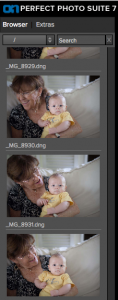
I wasn’t a huge fan of the interface in PPS6. It wasn’t terrible by any means, it just wasn’t as sleek as it could have been. I think they really improved things in PPS7 both in looks and functionality. Where PPS6 was clunky and bulky, PPS7 is smooth and versatile. Instead of having to import every single photo into the suite, you now have access to all your computers files on the left side. You can scroll through any folder or use the search bar to type in a specific file. This feature alone should save a LOT of time and makes the program that much more of a standalone solution.

Moving between modules is quick and painless. In past versions there was a lot more waiting around so things have definitely improved in the speed department. Preset image previews used to run along the bottom and seemed to be a bit of a distraction. They used stock images from various photographers to show what a preset did and if you wanted to see a preview with your image, you’d have to hover over the preset and wait for it to pop up. Now the presets run along the left side in the same place as the the files and there’s no more stock images. In PPS7, your image is used for each preset automatically so no more need to hover and wait.

Perfect Black and White
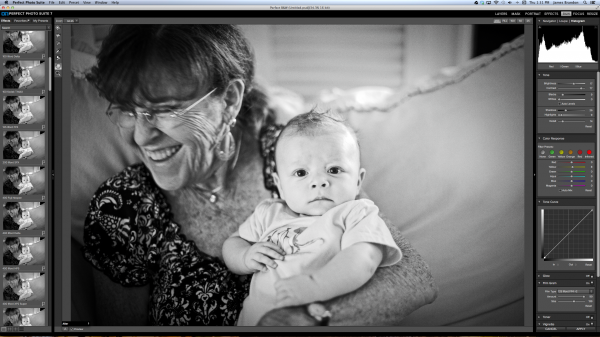
I’ve been waiting for onOne to come out with a Black & White program for quite a while now. So I was pretty happy to see it included in PPS7. I wouldn’t necessarily say that Perfect B&W is drastically different or more powerful than any other Black & White program. After all, converting an image to monochrome can only be so complicated, right? But there are things you can do in Perfect B&W that you can’t do in Lightroom or Photoshop alone. For example, in Perfect B&W you can add borders to your images (a remnant of the late Photo Frame software) without having to switch modules or export the photo anywhere (not available in LR or PS). You can add a blend mode on top of the image and then reduce its brightness (not available in LR). You can split tone the image like in LR but Perfect B&W also has presets readily available right in the toner drop down. And if you’re feeling really creative, you can simply take the photo into another onOne program like Focal Point with just one click. See how many clicks that takes in LR or PS! Here’s a quick video of Perfect B&W in action..

Improved and Expanded Presets Library

Using and creating presets in Perfect B&W (or Perfect Effects) couldn’t be easier. For the record, I love presets. To create a new preset once you have an image where you want it, just hit “shift > command > s” or go to the menu bar and choose “Presets > Save Preset” and a dialogue will pop up to walk you through the rest. Unlike Lightroom, in PPS7 you can add a creator and description to each preset which really comes in handy if you want to sell your presets online or give them out. Having presets readily available is great. You can always go back to ones you love to maintain a consistent look to your images, or you can use one preset and apply it to an entire photo shoot or series to really tie it all together. It’s good to see that onOne loves presets as much as I do. The litany of presets included in the PPS7 is exhaustive to say the least. That’s a good thing though. There are more presets, textures, brushes, borders and frames than I think I’ll ever fully know what to do with and that’s a lot better than having too few.

Say Goodbye To PhotoFrame

Yep, it’s true. PhotoFrame had a good run. It was the first onOne program that I ever purchased and now it’s been absorbed into the suite. You’ll find its remnants in Perfect Effects, Perfect Layers and Perfect B&W. It’s sad to see it go but that’s the way technology goes…

Start To Finish Video of Perfect Photo Suite 7 In Action

Here’s an in-depth video (about 45 minutes) of me editing an image from Italy using Lightroom, Perfect Photo Suite 7 and Photoshop. This is a long one, from start to finish, but if you want to see how I work through an image (unscripted) and see how seamless it is to work between these programs this should be an interesting watch for you. To watch even more videos on PPS7, be sure to visit onOne’s website and check out the Perfect Inspiration series from by good bud Brian Matiash or the countless videos available at any time at the onOne University.

Finished Image

Conclusion And Giveaway

I seriously am in love with this software. It’s incredibly versatile and it helps me out in so many ways from day to day. Whether it’s using Perfect Resize to prepare all of my gallery and fine art prints, dropping a photo into Focal Point to add some sweet blur or jumping into Perfect Mask when precision is needed; onOne’s Perfect Photo Suite has taken up permanent residence in my post processing workflow.

For a chance at winning a free copy onOne’s Perfect Photo Suite 7, here’s what you need to do: Leave a comment below telling us why/how you’d benefit from having PPS7. That’s it! And bonus point for following us all on Twitter!

We’ll choose the winner in one week from this post going live – midnight on 17 November US Eastern time.

@jamesdbrandon
@digitalps
@ononesoftware 

Post originally from: Digital Photography Tips.

Check out our more Photography Tips at Photography Tips for Beginners, Portrait Photography Tips and Wedding Photography Tips.

onOne Perfect Photo Suite 7 Review and Giveaway


Digital Photography School

 
Comments Off on onOne Perfect Photo Suite 7 Review and Giveaway

Posted in Photography


Moonbow Inspired Giveaway Winner is…

18 Aug

I wanted to thank everyone for taking part in the Moonbow Inspired Giveaway. I’m happy to announce that the winner was John Sweeney.  Have fun with the ThinkTank Hydrophobia SLR rain/dust cover John.

Again thanks to ThinkTank (my affiliate store link) for their great gear and generosity. Also be sure to follow them on Twitter at @thinktankphoto and on Facebook.

Lunar Rainbow (Moonbow) at Lower Yosemite Falls, Yosemite National Park

Lunar Rainbow (Moonbow) at Lower Yosemite Falls, Yosemite National Park

Technorati Tags: photography, Yosemite, Moonbow, Lunar Rainbow, landscape, nature, stock photo, stock picture, giveaway, ThinkTank

Copyright Jim M. Goldstein, All Rights Reserved

Moonbow Inspired Giveaway Winner is…

flattr this!


JMG-Galleries – Jim M. Goldstein Photography

 
Comments Off on Moonbow Inspired Giveaway Winner is…

Posted in Equipment