Tag: Font

  • Self-Censoring Font Automatically Redacts Fed Watchlist Words

    [ By WebUrbanist in Design & Graphics & Branding. ]
    seen font security privacy

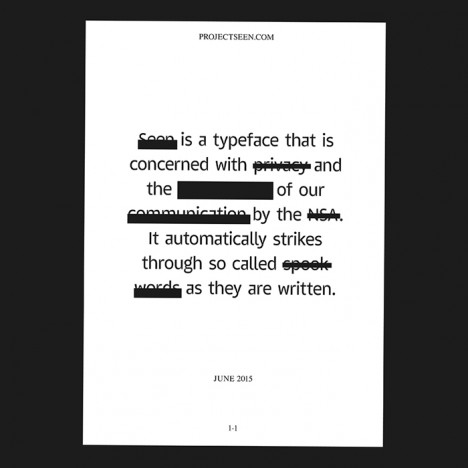
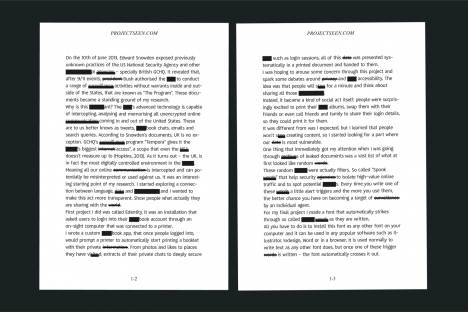
    Simple called Seen, this font will frustrate you, redacting both expected and surprising things, as it checks what you type in realtime against a list of flagged words and phrases employed by the Department of Homeland Security.
    seen font in action

    Security, shooting, nuclear and outbreak are all fairly obvious, but drill, cloud, wave and sick seem so common as to be functionally useless for monitoring purposes, at least in isolation.
    seen font blackouts

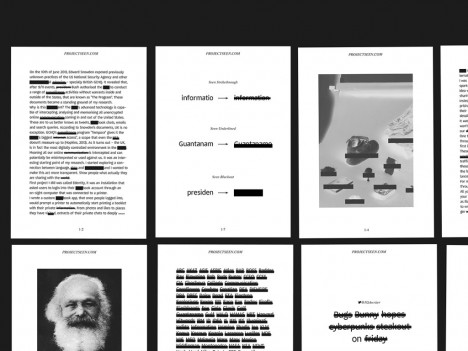
    A London design student originally from Slovenia, Emil Kozole developed Project Seen as part of an awareness-raising campaign about security and privacy in and beyond the United States. He wants people to wonder why some words were included in the first place, and ask whether they should have to worry about self-censorship around broad (and in many cases bland) terms.
    project seen examples

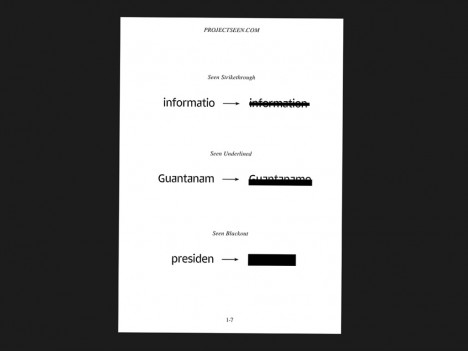
    His custom Adobe OpenType font takes the aforementioned list, revealed originally through a Freedom of Information Act Request, and blacks them out just as you would expect to see in a top-secret document. While not intended to be practical, it is certainly an interesting exercise – try typing a few ordinary paragraphs and see for yourself the potentially surprising results.

    Share on Facebook


    [ By WebUrbanist in Design & Graphics & Branding. ]

    [ WebUrbanist | Archives | Galleries | Privacy | TOS ]


    WebUrbanist

  • Create Your Own Font Using Tools and Tips

    Here are a list of online font tools to use:

    PaintFont
    FontStruct
    FontForge
    BitfontMaker
    Type light
    gbdfed Bitmap Font Editor
    Font Constructor
    Raster Font Editor

    Here are some tips for creating fonts:

    Steps to creating a font by FontForge
    My First Font – How to make your own font
    Create Your Own Font – Wired How-To Wiki

    Back to Top

    BlogPhoto

  • Cubicle Typography: Unique Desks as Office Furniture Font

    [ By WebUrbanist in Design & Graphics & Branding. ]

    furniture font design space

    One of the most dreary aspects of daily life in a cubical farm is the relentless sameness that pervades each office pod – perhaps it would help if each workspace were different, easy to assemble and simple to recycle.

    furniture letter r desk

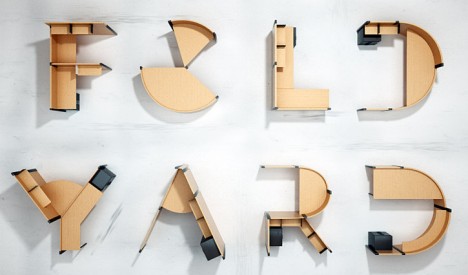
    This Fold Yard typography of Benoit Challand has a touch of whimsy to be sure, but it also suggests a way to break out of the box by customizing each station at a given place of work.

    furniture typography font concept

    Who knows: these quickly-customized corrugated cardboard cubes (joined with modular plastic pieces) might be a good recipe for helping employees feel less like a hive of drones and more like individual workers with independent value and personal flexibility.

    furniture fold yard set

    furniture design title idea

    About the creator: “Ben is a creative image maker focused on digital art, 3D illustration and typography” – his work includes CGI retouching and digital drawings, with a background in motion design (animation). He has done typographic and other work for major brands as well as creating a number of neat independent projects.

    Share on Facebook


    [ By WebUrbanist in Design & Graphics & Branding. ]

    [ WebUrbanist | Archives | Galleries | Privacy | TOS ]


    WebUrbanist

  • Microsoft Outlook 2010 – Enlarge or Change the Calendar Date Navigator Font

    Make the Date Navigator easier to read in Outlook 2010, or customize the font.

    If you find the small font of the Date Navigator in Microsoft Outlook 2010 difficult to view, or you find it hard to click on the small day numbers, you may wish to enlarge the font.

    Especially if you have a larger monitor and resize the Navigation pane, you can increase the font size by a few points. Or, for the sake of customization you may also wish to change the font entirely from its default….

    Read more at MalekTips.
    New Computer and Technology Help and Tips – MalekTips.Com

  • [MODIFIED] Safari for Windows – Change Font Smoothing

    Change the amount of smoothing Safari performs on text to increase legibility.

    Similar to some other web browsers, Safari for Windows includes technology to smooth the display of on-screen fonts to help increase text legibility.

    However, Safari takes font smoothing a step further and lets you adjust the amount of smoothing you wish to perform instead of using Windows default settings. Depending on your monitor type and preferences, experimenting with these settings may create pleasing results:…

    Read more at MalekTips.
    New Computer and Technology Help and Tips – MalekTips.Com

  • Microsoft Excel 2010 – Change the Default Font for New Workbooks

    Tired of every Excel 2010 workbook using 11 point Calibri as the default for cells? Change the default font for all new workbooks.

    Just as in other Office 2010 applications, Microsoft Excel 2010 has a default font for new documents – 11 point “Body Text” (Calibri). While you can change the font for individual cells or groups of them, what if you grow tired of every new spreadsheet using this standard font? Maybe you want to use Arial or Verdana, or want cells a little larger so they are easier to read?

    1. Select the “File” tab in the Ribbon….

    Read more at MalekTips.
    New Computer and Technology Help and Tips – MalekTips.Com