About 12 years ago, in 2006, I had what at the time felt like the biggest technological change in my life. I switched from a PC to my first MacBook Pro. Switching computer operating systems at the time seemed like a massive chasm to overcome, but I did it and I’m glad I did. My main motivation was that I was tired of all of the errors that I was getting from PCs and all my friends with Macs just kept saying pretty much the exact same thing, “it just works.” After hearing that enough I broke down and made a decision that it was time for a change.
Over the last decade, that first decision has brought dozens of new Apple products into my life. Every three years or so I’d upgrade MacBook Pros. I bought a Mac Mini for the kitchen which I upgraded to a nicer iMac latter. I bought a high end iMac to edit my photos on for my home office. I bought a Cinema Display as a second monitor. I spent the night in line overnight to buy the very first iPhone. I bought the iPhone 3g, the iPhone 4, 5, 6s and most recently the 10. I’ve bought iPads, MacBook Pros and iPhones for my wife and kids. I always buy Apple Care. Apple iCloud storage, movies, tv shows, airpods, the list goes on and on.
I haven’t added it all up yet, but I’d say over the past decade I’ve easily spent tens of thousands of dollars on Apple products.
I feel like at some point I’ve just about purchased every product as a good Apple consumer is supposed to… except maybe the watch. The watch feels stupid to me. If I want to know what time it is I can just look at my phone. I haven’t worn a watch in 20 years. I don’t need an uncomfortable thing strapped to my hand and my health is good enough that I don’t need to constantly run ECGs or have someone notified if I fall down and can’t get back up (which hasn’t happened once yet in the 50+ years I’ve been on the planet).
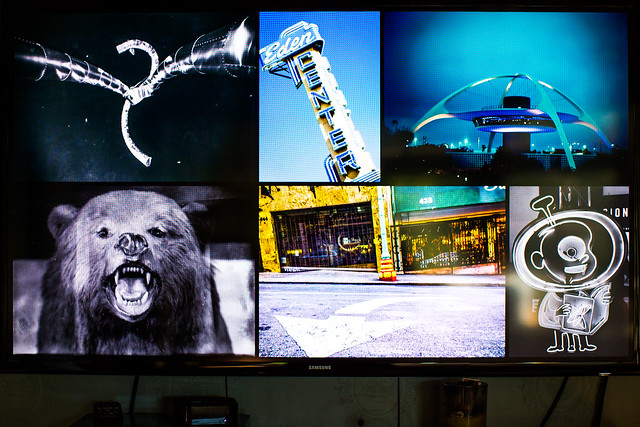
Unfortunately for me though, it’s the Apple TV which I’ve always been the most excited about and which has also unfortunately frustrated me more than any Apple other gadget I’ve ever owned. I’ve bought every version of the Apple TV as they’ve been released dutifully. Giving Apple my hard earned money for the promise of something great, the ability to watch my photos in my living room — and it’s been a completely frustrating experience along the way.
I’m not sure exactly why I’m writing this blog post about Apple TV. I haven’t blogged in a while. In part it’s probably cathartic for me. In part I feel like I’m giving up on photos tonight and hope that maybe someday someone will Google one of my error codes and have a better answer. Maybe someone will read it and have some suggestion that I haven’t considered. Maybe someone will suggest a better way to watch photos on a TV.
My most recent problem revolves around the new Apple 4k TV. Of the six Apple TVs in my house I have two connected to Vizio 4k TVs. Of course I upgraded to the 4k Apple TV because what’s the point of having a 4k TV without a 4k device.
For the most part over the life of the AppleTV product photos have been frustrating. I have a large library of images that I want to play on my Apple TVs. I use home sharing and point my iTunes to a folder of images and ask for my Apple TVs to stream those images. (File >> Home Sharing >> Choose Photos to Share with Apple TV…) Frequently my AppleTVs lose their connections to my iTunes library and the only way to get the photos to play again is to quit iTunes and relaunch it. I frequently would have to restart the Apple TVs. The Apple TV in the living would be working but then the one in the attic couldn’t connect. The one in the attic would work but then the one in the bedroom wouldn’t connect. It was a constant exercise of frustration. I set all of the Apple TVs to update automatically and I’d constantly check for updates to apply them manually.
About a year ago I spent several weeks working with Apple Engineers. They sent these trace packet things to me by email and I’d do different things, run the logging software and send them log files. After several weeks and many log files I did get an answer back about a year ago that Apple engineers had found a problem related to my Apple TVs constantly disconnecting from home sharing that that a fix would be coming. They couldn’t tell me when but said that it was an issue on their end and to keep checking for updates. So at least I wasn’t totally crazy and at least there was hope… kind of?
Although this was a frustrating way to use my AppleTV, the payoff of being able to relax on the couch and watch my life’s work, my photos that I love so much, while enjoying a glass of wine was such a high payoff that I put up with it… until, unfortunately now, with the latest dreaded TVOS12 update.
Last week I updated all of my Apple TVs to TVOS12. On my non-4k Apple TVs, it’s the same sad, frustrating experience of having to restart Apple TVs, restart, my iMac, restart iTunes, constantly to get them to work. But when they do work it will play my photos for hours. Unfortunately on the two 4k Apple TVs photos crash 100% of the time. Usually within 10 seconds, but sometimes I can get them to play for 20 seconds or 45 seconds or maybe even 2 minutes before it crashes. But they crash 100% of the time. I’ve spent at least 20 hours trying to fix my photos over the past week (including a good 3 hour phone call last night with an Apple Care tech) but nothing seems to work.
If I try to stream photos on my iMac to my 4K Apple TVs the photos crash. If I try to stream photos on my MacBook Pro to my 4k Apple TVs the photos crash. If I try to stream photos on my home network to the 4k AppleTVs the photos crash. If I create a hotspot with my iPhone with just my MacBook Pro and one 4k Apple TV photos crash.
If instead of pointing home sharing to a folder, I import all the photos into Apple’s Photos app on my iMac (I hate the Apple Photos App on my iMac) and share from there instead still photos crash.
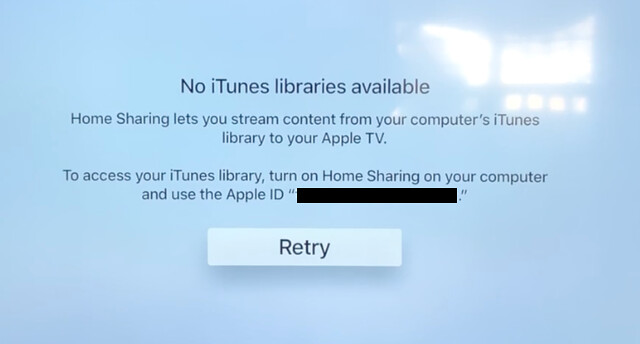
Every time after the photos crash there is a brief error message on the screen for about 1 second that reads “No iTunes libraries available. Home Sharing lets you stream content from your computer’s iTunes library to your Apple TV. To access your iTunes library, turn on Home Sharing on your computer and use the Apple ID. Retry.”
That message disappears and brings me right back to the main home sharing page on the Apple TV.
I’ve made sure that the photos that I want to share are all on the internal hard drives of the devices I’m trying to stream. I even upgraded yesterday to the new Apple OS Mojave, in the hopes that this might fix things. I’ve turned my Comcast router on and off.
The bottom line is there is simply nothing that I can do to make photos work on my 4k Apple TVs since updating to TVOS 12. And, of course, Apple will not allow you to roll your OS on your Apple TV back to a previous version so there is no getting out of TVOS 12 hell. I did a reset of the entire device back to factory settings, but instead of resetting it back to the factory setting from when I bought it. It reset it back to the factory settings for TVOS 12.
The Apple Tech I spent hours on the phone with yesterday suggested that I take my Macbook Pro and my 4k AppleTV into the Apple store and set an appointment to show them there. I had an appointment this afternoon at 2pm to do just that, but after only getting three hours of sleep last night trying to troubleshoot my Apple TV I just couldn’t go through with it today. It’s just too much, too soon.
In the meantime it looks as though I wasted $ 200 each on some useless Apple hockey pucks, but maybe at some point I’ll regain the strength to try again, or maybe someday, somewhere I’ll find an answer on how to make these devices stream photos for me again.
Or maybe like I ditched Windows back in 2006, it’s now time to ditch Apple again and maybe go find something that you know, “just works.”
Needless to say, your 4k AppleTV may work flawlessly and perfectly for you. This is my personal experience though and it’s my blog and this is what the experience has been like for me.
I made a video of this problem here. If anyone does have any constructive advice I’d love to hear it. Thanks.