RSS
 

Posts Tagged ‘Features’

Lightroom Classic 7.2: Major performance boost, new features, and more

14 Feb

Lightroom Classic 7.2—the performance boosted version of Lightroom DPReview got to test for ourselves at the end of January—has finally arrived! And with it come numerous performance improvements, better support for Intel hardware, a fix for speed issues experienced by some users, and some new features to boot.

Additionally, Adobe has also updated the new cloud-based Lightroom CC ecosystem for both desktop and mobile operating systems. Let’s take them one at a time.

Lightroom Classic Performance Boost

The company explains that it has worked with Intel to improve performance scaling on computers that have multiple cores and at least 12GB of RAM, and as we showed in January, the result is much faster importing and preview generation, and improved speed for things like adjustments rendering in Develop, HDR/Panos rendering, and more.

“One key attribute of the enhancements is that they scale appropriately with a customer’s investment in hardware,” says Adobe. Users who invest in newer, more powerful hardware will see more performance improvements, particularly if the system has at least 12GB of memory. This time around, Adobe says it focused on batch processing improvements (how efficiently system resources are used and batch tasks are completed), but the company will also focus on Interactive (interface response speed) needs in the near future.

Some users had experienced problems with Lightroom Classic slowing down over time, an issue Adobe says it has fixed “in most cases,” though it is possible some users will still experience this issue.

Lightroom Classic Feature Enhancements

Performance improvements and fixes aside, Lightroom Classic 7.2 comes with multiple new features, including a text search for finding a specific folder (“Folder Search”), the ability to filter favorites within folders, an option for creating collection sets from folders for use with Lightroom mobile, as well as a feature for creating collections from Map Module pins.

This version of Lightroom Classic also adds a library filter for unedited and edited images and enables users to create smart collections with unedited or edited images.

$ (document).ready(function() { SampleGalleryV2({“containerId”:”embeddedSampleGallery_3173476968″,”galleryId”:”3173476968″,”isEmbeddedWidget”:true,”selectedImageIndex”:0,”isMobile”:false}) });

Finally, Adobe says it has enabled Photoshop Continuously Scalable User Interface in the Adobe Camera Raw plugin, with the scaling limited to 100% or 200%. Support for per-monitor scaling in Windows has also been added. In explaining the plugin update, Adobe said, “This is primarily a Windows change to sync up Photoshop, and Windows users will now be able to scale the ACR plugin from 100% to 500%, in increments of 100%.”

The full Lightroom Classic 7.2 update changelog is available here, new camera support can be found here, and new lens profile support can be found here.

Updates to Lightroom CC and Lightroom Mobile

In addition to the Lightroom Classic CC updates, the whole Lightroom CC ecosystem—including the Lightroom Mobile apps on iOS and Android—have been updated as well with “optimized performance, added support for new cameras and lenses, and some great new features for desktop and Android.”

Adobe says it put a lot of effort into “tuning and improving stability” with this update. Lightroom CC on Mac and Windows will see performance improve when moving between photos, grid scrolling, and exporting, while all the apps across mobile and desktop should be “a lot more stable.”

As for new features, Lightroom CC for desktop gets the ability to add copyright to imported images; meanwhile, Lightroom Mobile on Android gets a geometry tab for correcting perspective distortion, the ability to add a watermark upon export, the ability to search your Lightroom library with Google Assistant, and a new “Add to Lr” option that will allow you to add photos from third party apps directly into your Lightroom library.

$ (document).ready(function() { SampleGalleryV2({“containerId”:”embeddedSampleGallery_8528326624″,”galleryId”:”8528326624″,”isEmbeddedWidget”:true,”selectedImageIndex”:0,”isMobile”:false}) });

All of these updates are available now, so if you have a Creative Cloud subscription, update to the latest versions and give them a go. And if you want to dive deeper into all of these new features, head over to the Adobe blog.

Articles: Digital Photography Review (dpreview.com)

 
Comments Off on Lightroom Classic 7.2: Major performance boost, new features, and more

Posted in Uncategorized


Top 10 Luminar 2018 Features That I Discovered by Accident

07 Feb

Luminar’s powerful, customizable approach to image editing is wrapped in a cloak of simplicity which is great for photographers who tend to feel intimidated by the hundreds of buttons, menu options, and sliders available in other post-processing programs. The more you use it the more you will likely realize that there is far more to Luminar 2018 than a handful of presets and filters. You will probably stumble across some neat hidden features that can do a lot to improve your editing and workflow.

Here are 10 of my favorite features, in no particular order, that I found just by poking around and going about my usual business of editing photos with Luminar. Not all of these will change your life, but several might make you react like I did, by thinking “Hey now, that’s really useful!”

Top 10 Luminar 2018 Features That I Discovered by Accident

Luminar has a host of small but useful features up its sleeve to help novices and professionals alike.

#1 – Before/after preview slider

As a longtime user of Lightroom, the idea of having a before/after preview is nothing new. With one click you can see your image split in two, with one half as the original and the other half showing the edits. Luminar has this feature as well but it kicks things up one notch by allowing you to move the preview slider back and forth.

This lets you see your edits applied to any part of the image you want, and it updates instantaneously as you move the slider. It’s an incredibly useful feature that you might not notice at first, but once you do could seriously improve your editing.

Top 10 Luminar 2018 Features That I Discovered by Accident

#2 – Lasso tool for erasing

Sometimes you need the Spot Healing tool to remove unwanted blemishes and imperfections from an image, but sometimes that very same tool can drive you crazy due to its imprecise nature and circular application brush. When I first started using Luminar I was well aware of its healing tool that functioned much like similar tools in other applications, but I didn’t realize that it was also possible to use the same technology with a lasso-style implementation.

To erase oddly-shaped portions of an image select Tools>Erase, then select the lasso tool, and then click to outline the spot that you want to erase. When you are finished, click “done” and Luminar will eliminate it like it was never even there.

Top 10 Luminar 2018 Features That I Discovered by Accident

I liked this image but was not happy with the orange banner in the background.

Top 10 Luminar 2018 Features That I Discovered by Accident

The Lasso Erase tool let me select just the banner and then remove it from the photo with one click.

Top 10 Luminar 2018 Features That I Discovered by Accident

The final image is much improved, and it took very little effort to do so.

#3 – Single View Mode

As you add filters to an image it can get a little cumbersome having to deal with an ever-expanding vertical list of image adjustments. Thankfully there is an easy way to tame your filters. Just click on the Filters label at the top of the list and choose Single View Mode.

This collapses all of your filters and allows you to work with just one at a time, dynamically collapsing it when you click on another one. This single tip has saved me countless headaches as I scroll up and down my filters workspace to find the one I need, and I don’t think I could ever go back to any other way of editing.

Top 10 Luminar 2018 Features That I Discovered by Accident

#4 – Edit multiple images at one time

This one requires a bit of legwork but it can really come in handy depending on your editing needs. If you want to work with multiple images at one time, each on its own layer and with its own set of filters, click the + button in the Layers panel and add a new Image Layer. This new layer is added on top of your existing layer and can be combined with another layer with tools like masking and by changing the opacity.

However, you can also work on both images side-by-side by using the Free Transform option in the Tools menu. First select one of the layers, then click Tools > Free Transform, and re-size the image so it’s on one side of your screen. Do the same for the other layer, and you now have a workspace that allows you to edit multiple images at the same time.

Top 10 Luminar 2018 Features That I Discovered by Accident

#5 – Crop to Facebook cover

If you have ever uploaded a picture to your Facebook page as a Cover Photo you may have been disappointed to see your painstakingly-edited picture re-cropped and re-sized so the final result is a shadow of what you intended.

Luminar’s crop tool has a way to mitigate this issue entirely by including a Crop to Facebook Cover option in the crop tool. This will ensure that your resulting image will be just the right dimensions to fit perfectly on top of your Facebook profile page without any annoying automated edits from Mark Zuckerberg and his company.

Top 10 Luminar 2018 Features That I Discovered by Accident

#6 – Click the histogram to show color channels

It’s no secret that Luminar has a histogram view, and in fact, it would be kind of surprising if any image editor worth its salt didn’t have this tool. But what’s a little different here is that you can click the histogram to show individual color channels one by one.

This might not be something you use every single day but can really come in handy if you want to see the exposure level of the reds, blues, and greens.

Top 10 Luminar 2018 Features That I Discovered by Accident

#7 – Apply user presets during batch processing

Luminar’s workflow generally revolves around the idea of applying filters. You can also instantly apply many filters at once using a preset. What I find more useful, though, is that you can combine different filters to make your own presets, such as one that I use quite often called “Clarignette” that applies a bit of clarity while also adding a vignette.

It’s a simple but effective preset that I tend to use on many images, and Luminar’s batch processing tool makes this even easier. When you load a series of images for batch processing you can apply any of Luminar’s existing presets in addition to any custom presets you create yourself. This can dramatically speed up your editing if you find yourself doing the same types of editing operations on many of your photos.

Top 10 Luminar 2018 Features That I Discovered by Accident

#8 – Drag-and-drop layer reordering

Luminar’s layer-based workflow functions much like Photoshop and other editing applications. While this particular tip might not be especially groundbreaking it is something I found to be very handy. You can, of course, rename layers by double-clicking on their name and use blend modes by right-clicking on them (or control-clicking on a Mac).

But one thing I didn’t realize at first was how easy it was to reorder the layers in Luminar 2018. A simple drag-and-drop can be used to adjust which layer comes first. Since your edits are applied in a top-down fashion this can have a big impact on your overall image.

Top 10 Luminar 2018 Features That I Discovered by Accident

#9 – Change editing background color with one click

As a longtime user of Lightroom I have developed a pretty consistent set of editing preferences, and I have found that a light gray background helps me focus on editing my images without straining my eyes too much. However, sometimes I want to change the background color.

Luminar handles this with one click, which makes it a lot easier and more practical. Simply right-click (or control-click on a Mac) anywhere in the background area of your editing workspace to change the color.

Top 10 Luminar 2018 Features That I Discovered by Accident

#10 – One-Click Preset Updates

It’s not uncommon for me to create a preset and then change it over time as my editing evolves, but for a while I used a cumbersome process to do this. It involved clicking on a preset, changing its parameters, saving it as a new preset. Then I’d navigate to the Preset folder on my computer to delete the original preset and finally change the name of the revised preset.

It was a chore and often resulted in a Preset folder littered with old versions that I didn’t use anymore, but thankfully there is a much easier way to do this. Simply click the name of one of your Custom Presets in the tray at the bottom of the screen and choose “Update with current settings” and your preset will be updated without any other work on your part.

Top 10 Luminar 2018 Features That I Discovered by Accident

More to discover

While some of these tips might not be new to you at all, each was something I stumbled across by accident while using Luminar 2018. They served as a reminder to me of how I appreciate this program’s ability to surprise and delight.

I enjoy finding useful tips and tools by accident, and Luminar is full of these sorts of hidden, helpful features. What sorts of things have you come across while using Luminar? Do you have a favorite tip or trick to share? Please leave your thoughts in the comments below.

Disclaimer: Macphun, soon to be Skylum, is a dPS advertising partner.

The post Top 10 Luminar 2018 Features That I Discovered by Accident by Simon Ringsmuth appeared first on Digital Photography School.


Digital Photography School

 
Comments Off on Top 10 Luminar 2018 Features That I Discovered by Accident

Posted in Photography


HTC U11 Eyes smartphone features a dual selfie camera with live bokeh

17 Jan

HTC has launched a new variant of its U11 smartphone called the HTC U11 Eyes, and it’s built specifically for selfie takers (cue eye roll). The name “Eyes” refers to the handset’s chief feature: dual front-facing cameras, which resemble a pair of eyes and bring features like live bokeh and post-focusing to selfies.

HTC packs some other premium features into the model, including an 18:9 ratio Full HD+ 6″ Super LCD 3 screen and a “flagship camera” on the rear, but other than the front-facing camera, the handset is more-or-less the same as the regular HTC U11.

The front-facing camera is comprised of dual 5MP BSI sensors behind F2.2 aperture lenses, which support Full HD 1080p video capture in addition to stills. The selfie cameras produce “studio-quality portraits,” claims HTC, with Bokeh Mode being the most notable feature. In that mode, selfie backgrounds are blurred in real time, though users also have the option of adjusting it manually after the fact.

The model’s front camera also supports Screen Flash, HDR Boost, Voice Selfie, Auto “Beautification,” Auto Selfie, and Selfie Panorama. The rear camera, meanwhile, features a 12MP HTC UltraPixel 3 with 1.4?m pixel, BSI sensor, OIS, F1.7 aperture, an LED flash, and UltraSpeed Autofocus. HTC has included a “Pro Mode” with manual control for its rear camera, including 32-second long exposures, Raw support, and manual control.

Cameras aside, the HTC U11 Eyes has a high-capacity 3930mAh battery that supports up to 28.8 hours of talk time (depending on the network) as well as Qualcomm Snapdragon 652 processor, IP67 water- and dust-resistance, Edge Sense squeezing support, HTC USonic audio tech, active noise cancellation, and Face Unlock.

Availability outside of China and pricing isn’t clear. Engadget reports that its “local sources” put the price potentially at HK$ 3,200, which is equivalent to about $ 410 USD and 334 EUR.

Articles: Digital Photography Review (dpreview.com)

 
Comments Off on HTC U11 Eyes smartphone features a dual selfie camera with live bokeh

Posted in Uncategorized


Nikon’s 180-400mm F4E TC1.4 FL ED VR lens features built-in teleconverter

09 Jan

$ (document).ready(function() { SampleGalleryV2({“containerId”:”embeddedSampleGallery_5203459285″,”galleryId”:”5203459285″,”isEmbeddedWidget”:true,”selectedImageIndex”:0,”isMobile”:false}) });

Nikon has announced a new full-frame lens with one of the longest names we’ve ever seen: the AF-S Nikkor 180-400mm F4E TC1.4 FL ED VR.

Besides its impressive range, the highlight of this hulking lens is its built-in 1.4x teleconverter. Taking a leaf out of Canon’s book, the built-in converter boosts the focal range to 252-560mm with a corresponding 1-stop reduction in maximum aperture. If you’re using this $ 12,000+ lens on an APS-C body, the equivalent focal range becomes 270-600mm without the TC and 378-840mm with it.

The lens features 1 fluorite and 8 extra-low-dispersion elements plus fluorine, Nano Crystal and Super Integrated coatings. It has 9 rounded aperture blades, a Vibration Reduction system that reduces shake by up to 4 stops and a minimum focus distance of 2 meters. As you’d expect, this magnesium alloy lens (that weighs almost 8 pounds / 3500 grams) is weather-sealed. Drop-in 40.5mm filters are supported.

As an added bonus, if you’re using a camera with a 153-point AF system (D5, D500, D850) the outer row of AF points become cross-type sensors for improved coverage. A firmware update will be required in order for cameras to take advantage of this feature.

The AF-S Nikkor 180-400mm F4E TC1.4 FL ED VR will be available in March for a whopping (but unsurprising) MSRP of $ 12,399.

Press Release

NIKON ANNOUNCES NEW AF-S NIKKOR 180-400mm F/4E TC1.4 FL ED VR SUPER TELEPHOTO ZOOM LENS AT CES 2018

LAS VEGAS — CES BOOTH #14018 (January 8, 2018) – Today at the Consumer Electronics Show (CES), Nikon Inc. announced the new AF-S NIKKOR 180-400mm f/4E TC1.4 FL ED VR super-telephoto zoom lens, which is ideally suited for photographing sports and wildlife with astounding speed and clarity. This professional level FX-format lens is more versatile than ever, and has been updated with the newest NIKKOR lens technologies including Nikon’s first ever built-in teleconverter and an advanced optical formula to enhance performance and minimize weight.

“This lens is a great example of how Nikon continues to push the boundaries of innovation and what’s possible with pro-level optics and high-end imaging equipment,” said Kosuke Kawaura, Director of Marketing and Planning, Nikon Inc.

Popular Pro-Level Lens Gets Even More Versatile

This new NIKKOR lens is a professional super-telephoto zoom lens, which is even more versatile with an extended wide range of 180-400mm, and a constant f/4 aperture to easily isolate a subject from the sidelines, even in challenging light. This is also the first NIKKOR lens to include a built-in 1.4X teleconverter, allowing photographers to seamlessly swap to a 252-560mm1 (FX-format) focal range. The teleconverter is engaged at the flick of a switch, and is easily operated with a single finger while looking through the viewfinder. When used on the Nikon D500 and other DX-format DSLRs, the focal length is the equivalent of 270-600mm (378-840mm with teleconverter engaged).

Whether capturing fast-moving winter sports on the slopes or elusive wildlife at a distance, photographers can shoot with confidence from this high performance NIKKOR lens. The new 180-400mm f/4 is optimized for high-speed capture, and features an electromagnetic diaphragm, helping to create smooth and consistent exposures while shooting high-speed bursts of images. What’s more, the AF tracking algorithm controlling the motor drive has been enhanced to increase tracking performance of fast moving subjects. When using cameras equipped with Nikon’s advanced 153-point AF system (D5, D500, D850), the outer row of AF points are activated as cross-type sensors to significantly enhance the AF coverage throughout the frame.2

Enhanced Performance with the Addition of New Technology

The lens now uses a fluorite element, which contributes to improved balance while minimizing weight. To further enhance handling and agility, the lens has adopted a new ball-bearing tripod collar ring to create a seamless transition from shooting horizontal to vertical composition. The VR mechanism offers a normal and sports mode, with up to four stops3 of compensation to help create sharp images, even when handheld.

The lens construction includes the use of durable magnesium alloy for weight reduction, while the lens is also sealed against dust and moisture. A fluorine coating is also used to help repel water droplets and dirt.

The optical formula of the lens uses eight Extra Low Dispersion (ED) elements, doubling the amount of ED elements used by its predecessor, the NIKKOR 200-400mm. These help to provide extremely sharp and detailed images and 4K UHD / 1080p video, and is ideally mated to high resolution Nikon DSLR cameras. Nikon’s exclusive Nano Crystal Coat is used to effectively suppress instances of ghosting and flare.

Price and Availability

The AF-S NIKKOR 180-400mm f/4E TC1.4 FL ED VR lens will be available in March 2018 for a suggested retail price of $ 12,399.954. For more information on this NIKKOR lens and other Nikon products, please visit www.nikonusa.com.

1. When the built-in or an external teleconverter is used, the focal length may not be displayed correctly in shooting information / Image data.
2. This feature will be available with a firmware upgrade for the D5, D850 and D500 as of March 2018
3. Based on CIPA Standard. This value is achieved when FX-format compatible lenses are attached to a FX-format digital SLR camera and zoom lenses are set at the maximum telephoto position.

Nikon AF-S Nikkor 180-400mm F4E TC1.4 FL ED VR specifications

Principal specifications
Lens type Zoom lens
Max Format size 35mm FF
Focal length 180–400 mm
Image stabilization Yes
CIPA Image stabilization rating 4 stop(s)
Lens mount Nikon F (FX)
Aperture
Maximum aperture F4
Minimum aperture F32
Aperture ring No
Number of diaphragm blades 9
Optics
Elements 27
Groups 19
Special elements / coatings 1 fluorite + 8 ED elements and Nano Crystal + Super Intergrated + fluorine coatings
Focus
Minimum focus 2.00 m (78.74)
Maximum magnification 0.25×
Autofocus Yes
Motor type Ring-type ultrasonic
Full time manual Yes
Focus method Internal
Distance scale Yes
DoF scale No
Focus distance limiter Yes
Physical
Weight 3500 g (7.72 lb)
Diameter 128 mm (5.04)
Length 363 mm (14.29)
Materials Magnesium alloy
Sealing Yes
Colour Black
Zoom method Rotary (extending)
Power zoom No
Zoom lock Yes
Filter thread 40.5 mm
Filter notes Uses drop-in filters
Hood supplied Yes
Tripod collar Yes
Other
Notes Has a built-in 1.4x teleconverter

Articles: Digital Photography Review (dpreview.com)

 
Comments Off on Nikon’s 180-400mm F4E TC1.4 FL ED VR lens features built-in teleconverter

Posted in Uncategorized


Samsung’s new W2018 flip phone features a variable aperture F1.5-F2.4 lens

02 Dec

Samsung just announced something that looks like it belongs in the mid-2000s… but looks can be deceiving. Meet Samsung’s new flip phone: the W2018. Announced earlier today at an event in Xiamen, China, the followup to the W2017 is an Android-powered flip phone that boasts smartphone-caliber specs. In fact, the 12-megapixel rear camera is nearly identical to the one found in the Galaxy S8, featuring dual pixel autofocus, optical image stabilization and 1.4?m pixels.

It does differ in one very interesting way though.

Not only does the W2018 boast an F1.5 aperture—the brightest you’ll find on a phone—that aperture is actually variable, switching between F1.5 and F2.4 when it senses there’s enough light around. In this way, the phone automatically captures as much of the background as possible.

You can see the trick in this close-up video uploaded to Weibo by Jason Wang:

Rumors have been floating around that the Galaxy S9 will feature a variable aperture F1.5 lens; as you might expect, the appearance of the selfsame lens in another Samsung phone makes us pretty confident that will, indeed, be the case. As to whether or not you ever really need to ‘stop down’ a smartphone camera lens… that’s another topic entirely.

Like the W2017 before it, this phone will first be released in China, comes with a bunch of “VIP” perks like free tech support, and will probably cost upwards of $ 3,000… no, we didn’t add another zero.

Articles: Digital Photography Review (dpreview.com)

 
Comments Off on Samsung’s new W2018 flip phone features a variable aperture F1.5-F2.4 lens

Posted in Uncategorized


Rotolight Anova Pro 2 features improved output and ‘unrivaled battery’

23 Nov

Lighting manufacturer Rotolight has introduced a mark 2 version of its Anova Pro circular LED stills and video light. The Anova Pro 2 is the same size as the previous model, but according to the company, the new model features a 70% uplift in brightness, “unrivaled battery performance”, and up to 10,700 lux at 3 feet instead of 6,280 in continuous mode.

Like the previous model, the Anova Pro 2 also operates as a flash unit, and is capable of high speed sync at up to 1/8000sec. Rotolight says the flash mode has no recycle time and that the maximum output has been increased by 250%.

The Anova Pro 2 also has the Elinchrom Skyport system built-in to allow wireless radio triggering and control of the lights. The Skyport receiver has a range of 200m and provides remote access to light levels in flash and continuous modes, as well as color temperature and the built-in CineSFX cinema effects.

Gillian Anderson by Mark Mann Martin Scorcese by Mark Mann

Rotolight says the CineSFX effects—which create various flashing patterns to simulate the light from a fire or a TV, for example—have been improved to give them ‘enhanced realism’ with the help of Batman and James Bond visual effects cinematographer Stefan Lange. The unit also has variable color temperature settings that run from 3150 to 6300K, a CRI value of >96, and a Television Lighting Consistency Index of 91.

Although its rating of 72W uses more power than the original version, it still has the best power consumption ratio in the industry when the output is taken into consideration, says Rotolight. The light can be powered by a V-Mount battery or directly from the mains supply.

The Rotolight Anova Pro 2 will be available next month, starting from £1250/$ 1625/€1400 including integrated DMX, V-lock battery plate, wireless Elinchrom receiver, and 4-piece filter kit as standard.

For more information, visit the Rotolight website.

Press Release

ROTOLIGHT UNVEIL ANOVA PRO 2

Revolutionary LED Studio/location light

Rotolight, award-winning British LED lighting manufacturer, has announced the launch of Anova PRO 2; a pioneering continuous light and High Speed Sync (HSS) flash for creative image-makers. Redefining the standard for professional LED lighting in studio or location, Anova PRO 2 is one of the brightest LED lights ever launched in its class, delivering 10,700 lux at 3 feet. Packed with innovative features for television, film production, and photography, the Anova PRO 2 is the 4th generation of Rotolight’s award winning studio/location light.

The Rotolight Anova PRO 2 embodies the pinnacle of LED technology, designed for the most demanding of professionals. Offering 70% more power output than its predecessor, Rotolight Anova PRO 2 provides the best power to consumption ratio in the industry, as one of the most energy efficient LED panels ever designed. With a mere 72W consumption, Anova PRO 2 reduces operating costs for TV studios, whilst providing unrivalled battery performance on location.

Anova PRO 2 delivers outstanding colour reproduction (CRI>96, TLCI 91) eliminating the need for expensive post production, whilst featuring electronically adjustable colour temperature in both flash and continuous modes (6300-3150K).

“The Rotolight Anova PRO 2 is the perfect light for working in the live television environment. We are able to light people accurately, very quickly, saving us time, mistakes on air and a lot of money” says Wesley Dodd, CEO Celebro Media.

Rotolight are the lighting provider of choice for Celebro, London’s first fully 4K television studio regularly used by global broadcasters such as the BBC, MTV, and the Discovery Channel. As an existing Rotolight customer, Celebro Media were keen to be the first in the world to get their hands on Rotolight’s latest lighting innovation.

“We are very excited to have placed an order for 200 of the Anova Pro 2 lights for our new studios opening this year in Washington, Moscow and Los Angeles” says Dodd.

Due to its powerful output, yet lightweight nature, Anova PRO 2 is also ideal on location, and has become the light of choice for Italian state broadcaster RAI TV, who recently acquired 150 Anova PRO Kits for their ENG production teams.

“Rotolight is a totally unique product, as it works equally well in the studio and the field. As we develop the Live OB side of our business, the Anova PRO 2 was an obvious addition to our equipment list. Having a lighting fixture with such a substantial increase in power output means we will be able to cope with the most demanding of locations or weather conditions, whilst its battery efficiency simplifies our setup. The addition of an RJ45 DMX connection allows us to install them in our studio, at a fraction of a cost with the same professional results” says Andrew Lebentz, Head of Production for Celebro Media.

For television and film production, Anova PRO 2 includes a customizable suite of Rotolight’s award winning CineSFX™ (Fire, Lightning, TV, Gunshot, Paparazzi etc) which eliminate the need for expensive, time consuming legacy ‘flicker-box’ workflows. Designed in conjunction with Stefan Lange, Visual FX veteran (Batman, James Bond ‘Skyfall’, Tomb Raider), the patented CineSFX™ suite has been updated with ‘enhanced realism’ and the addition of a ‘Chase’ FX capability, to simulate the effect of motion on static sets. The newly integrated wireless Elinchrom Skyport receiver enables wireless control of CineSFX, colour temperature and brightness from up to 656ft(200m).

For professional photographers, Anova PRO 2 also features an updated High Speed Sync (HSS) flash capability (1/8000th), with a 250% power boost in flash mode. With zero recycle time, you’ll never miss a shot, making it the perfect choice for today’s high frame rate capable cameras. Anova PRO 2 can be simultaneously a continuous ‘modelling light’ and HSS flash, allowing the photographer to easily acquire focus in dimly lit situations and optimise composition. The unique circular shape also provides a naturally soft, flattering light output, with Rotolight’s signature catchlight effect.

Celebrity photographer Mark Mann (Margot Robbie, Martin Scorsese, Benedict Cumberbatch) said:

“I’ve shot strobe my entire career, and had always been intrigued by continuous light, but never found any that I liked until the Rotolight Anova. The quality of light is absolutely beautiful, it gives you a very filmic feel. Versatile, consistent and reliable, it also looks good on set and I know it will always deliver in high turnaround environments. As a photographer who’s being asked more and more to shoot video and stills at the same time, Rotolight has really improved my work flow”.

Anova PRO 2 is available from £1249.99ex/ $ 1625/1399euro and ships as standard with integrated DMX, V-lock battery plate, wireless Elinchrom receiver and 4 piece filter kit as standard. A wide range of additional accessories and modifiers are separately available. Shipping December 2017, for more information visit www.rotolight.com

Articles: Digital Photography Review (dpreview.com)

 
Comments Off on Rotolight Anova Pro 2 features improved output and ‘unrivaled battery’

Posted in Uncategorized


ON1 Photo RAW 2018 takes on Lightroom with more features and improved Raw processing

10 Nov

After releasing it in beta last month, ON1 has officially announced the latest version of its image editing and organization software: ON1 Photo RAW 2018. With this newest version, ON1 wants to establish its application as a viable alternative to Adobe’s Lightroom, and says most of the improvements to the new version are a direct result of community input.

The new app comes with an updated raw processing engine and a new HDR function that merges a bracket of photos for increased dynamic range. Pano Stitching combines multiple photos into a single panoramic image and a host of new masking tools allow for precise selection of image areas and background masking.

ON1 has also updated the UI for a cleaner and more modern look, and has added support for the Nikon D850, Olympus EM-10 III, Panasonic DMC-G85, preliminary support for Sony a7R III, and a range of new lenses.

Other features include: re-editable adjustments for exposure, contrast, color, shadows, highlights, lens correction, and transform tools, as well as hundreds of customizable photo effects.

ON1 Photo RAW 2018 for Mac and Windows is available now for download as a free 30-day trial from the ON1 website. Previous owners of any ON1 app (or ON1 plug-in) can upgrade to the new version for $ 100, while new users will have to pay $ 120. However, a single license can be activated on up to five computers.

For more information and a full list of updates, check out the video below and read the full press release below that.

Press Release

Portland, OR – November 9, 2017 ­– Today, ON1, Inc. announced ON1 Photo RAW 2018 is officially available. Along with the essential tools and features needed in a photography workflow, ON1 Photo RAW 2018 includes key updates to the fast, non-destructive raw processing engine. Photographers now have an integrated tool with accelerated photo management, precise photo development, hundreds of customizable photo effects, fast and beautiful HDR, pano stitching, masking and blending adjustments, layers, and much more – in one app.

From the beginning the ON1 community has driven the development of ON1 Photo RAW based on what’s most important to them. Almost every feature and improvement made to the app in version 2018 is a direct result of community input through the ON1 Photo RAW Project.

This type of transparency is what customers can continue to expect from the ON1 team. This process has solidified ON1 Photo RAW as the app designed by photographers for photographers and a great alternative to Adobe® Lightroom®.

ON1 Photo RAW 2018 includes major updates and enhancements in many areas. Key new features include the following.

  • ON1 HDR – Create stunning HDR photos that merge all tonality from a bracket of photos in a fraction of the time (test results have shown up to seven times faster than other HDR apps). Automatically aligns photos and removes ghosting from motion between exposures. Includes full non-destructive editing with natural results and can be turned up to 11 for a surreal look.
  • Pano Stitching – Combine multiple photos into a single panoramic or matrix photo. Automatically aligns photos, even if they are not shot on a tripod, and blends them together seamlessly. An option to embed panoramic metadata for Facebook panning is also available.
  • Global Mask Editing Tools – These include new mask Density and Feather sliders to allow for changing the density or opacity of masks as well as blur masks for softening.
  • Luminosity Mask Updates – Adjust the levels of a mask to increase the contrast or brightness as well as set a tonal window to only affect a certain zone. These updates allow users to target just the area they want, based on the photo.
  • Color Range Masks – Create a mask from a color range selection.
  • Blur and Chisel Mask Tools – In ON1 Effects, the Blur and Chisel mask tools are now included. The blur tool is perfect for softening or feathering a mask selectively. The Chisel tool lets the user push or pull the edge selectively, to remove halos. All of these new masking options are re-editable and non-destructive.
  • Versions — Versions are virtual copies of the same photo. Each version created can include non-destructive settings, including crop, retouching and adjustments. Versions work just like any other photo without taking up more space on your computer.
  • Updated UI — Clean and modern UI where your photo is the center of attention. Custom name filters and layers to easier keep track of work. Also select your own UI accent color.
  • Paint with Color Brush — Painting with color can be a solid color, perfect for skin smoothing and making annotation layers, or paint with just the color and leave the underlying luminosity in place to change the color of objects like eyes.
  • Selectively Add or Remove Noise — Brush away noise in areas like skies or add noise for an artistic effect.
  • Improved Highlight Recovery –– The algorithms for highlight recovery have been improved.
  • ON1 Photo for Mobile — Take the best shots with you on the go with the free ON1 Photo for Mobile app. It’s a great way to share portfolios. It can also sync new photos taken on phones back to the desktop so those photos are ready for editing.
  • Additional Camera & Lens Support — Added support for the Nikon D850, Olympus EM-10 III, Panasonic DMC-G85, preliminary support for Sony a7R III, plus a ton of new lenses.

ON1 Photo RAW 2018 differentiates itself from other apps by allowing photographers to both browse and catalog their photos from the very beginning of their workflow. This hybrid system provides one of the fastest digital asset management tools available today. The ultra fast photo browser is perfect for quickly viewing and culling through photos without having to wait on an import process. Once the culling process is complete, the ability to create and catalog those photos is the next step in common workflows.

There is plenty more available within the app’s non-destructive photo development. These features include re-editable adjustments such as exposure, contrast, color, shadows, highlights, lens correction, and transform tools. The hundreds of unique photo effects are also perfect for finishing off your photos to add that extra punch. Photographers have complete control of how each effect is applied using masking brushes, gradients masks, and local adjustments. Each effect is also completely customizable to save any look as a custom preset.

Photo editing technologies such as live blending options, apply to, smart layers, smart photos, and mask refinement tools also make ON1 Photo RAW 2018 a more advanced pixel editor without having to launch a separate app. The ability to combine photos together with layers, masks, and selectively apply filters and effects to raw photos gives users a big advantage.

ON1 Photo RAW 2018 isn’t just for raw files. Supported file formats include JPEG, TIF, PSD, PSB, PNG, and DNG are supported and benefit from the speed, performance, and abundance of editing tools in the app. Photo RAW 2018 also continues to work seamlessly within current photography workflows. The app integrates as a plug-in for Adobe® Lightroom® Classic CC and Photoshop® and further builds its case as a complete standalone photo editor or alternative to the Adobe Photography Plan. Version 2018 also integrates with the major cloud services to allow for uploading, managing and editing photos across multiple computers. This also allows users to sync photos and their edits across multiple computers or in a studio setting.

Price and Availability

ON1 Photo RAW 2018 is available for download as a free 30-day trial from the ON1 website. Previous owners of any ON1 app (or ON1 plug-in) can upgrade for $ 99.99. Those who don’t own an ON1 app can order for $ 119.99. ON1 Photo RAW 2018 is also bundled with some excellent bonus materials which include: Three ON1 Photo RAW 2018 Courses by Product Director Dan Harlacher, and all of their 2017 and 2018 Loyalty Rewards. ON1 Photo RAW 2018 works with both Mac and Windows and includes activation on up to five computers.

Articles: Digital Photography Review (dpreview.com)

 
Comments Off on ON1 Photo RAW 2018 takes on Lightroom with more features and improved Raw processing

Posted in Uncategorized


Panasonic G9 offers pro-level features, 20 fps bursts, huge EVF and class-leading image stabilization

08 Nov

$ (document).ready(function() { SampleGalleryV2({“containerId”:”embeddedSampleGallery_4570890856″,”galleryId”:”4570890856″,”isEmbeddedWidget”:true,”standalone”:false,”selectedImageIndex”:0,”startInCommentsView”:false,”isMobile”:false}) });

Panasonic’s new Lumix DC-G9 is the company’s first mirrorless camera aimed specifically at professional stills photographers. Geared for high-speed capture at up to 20fps, the G9 offers the same 20MP Four Thirds sensor as the video-centric GH5, but with tweaked image processing for better JPEG image quality. If 20 Megapixels isn’t enough for you, the G9 is able to shift its sensor (more on that below) eight times to create an 80MP Raw image with ultra-high resolution.

The G9’s image stabilization is as good as you’ll find on any interchangeable lens cameras, capable of reducing shake by up to 6.5 stops. Panasonic claims that this system still offers that level of stabilization at wider focal lengths when using non-stabilized lenses, and maintains it at longer focal lengths with those with built-in IS, where it can use ‘Dual I.S. 2.’

There’s a refined ‘Depth from Defocus’ AF system on the G9, which offers 225 selectable points and improvements in both speed and subject tracking. The camera is capable of shooting bursts at 20 fps with continuous autofocus using its electronic shutter (9 fps with mechanical) and 60 fps with single AF (12 fps with mechanical). The buffer allows for up to 50 Raw images to be captured in a single burst.

The G9 samples the full width of the sensor for all resolutions, which means no crop and higher quality.

The G9 has a sturdy metal body that’s sealed against the elements and freezeproof to -10C/+14F. Direct controls include a lockable mode dial with a sub-dial for drive mode, an AF-point selection joystick and function switch for quickly swapping settings, similar to what’s found on some Olympus cameras. The OLED electronic viewfinder is downright enormous, with a maximum magnification of 0.83x equivalent and a resolution of 3.68 million dots. A 3″ fully articulating touchscreen LCD is also available. The camera has two SD memory card slots, both of which support UHS-II media. Ports include HDMI, microphone, headphone, flash sync, USB 3.0 (Micro B) and wired remote.

On the video front, the G9 can capture UHD 4K video at up to 60 fps, with a maximum bitrate of 150Mbps. It samples the full width of the sensor for all resolutions, which means no crop and higher quality. You can shoot slo-mo video at up to 60 fps in 4K and 180 fps at Full HD. The G9 can use its video capabilities to capture both 6K and 4K stills.

The G9 is powered by the same DMW-BLF19 battery as the GH5 with a CIPA rating of up to 400 shots per charge. A ‘power save LVF’ mode puts the camera into sleep mode when the EVF is not in use, and the camera turns on instantly when the shutter release is half-pressed. This mode improves battery life by roughly 2.3x. An optional battery grip holds an additional DMW-BLF19, bringing the CIPA number up to 800 shots. The G9 can be charged over USB.

Lastly, connectivity. While most cameras are still using 802.11b/g/n, the G9 uses the modern 802.11ac standard. Using the Panasonic Image App you can remotely control the camera, automatically transfer photos and copy settings from one G9 to another. Bluetooth 4.2 LE maintains a constant connection between the camera and smartphone and a basic app can be used as a remote shutter release.

The DC-G9 will ship in January 2018 for $ 1699 body only. The DMW-BGG9 grip will arrive at the same time for $ 349.

Press Release

Panasonic LUMIX G9 – The Ultimate Photo Shooting Camera

Featuring High Picture Quality, an 80-megapixel High Resolution Mode and 6.5-stops of compensation with or without Dual I.S. 2.0 compatible LUMIX lenses

November 8, 2017 (Newark, NJ) – Panasonic Consumer Electronics Company is proud to introduce a new flagship Digital Single Lens Mirrorless camera, the LUMIX G9 that boasts outstanding mobility with ultra-high-speed response. Evolving from the GH5’s high performance, the LUMIX G9 achieves the highest-ever image quality in photo shooting by elevating resolution, gradation and color reproduction with its 20.3-megapixel Digital Live MOS Sensor without a low-pass filter. A High Resolution mode is also added that provides 80-megapixel equivalent images in JPEG /RAW formats produced in-camera.

The Body I.S. (Image Stabilizer) in the LUMIX G9 is dramatically improved, making it possible to use 6.5 stops of compensation with or without Dual I.S.2.0 compatible Lumix lenses. This is achieved by a more accurate calculation of shake in various shooting conditions, utilizing information of angular velocity and motion vector acquired not only from the gyro sensor but also from the image sensor and accelerometer sensor.

The high-speed, high-precision AF with DFD technology achieves the world’s fastest*1AF speed of 0.04 sec*2. With its high tracking performance to the subject, the LUMIX G9 does not lose the target subject.

The LUMIX G9 also boasts the fastest-in-class*3 20 fps (AFC) / 60 fps (AFS) in 20.3-megapixel full resolution to capture those unmissable moments. Complying with 6K/4K PHOTO, users can choose the most suitable burst shooting mode in addition to the regular consecutive shooting mode and new Pre-burst shooting mode depending on the situation.?
The LUMIX G9 has the largest-in-class*1 LVF (Live View Finder) with a stunningly high magnification ratio of approx.1.66x / 0.83x (35mm camera equivalent). No blackouts occur even in high-speed burst shooting*4. Night mode and an AF Point Scope function is also integrated.

To withstand heavy field use, the LUMIX G9 is composed of a magnesium alloy full die-cast front / rear frame and is not only splash proof*5 and dustproof but also freeze proof down to -10 degrees centigrade. The largest-in-class Status LCD on the top of the camera makes shooting even easier and more comfortable. For the rear monitor, a 3.0-inch free-angle LCD in 3:2 aspect ratio with 1,040K-dot high resolution is equipped. The G9 has a double SD Memory Card slot, compatible with the high-speed, high-capacity UHS-II.

The LUMIX G9 includes Bluetooth and Wi-Fi® connectivity to offer a more flexible shooting experience and instant image sharing with easy operation. Compatibility with Bluetooth 4.2 (called BLE: Bluetooth Low Energy) enables constant connection with a smartphone or tablet with minimum power consumption. For Wi-Fi, 5GHz (IEEE802.11ac) can be selected in addition to the conventional 2.4GHz (IEEE 802.11b/g/n) for an even more secure and stable connection.
*1 As a Digital Single Lens Mirrorless camera, as of November 8, 2017
*2 In 1-Area AF, at wide-end with H-ES12060 (CIPA) in LVF120 fps setting.
*3 With H-ES12060, as a Digital Single Lens Mirrorless camera, as of November 8, 2017
*4 In AFC 20 fps/ AFS 60 fps setting
*5 Splash Proof is a term used to describe an extra level of protection this camera offers against exposure to a minimal amount of moisture, water or dust. Splash Proof does not guarantee that damage will not occur if this camera is subjected to direct contact with water.

1. Highest picture quality in the history of LUMIX cameras
Evolving even further from the performance of the LUMIX GH5, the LUMIX G9 achieves the highest image quality in the history of all LUMIX G Digital Single Lens Mirrorless cameras. The 20.3-megapixel Digital Live MOS Sensor without low-pass filter drives the maximum performance of the lens and the Venus Engine 10 rendering high-precision yet natural images with its Multipixel Luminance Generation and Intelligent Detail Processing. An optimum gradation setting according to the characteristics of the sensor provides a wider dynamic range for smoother gradation. Plus, an AR coating on the sensor minimizes ghosts and flaring even in backlighting. A Tuned Three-dimensional Color Control detects not only hue and saturation but also brightness, and applies optimal control according to the value of each factor. This achieves rich color reproduction from dark to bright parts of the image, which especially improves the expression of skies or human skin. A Tuned High Precision Multi Process NR boasts high noise identification accuracy and preserves details even after the noise reduction process, which results in natural textures and precise detail especially in middle to high sensitivity image recording.

The new High Resolution mode produces an 80-megapixel equivalent (10368 x 7776) image by synthesizing 8 consecutively shot images while shifting the sensor. Not only JPEG but also RAW can be produced in the camera, without the need for software processing. This magnificently high resolution photo is ideal for landscape and product photography using a tripod.

2. Advanced Body I.S. (Image Stabilizer) and Dual I.S.
To achieve stable handheld shooting even in slower shutter speed, the Body I.S. (Image Stabilizer) in the LUMIX G9 is further advanced. Panasonic adopted a newly developed algorithm that precisely calculates shake information acquired not only from a gyro sensor, but also from the image sensor and accelerometer sensor. This enables more accurate shake detection and compensation, making it possible to use a 6.5-stop slower shutter speeds*1. Notably, movement with characteristically low-frequency is suppressed more effectively to use slower shutter speeds.. With its high mobility achieved by the compact, lightweight design and powerful Body I.S., this LUMIX G Digital Single Lens Mirrorless Camera makes previously impossible shooting, such as handheld 800mm (35mm camera equivalent) ultra-telephoto shooting possible.

Combining an this B.I.S.(Body Image Stabilizer, 5-axis) and O.I.S.(Optical Image Stabilizer, 2-axis), the 5-axis Dual I.S. (Image Stabilizer) 2*2 in the LUMIX G9 compensates for larger movements that were conventionally uncontrollable. Maximizing both O.I.S and B.I.S. is highly beneficial in telephoto shots and in adverse situations, such as at night or with one-handed shooting with a 6.5-stop slower shutter speed*3.

The 5-axis Dual I.S. 2.0 works for both photo and motion picture recording, including 4K video. Panasonic LUMIX G DSLM Cameras offer a wide variety of digital interchangeable lenses and most of them support the 5-axis Dual I.S. in the LUMIX G9. The B.I.S. compensates for camera movement even when a lens without O.I.S. (e.g. a cine lens) is used.
*1 Based on the CIPA standard [Yaw/Pitch direction: focusing distance f=60mm (35mm film camera equivalent f=120mm), when H-ES12060 is used.
*2 5-Axis Dual I.S.2 can be used with the following lenses as of November 8, 2017: H-HSA12035, H-ES12060, H-FS14140, H-HSA35100, H-FSA45200, H-FSA100300, H-RS100400 and H-ES200. Firmware update is required for some lenses.
*3 Based on the CIPA standard [Yaw/Pitch direction: focusing distance f=140mm (35mm camera equivalent f=280mm), when H-FS14140 is used

3. Outstanding tracking performance and high-speed, high-precision AF
The DFD (Depth From Defocus) technology*1 calculates the distance to the subject by evaluating two images with different sharpness levels while instantly consulting the optical characteristics data of the current lens. Panasonic’s combination of the Contrast AF with DFD technology was further advanced in the LUMIX G9 together with the speed of the sensor drive during auto focusing in photo shooting, which achieves 480 fps. Consequently, the LUMIX G9 realizes an ultra-high-speed AF of approximately 0.04 sec*2 and 60 (AFS) / 20(AFC) fps high-speed burst shooting using an electronic shutter at full resolution.

Thanks to the high processing performance of the Venus Engine 10, the LUMIX G9 incorporates Deep Learning technology that detects a human body in addition to the conventional face and eye detection. The AF Point Scope function is also new on the LUMIX G9. It magnifies subjects that are far away to capture them in clear focus.

For more precise focusing, the focus areas are increased from 49 to 225-areas in addition to the conventional Face/Eye Recognition, Tracking AF, 1-area AF and Pinpoint AF. Users can make a group of 225 focus areas and move or change the size of it as they like according to the composition. All focusing operations are easily controlled with the newly adopted joystick located on the thumb position without taking the eyes off of the subject even when using an LVF or releasing the finger from the shutter button. The LUMIX G9 is equipped with AF Custom Settings with which users can set AF Sensitivity, AF Area Switching Sensitivity and Moving Object Prediction Level. Four patterns of presets are also available for frequently used situations.
*1 Contrast AF with DFD Technology works only with Panasonic Micro Four Thirds lenses.
*2 In 1-Area AF, at wide-end with H-ES12060 (CIPA) in LVF120 fps setting.

4. High mobility for agile field shooting
The LUMIX G9 boasts outstanding performance to achieve the fastest-in-class*1 20 fps (AFC) / 60 fps (AFS) at 20.3-megapixel full resolution. Taking advantage of its blackout-free LVF (Live View Finder), it is the best mirrorless camera for capturing moving subjects in sharp focus. With its high tracking performance to the subject, the LUMIX G9 doesn’t loses the target subject. Pre-burst shooting is also new on LUMIX G9, which starts shooting 0.4 sec in advance to releasing the shutter.?

For more continuous burst shooting, the 6K PHOTO*2 makes it possible to capture the unmissable moments at 30 fps by extracting the frame with the best timing out of a 6K burst file (in 4:3 or 3:2 aspect) to save as an approx.18-megapixel equivalent high resolution photo. The 4K PHOTO is also upgraded to enable 60 fps high-speed capture in approx.8-megapixel equivalent resolution. In 6K PHOTO /4K PHOTO, three exclusive modes can be chosen from depending on the situation; 6K Burst / 4K Burst, 6K Burst (Start/Stop) / 4K Burst (Start/Stop) and 6K Pre-burst / 4K Pre-burst. Users can choose the most suitable burst shooting mode in addition to the regular consecutive shooting mode in full resolution depending on the situation.

The new High Sensitivity MOS Sensor helps to suppress the rolling shutter effect. Plus, the Venus Engine 10 makes it possible to apply Post Recording Refinement over the pictures to correct distortion and reduce noise when playing back or cutting images out of the 6K burst file / 4K burst file by compensating the signal information between the consecutive frames. As a result, the picture quality of 6K PHOTO /4K PHOTO shot at high shutter speed in high sensitivity or those shot when panning are dramatically improved.
*1 ‘As a Digital Single Lens Mirrorless Camera, as of November 8, 2017.
*2 ‘6K PHOTO’ is a high speed burst shooting function that cuts a still image out of a 4:3 or 3:2 video footage with approx.18-megapixel (approx. 6000 x 3000 effective pixel count) that the 6K image manages.

5. Innovative LVF (Live View Finder) with high magnification ratio and excellent performance
The LVF (Live View Finder) is the key factor for completing the ultra-high-speed response of the camera. The LUMIX G9 has the largest-in-class LVF with a stunningly high magnification ratio of approx.1.66x / 0.83x (35mm camera equivalent). The magnification ratio can be switched among 0.7x, 0.77x and 0.83x according to the shooting situation. High-precision, high-speed OLED (Organic Light-Emitting Diode) display features 3,680K-dot high resolution and 100% field of view. Adoption of OLED for the LVF achieves smooth display at 120 fps and high speed response with minimum time lag of less than 0.005 sec as well as 10,000:1 high contrast for exceptional visibility. No blackout occurs even in high speed burst shooting, so as not to lose sight of the subject. With an eye point of approximately 21 mm, it offers high visibility with comfort for users wearing glasses. It is always sharp and clear from the center all the way to the corners. The LUMIX G9 incorporates Night mode which provides mild backlighting. It lets the user watch the subject comfortably immediately after viewing the monitor while in a dark situation for a long period of time.

6. Optimal design for Intuitive control and operation
The LUMIX G9 includes a largest-in-class Status LCD on the top, allowing users to check the settings at a glance.

The Fn lever makes it possible to change the setting quickly once frequently-used settings are assigned. The LUMIX G9 also comes with a joystick at the optimal position to achieve intuitive focus area control without taking the eyes off of the viewfinder, together with a focus lever and AF mode button. Dials on the grip and Fn buttons are also located in the best position to operate unseen.

7. High mobility and rugged design for heavy field use
To be tough enough to withstand even heavy field use, the main structure is composed of a magnesium alloy full die-cast front/rear frame. Secure construction and a sealing for every joint, dial, and button make the LUMIX G9 not only splash proof and dustproof but also freeze proof down to 14°F (-10 degrees Celsius).

The LUMIX G9 is equipped with a double SD Memory Card slot compatible with high-speed, high capacity UHS-II. Users can flexibly choose the recording method from Relay Recording, Backup Recording or Allocation Recording. In Relay Recording, the data will be written on the SD Memory Card in the second slot when the SD Memory Card in the first slot is full. The content will be written in both SD Memory Cards in the first and second slot simultaneously in Backup Recording. In Allocation Recording, data is automatically allocated to the SD Memory Card in the designated slot by the type of content – RAW, JPEG, 6K PHOTO / 4K PHOTO, or 4K video data. For example, users can store only photos on the SD Memory Card in slot 1 and videos in slot 2. Moreover, both slots are equipped with access lamps so users can tell which SD Memory Card is under writing and which can be ejected at a glance.
The LUMIX G9 enables not only power charging but also power feeding via USB, which enhances extended shooting time.

8. Other Features
?3.0″1040k-dot Free-angle Monitor
Adopting a static-type touch control system, the 3.0-inch free-angle rear monitor in 3:2 aspect with 1,040K-dot high resolution features approx.100% field of view. It uses a pixel structure of RGB (Red / Green / Blue) and White to feature even higher visibility in sunny outdoor scenes. It tilts up and down by approx.270-degree which makes shooting at either high or low angles even easier. Night mode can also be applied to the display on the rear monitor.
?Bluetooth 4.2 and Wi-Fi 5GHz (IEEE802.11ac) / 2.4GHz (IEEE802.11b/g/n)
The LUMIX G9 integrates Bluetooth and Wi-Fi® connectivity to offer a more flexible shooting experience and instant image sharing with easy operation. Once the camera is connected to a smartphone or tablet installed with Panasonic’s dedicated application software Image App for iOS / Android, users can shoot, browse and share images remotely. Compatibility with Bluetooth 4.2 (called BLE: Bluetooth Low Energy) enables constant connection with a smartphone/tablet with minimum power consumption. This enables the camera to activate by simply using a smartphone/tablet or to add GPS geotag on the photos automatically. Furthermore, the settings of a LUMIX G9 camera can also be copied and transmitted wirelessly to other G9 cameras when using multiple G9 cameras.

For the Wi-Fi, 5GHz (IEEE802.11ac) is effective in addition to the conventional 2.4GHz (IEEE802.11b/g/n. This provides even secure and stable connection not only with a smartphone/tablet but also with other devices on location for smooth remote control. Transmission speed of photo/video data is also increased up by using the 5GHz-band*.
* 5 GHz Wi-Fi is not available in some countries.

9. Optional Accessories Specially Designed for LUMIX G9
?Battery Grip DMW-BGG9
The LUMIX G9 is compatible with the new Battery Grip DMW-BGG9. By using two batteries, one in the camera and the other in the grip, the DMW-BGG9 extends the battery life for longer shooting time. It also makes handling more comfortable even in vertical angle shooting. The DMW-BGG9 also provides intuitive operation with a joystick. Exclusively designed for the LUMIX G9, the DMW-BGG9 perfectly matches the camera, boasting a rugged, splash proof, dustproof and freeze proof design.
-Eye Cup DMW-EC4
The Eye Cup DMW-EC4 makes it even more comfortable to see the high-performance LVF of the G9.
-Battery Charger DMW-BTC13
The Battery Charger DMW-BTC13 enables quick charging of the Battery Pack DMW-BLF19 from an AC outlet using the bundled AC adopter.
-Shoulder Strap DMW-SSTG9
The Shoulder Strap DMW-SSTG9 is a length-adjustable shoulder strap. The camera can be detached or replaced quickly to prepare for the next photo opportunity in various shooting situations.

The new G9 and all accessories will be available in early January 2018. The G9 (body only) MSRP will be $ 1699.99 and the Battery Grip $ 349.99.

Panasonic Lumix DC-G9 specifications

Price
MSRP $ 1699 (body only)
Body type
Body type SLR-like (bridge)
Body material Magnesium alloy
Sensor
Max resolution 5184 x 3888
Image ratio w:h 1:1, 4:3, 3:2, 16:9
Effective pixels 20 megapixels
Sensor photo detectors 22 megapixels
Sensor size Four Thirds (17.3 x 13 mm)
Sensor type CMOS
Color space sRGB, Adobe RGB
Color filter array Primary color filter
Image
ISO Auto, 200-25600 (expands to 100-25600)
Boosted ISO (minimum) 100
White balance presets 5
Custom white balance Yes (4 slots)
Image stabilization Sensor-shift
CIPA image stabilization rating 6.5 stop(s)
Uncompressed format RAW
JPEG quality levels Fine, standard
File format
  • JPEG (Exif v2.31)
  • Raw (Panasonic 12-bit RW2)
Optics & Focus
Autofocus
  • Contrast Detect (sensor)
  • Multi-area
  • Center
  • Selective single-point
  • Tracking
  • Single
  • Continuous
  • Touch
  • Face Detection
  • Live View
Autofocus assist lamp Yes
Digital zoom Yes (2x-4x)
Manual focus Yes
Number of focus points 225
Lens mount Micro Four Thirds
Focal length multiplier 2×
Screen / viewfinder
Articulated LCD Fully articulated
Screen size 3
Screen dots 1,040,000
Touch screen Yes
Screen type TFT LCD
Live view Yes
Viewfinder type Electronic
Viewfinder coverage 100%
Viewfinder magnification 1.66× (0.83× 35mm equiv.)
Viewfinder resolution 3,680,000
Photography features
Minimum shutter speed 60 sec
Maximum shutter speed 1/8000 sec
Maximum shutter speed (electronic) 1/32000 sec
Exposure modes
  • iAuto
  • Program
  • Aperture priority
  • Shutter priority
  • Manual
Built-in flash No
External flash Yes (via hot shoe or flash sync port)
Flash modes Auto, Auto/Red-eye Reduction, Forced On, Forced On/Red-eye Reduction, Slow Sync., Slow Sync./Red-eye Reduction, Forced Off
Flash X sync speed 1/250 sec
Drive modes
  • Single
  • Continuous I/II
  • 6K Photo
  • Post Focus
  • Self-timer
  • TIme-lapse
Continuous drive 20.0 fps
Self-timer Yes
Metering modes
  • Multi
  • Center-weighted
  • Spot
Exposure compensation ±5 (at 1/3 EV steps)
AE Bracketing ±3 (3, 5, 7 frames at 1/3 EV, 2/3 EV, 1 EV steps)
WB Bracketing Yes
Videography features
Format MPEG-4, AVCHD, H.264
Modes
  • 3840 x 2160 @ 60p / 150 Mbps, MP4, H.264, Linear PCM
  • 3840 x 2160 @ 30p / 100 Mbps, MP4, H.264, AAC
  • 3840 x 2160 @ 23.98p / 100 Mbps, MP4, H.264, AAC
  • 1920 x 1080 @ 60p / 28 Mbps, MP4, H.264, AAC
  • 1920 x 1080 @ 30p / 20 Mbps, MP4, H.264, AAC
  • 1920 x 1080 @ 60p / 28 Mbps, AVCHD, MTS, H.264, Dolby Digital
  • 1920 x 1080 @ 60i / 24 Mbps, AVCHD, MTS, H.264, Dolby Digital
  • 1920 x 1080 @ 60i / 17 Mbps, AVCHD, MTS, H.264, Dolby Digital
  • 1920 x 1080 @ 23.98p / 24 Mbps, AVCHD, MTS, H.264, Dolby Digital
Microphone Stereo
Speaker Mono
Storage
Storage types Dual SD/SDHC/SDXC slots (UHS-II supported)
Connectivity
USB USB 3.0 (5 GBit/sec)
USB charging Yes
HDMI Yes
Microphone port Yes
Headphone port Yes
Wireless Built-In
Wireless notes 802.11ac + Bluetooth
Remote control Yes (wired or via smartphone)
Physical
Environmentally sealed Yes
Battery Battery Pack
Battery description DMW-BTC13 lithium-ion battery & USB charger
Battery Life (CIPA) 400
Weight (inc. batteries) 658 g (1.45 lb / 23.21 oz)
Dimensions 137 x 97 x 92 mm (5.39 x 3.82 x 3.62)
Other features
Orientation sensor Yes
Timelapse recording Yes
GPS None

Articles: Digital Photography Review (dpreview.com)

 
Comments Off on Panasonic G9 offers pro-level features, 20 fps bursts, huge EVF and class-leading image stabilization

Posted in Uncategorized


Affinity Photo 1.6 released: faster processing, new features, and free stuff

04 Nov

Serif has updated its image editing software Affinity Photo with ‘a huge performance boost’ to make it faster to use and more capable with large files. The step to v1.6 also brings a new ‘light’ user interface option for those new to the program or those who don’t need the full range of features.

Additional feature enhancements include a stroke stabilization mode for brushes and pencils, as well as better support for its Photoshop plug-in. Here’s a full list of the new features you’ll find in Affinity Photo 1.6:

  • New light user interface option
  • New stroke stabiliser for all pencil and brush tools
  • New “Edit In” integration with Apple Photos
  • Metal 2 accelerated view optimised for macOS High Sierra
  • Improved view pan/zoom performance and
  • Improved performance with large documents
  • New font chooser dropdown with recents, used fonts and favourites
  • New Glyph browser
  • Align to key items
  • Text frame vertical alignment options
  • Fit frame to text
  • Custom brush wet edges
  • Outlier stacking mode
  • Improved Photoshop Plugin support
  • Improved Live Filters performance
  • Many PDF export improvements including vector export of multi-stop gradients
  • Numerous bug fixes and other improvements

Additionally, the update gives new and existing users what the company describes as ‘bonus content’ worth around £120, including:

  • Dirk Wüstenhagen Fine Art Texture Collection: 99 beautifully crafted, high-resolution textures
  • Uplift Epic Skies Overlay: A versatile collection of 50 striking cloud overlays
  • Macro Pack: A stunning set of image styles, light leaks and distortions

Affinity Photo costs £49 / $ 50 / €55 and can be downloaded directly from the Affinity website.

Press Release

{PressRelease}

Affinity 1.6 updates and free bonus content available now

We are thrilled to announce that both Affinity Photo and Affinity Designer have just received a fantastic new update. And to celebrate for the next two weeks we are giving away a huge bundle of creative content free with every purchase!

Our apps continue to push the boundaries of professional creative software and this latest update raises the bar once again with a huge performance boost making them faster, smoother and more powerful than ever.

We’ve added valuable new features including a light UI mode, brush stabilisation and tons of useful performance improvements and enhancements. For more details check out our brand-new product pages and the 1.6 feature video below, all created using artwork submitted by our very talented users.

Affinity apps are all about enabling you to work faster – whether it’s a quick design draft or photo edit, or a painstaking, complex document involving hundreds of layers or stacked images.

Our apps are already a trusted part of the workflow for creative professionals around the world. The latest versions build on those proven capabilities to deliver lightning speed, pinpoint accuracy and incredible processing power like never before.
Along-side the v1.6 update you will also receive:

Affinity Photo bonus content worth around £105

  • Dirk Wüstenhagen Fine Art Texture Collection – 99 beautifully crafted, high-resolution textures
  • Uplift Epic Skies Overlay – A versatile collection of 50 striking cloud overlays
  • Macro Pack – A stunning set of image styles, light leaks and distortions

Affinity Designer bonus content worth around £60

  • Frankentoon Texturizer Pro Brush Pack – Over 70 brushes created exclusively for Affinity Designer
  • Tom Chalky Handcrafted Fonts & Textures – A huge bundle of stylish fonts and over 80 textures
  • Grade UI Kit – More than 1000 fully-customisable elements, icons, panels and buttons

If you already own Affinity Photo or Affinity Designer this update is completely free, and to thank you for your support we’ve also made the free content available to existing users until 16 November when the special offer ends.

Mac customers can download the update right now from the Mac App Store and Windows customers will be prompted to update the next time they open their app. Once installed a link to the free content will appear on the app welcome screen (go to Help and select Welcome if it does not appear at start up).

If you don’t own them yet now is the perfect time to buy. The apps are available priced at £48.99 / $ 49.99 / 54,99€ each, which we think is great value for money ? the free content alone would cost more than the app, if bought separately. And remember there’s no subscription and future updates like this one are also included in the price!

It’s also worth noting our free trials have now been reset, so if you downloaded a trial in the early days and would like to see how far our apps have come, you can now download the trial from our website for a second time.

{/PressRelease}

Articles: Digital Photography Review (dpreview.com)

 
Comments Off on Affinity Photo 1.6 released: faster processing, new features, and free stuff

Posted in Uncategorized


Zero-Carbon, All Bamboo Sports Hall Features Organic 50-Foot Trusses

19 Sep

[ By WebUrbanist in Architecture & Public & Institutional. ]

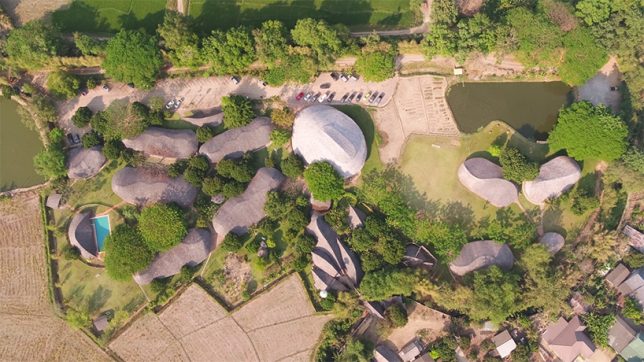
A new sports hall in Thailand highlights the aesthetic power and physical strength of bamboo, a flexible and fast-growing natural material. In total, more carbon is captured in the bamboo than was used to treat, transport and use it for construction, rendering its carbon footprint neutral.

Located at the Panyaden International School in the Chiang Mai province, the new building was designed by Chiangmai Life Architects, a firm specializing in natural materials like bamboo and rammed earth.

The symbolic design was inspired by the lotus, an important Buddhist and Thai symbol. Its natural materials tie it to scenic surroundings while open sides allow for passive ventilation for cooling purposes.

Despite its organic appearance, the structure is engineered to resist earthquakes, high-speed winds and other forces of nature.

The complex is able to accommodate 300 students, spanning over 8,000 square feet, and is used to host games of basketball and futsal, a variation on soccer that takes place in a court. It can also be used for student gatherings and visiting speakers.

Like wood, bamboo is becoming an increasingly appealing material for architectural construction thanks to its rapid growth rate and ability to sequester carbon — the natural look and feel are a nice touch, too.

Share on Facebook


[ By WebUrbanist in Architecture & Public & Institutional. ]

[ WebUrbanist | Archives | Galleries | Privacy | TOS ]


WebUrbanist

 
Comments Off on Zero-Carbon, All Bamboo Sports Hall Features Organic 50-Foot Trusses

Posted in Creativity