Tag: Enabled

  • iPhone XR Portrait mode for pets, inanimate objects enabled by Halide developers

    The developers behind camera app Halide may have discovered a way to enable Portrait mode for pets and objects on the iPhone XR. The revelation was made by one of the developers on Reddit over the weekend, where it was explained that the team found depth data from the iPhone XR’s camera and used it to successfully use Portrait mode on pets and inanimate objects.

    Unlike the other new dual-camera iPhone models, the iPhone XR’s single rear camera only supports taking Portrait images of humans, a limitation that may be addressed by third-party apps like Halide. According to the Reddit post, using the mode for non-humans on the iPhone XR is a bit finicky at times and only works if there’s “enough variance in relative distance of objects,” the developer explained.

    “Note that the depth map is way lower resolution than the dual camera setup, but it seems usable,” the post states. Halide developer Ben Sandofsky shared the above Twitter post showing the resolution difference between iPhone XS and iPhone XR depth data on Twitter. The feature needs “some more tooling,” the Reddit post states, but it’s likely Halide will offer the ability to iPhone XR users in a future update.

    Articles: Digital Photography Review (dpreview.com)

  • HDR is enabled by default on the iPhone 8 Plus, and that’s a really good thing

    Capturing HDR (high dynamic range) photos using an iPhone or iPad camera isn’t a new feature, but using it in the iPhone 8 Plus is the first time I’ve been wowed by it.

    HDR images are balanced and realistic, to the point where you may not even think about whether a photo is HDR or not. In fact, in the iPhone 8 and iPhone 8 Plus, Apple is so confident in the results that HDR is an automatic setting. When I mentioned to a friend that I was testing the HDR feature, he visibly winced, but there’s no need: Apple’s implementation shows that the term “HDR” doesn’t have to be associated with the garish, hyperreal look of a lot of HDR imagery. They’re often just darn good photos.

    HDR Auto by default

    On iPhone 7, iPhone 7 Plus, and earlier models, even under iOS 11, the HDR mode can be manually turned on, off, or set to Auto in the capture interface. On those devices, Auto means the camera decides whether HDR should kick in to improve a photo when capturing scenes under low light or with a lot of tonal contrast (such as a bright sky and dark foreground). A small yellow “HDR” icon appears at the top of the screen when it’s active.

    Capturing the HDR photo saves two images: the original metered image and a single HDR version that is a blend of three exposures (regular, light, and dark, which are recorded and combined in-camera, not saved as individual images). You can opt to hold onto that original by going to Settings > Camera > HDR (High Dynamic Range) and choosing Keep Normal Photo.

    For the iPhone 8 and iPhone 8 Plus (and the forthcoming iPhone X), however, auto HDR is enabled by default. And it’s not exactly the same HDR effect used by previous devices. The 8 and 8 Plus include an image sensor with larger pixels and improved silicon – a new ISP (image signal processor) and more powerful A11 Bionic main processor. Together they add more processing oomph, resulting in more dramatic HDR effects – without taking it too far.

    I tested using an iPhone 8 Plus, but the feature applies to the iPhone 8 and iPhone X, as well.

    HDR in the Real World

    Taking the iPhone 8 Plus outside on a sunny day provided dramatic results. In fact, it may subtly alter the way you take photos with the iPhone. Bright areas, such as clouds in the sky, appeared blown out while framing the shot. Typically, the way to compensate for that would be to reduce the exposure before you take the photo (tap the screen to set the focus and exposure, and then drag the brightness indicator down to darken the scene). However, in the captured photo, the HDR feature restored detail in the clouds and often presented blue skies where they weren’t visible in the preview.

    Preview image
    Final image

    If you’re shooting with Live Photos turned on (which records a few seconds of video around the still image), when you review your images in the Photos app, the “before” image briefly appears before cross-dissolving into the final HDR image.

    Comparing iPhone 8 Plus and iPhone 7 Plus

    Capturing the same scene with an iPhone 8 Plus and an iPhone 7 Plus reveals general improvement in the new model. Although both cameras’ HDR did a good job dealing with overexposed clouds, the iPhone 8 Plus tended to offer more graduated tones. Overall, it also did a better job of filling in shadows; the iPhone 7 Plus pulled more toward reducing exposure throughout to compensate for the brightness.

    HDR photo with iPhone 7 Plus
    HDR photo with iPhone 8 Plus

    That adjustment is welcome when photographing people. Often you don’t want to turn on HDR for portraits, because the effect exaggerates the contrast in facial features. But if Auto HDR is always available, you won’t have that control (unless you turn off Auto HDR in the Camera settings). Since the iPhone 8 Plus is also lifting the shadows, the effect isn’t as pronounced.

    iPhone 7 Plus iPhone 8 Plus

    Sometimes, Auto HDR didn’t engage under conditions when I expected it would, and still produced good results. When photographing in low-light, the iPhone 8 Plus turns first to increasing ISO and other software processing to create a usable image.

    iPhone 8 Plus telephoto lens, no HDR
    iPhone 8 Plus wide angle lens, no HDR

    Conclusion

    Making HDR a transparently automatic feature on the iPhone 8, iPhone 8 Plus, and iPhone X is a smart move on Apple’s part. Intelligent HDR application was one of the things that made the Google Pixel’s camera so good, so it seems wise for Apple to follow suit. Although Auto HDR can be turned off in the Camera settings, letting you choose when to activate HDR mode, in my testing I found little reason to do so.

    Articles: Digital Photography Review (dpreview.com)

  • Artistically Enabled: 18 Weird & Creative Handicapped Parking Signs

    [ By Steve in Culture & History & Travel. ]

    Blue & white Handicapped Parking signs and stencils are one of urban life’s most familiar icons… and then there are those that have been creatively hacked.

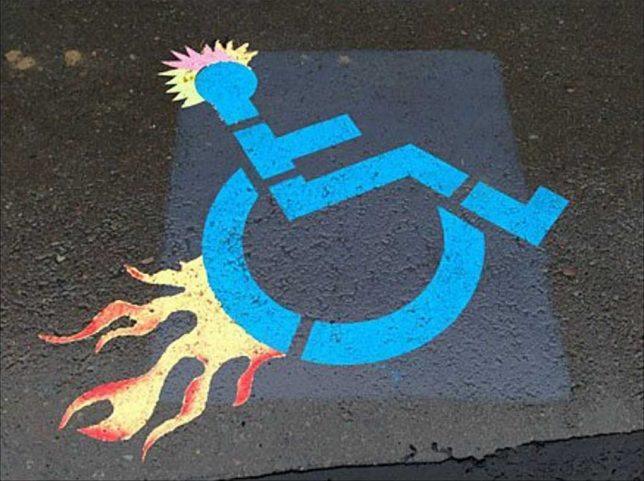
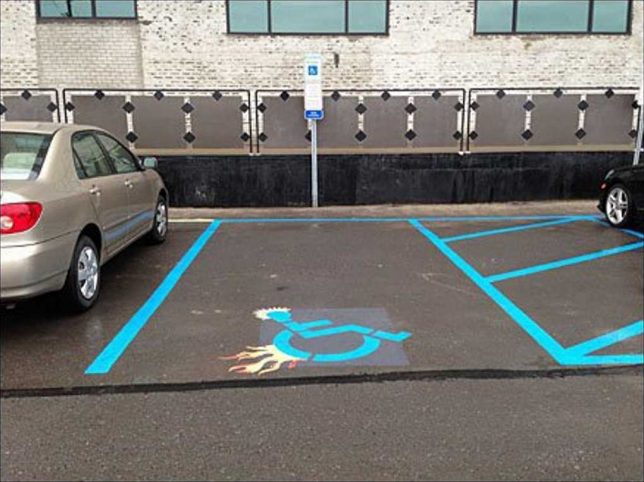
    There’s a fine line between amusement and mean-spiritedness but when it comes to visual imagery, outrage is often in the eye of the beholder. With that in mind, this edgy, spiky, flame-enhanced “Parking Space Designator” (is that what the kids are calling them these days?) follows the road blazed by TV’s Dr House and his boss flame-graphic walking cane. You’ll find the stencil on steroids above outside a Retail Boutique Incubator, tentatively attributed to Sean McDougal of Disfunctional Design Store.

    Interlocked & Loaded

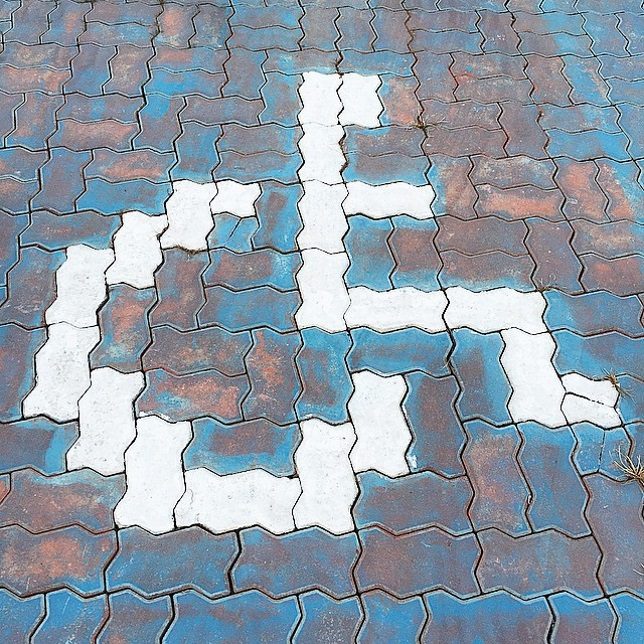
    Those interlocking driveway paving stones can be fit together in any number of patterns, including a reasonable, recognizable facsimile of the accessible parking graphic. Flickr user zwei zwei (zwei1189) captured this image on February 5th of 2015.

    Brazil Not

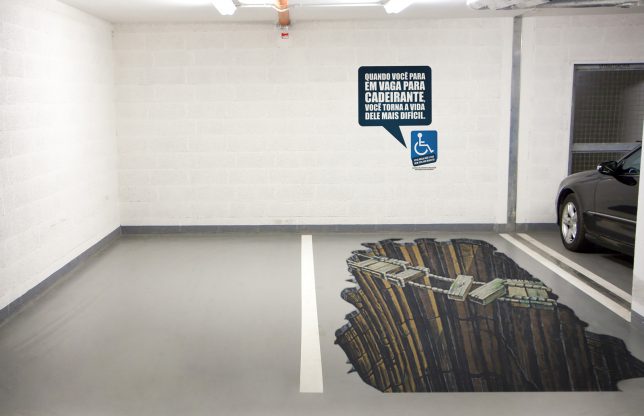
    A parking spot reserved for the “Sorcerer” truck, we assume? Not quite – this clever conjunction of a designated handicapped parking space and some awesome eye-fooling 3D graphic art comes from Brazil, where there’s an ongoing problem of able-bodied people parking in handicapped spaces “just for a minute”. Yeah, riiight. The explanatory text on the wall roughly translates from Portuguese to read “When you stop in place for disabled, you make his life more difficult”. It’s a theme we’ll revisit further on in this post.

    Hold My Beer And Park This

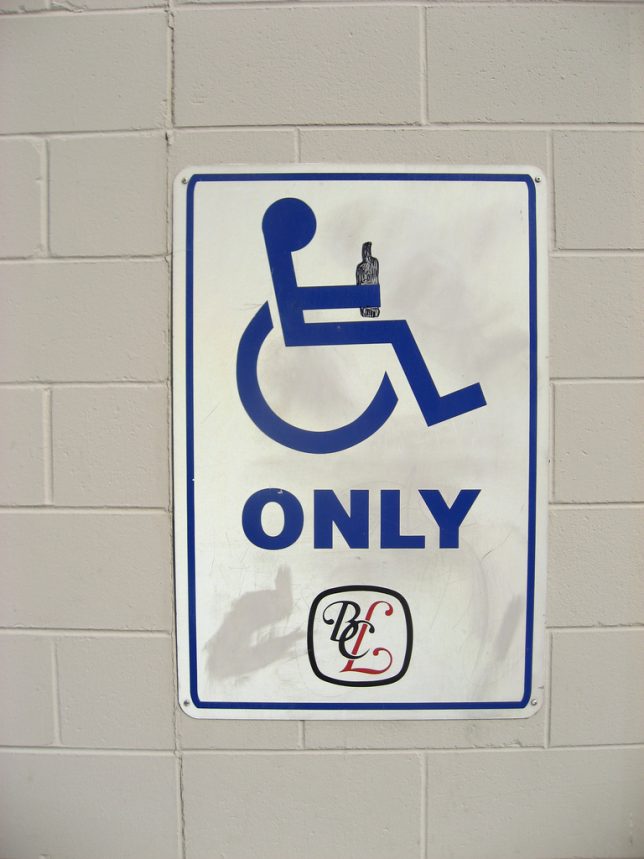
    Flickr user Mike Klassen snapped this mildly yet distinctively modified accessible parking sign behind a BC Liquor store in late September of 2008. As for that “fine line” we mentioned previously, well, this edges close to it but we’ll leave the last word to Nathan Ridge, one of the commenters at Klassen’s photo page: “I’ve heard of discrimination against disabled persons, but this is the first time I’ve heard of it the other way around! I love it, especially since I’m in a wheelchair myself!”

    Triple Chair Lift

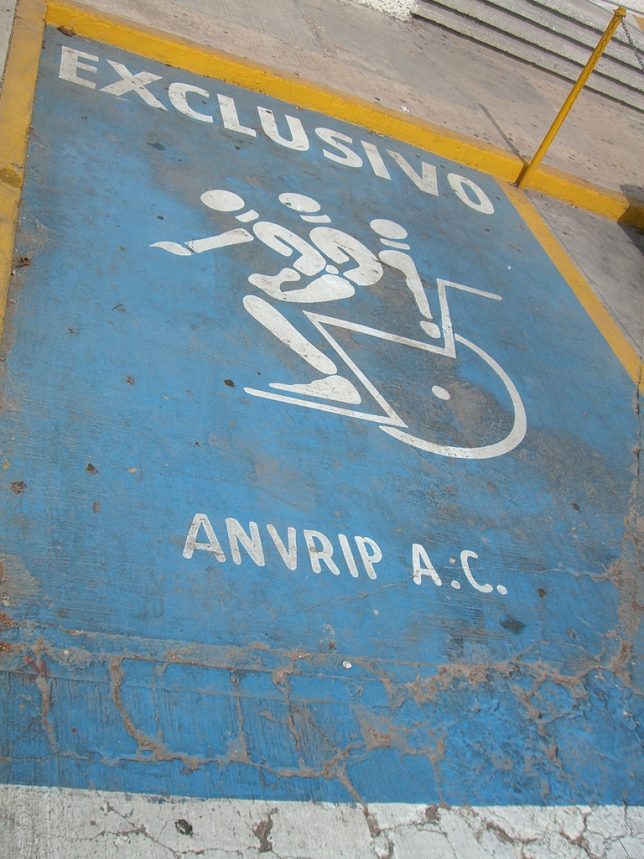
    When Mexico sends us their handicapped parking place stencils, they’re not… actually sometimes they ARE sending us their best. Take the “EXCLUSIVO” stencil above, snapped by Flickr user Mary Doyle (buffoonmeatmary) on August 5th of 2007. We can’t say whether this awesome graphic shows a disabled person getting into or out of their wheelchair but either way, the image demands a Six Million Dollar Man bionic sound effect to accompany it.

    Elderly Man Driver

    Elderly man driver, that elderly man driver, he don’t say nothing but he must know something, he just keeps rolling along… at 10mph under the speed limit until he (or she) parks, right on top of this designated Elderly-only parking space. Who knew this even existed? One might state just being a senior citizen isn’t actually a “disability” in the strict sense, though don’t try convincing any grouchy cane-wielding oldster of that. Flickr user Wee Viraporn snapped what appears to be a standardized stencil on January 3rd of 2010.

    Next Page – Click Below to Read More:
    Enabled 18 Weird Creative Handicapped Parking Signs

    Share on Facebook


    [ By Steve in Culture & History & Travel. ]

    [ WebUrbanist | Archives | Galleries | Privacy | TOS ]


    WebUrbanist

  • Sony introduces NEX-5T Wi-Fi and NFC enabled mirrorless camera

    nex5t_angle.png

    Sony has announced the Sony Alpha NEX-5T, boasting all the same features that the Alpha NEX-5R offered with the addition of NFC. Smartphones and tablets with the technology will be able to pair easily with the NEX-5T to take advantage of its wireless connectivity. With a 16.1 megapixel APS-C sized sensor, Wi-Fi connectivity and a 3.0-inch flip-up touch LCD, the NEX-5T is introduced at $ 50 less than its predecessor’s initial MSRP. Click through for more information.

    News: Digital Photography Review (dpreview.com)

  • Olympus launches PEN E-P5 high-end Wi-Fi enabled Micro Four Thirds model

    oly_em5.png

    Olympus has announced the PEN E-P5, the fourth in its range of enthusiast-targeted, rangefinder-style Micro Four Thirds cameras. The E-P5 takes the 16MP sensor that has appeared in the company’s other models and adds a five-axis image stabilization system and shutter capable of shooting at 1/8000th of a second amongst a host of tweaks and feature improvements. The camera will available from May at around $ 1,000/€1000. The company has also announced black versions of its 17mm, 45mm and 75mm F1.8 prime lenses, priced the same as their silver counterparts. There is also a 2.4M dot LCD electronic viewfinder, the VF-4.

    News: Digital Photography Review (dpreview.com)
  • Samsung ships WB250F and DV150F Wi-Fi enabled Smart cameras

    samsung_wb250f.png

    Samsung has started shipping its Wi-Fi-enabled DV150F dual-LCD and WB250F compact cameras at retail prices of $ 249.99 and $ 149.99 respectively. Announced at the CES 2013 tradeshow, the WB250F is an 18x, 24-432mm equiv compact superzoom with a 3.0″ touch screen and the company’s latest Wi-Fi implementation – dubbed ‘Smart 2.0.’ The DV150F is 16MP CCD with a 25-125mm equiv zoom and includes a 2.7″ LCD and a 1.5″ front LCD. UK and European pricing and availability have yet to be confirmed.

    News: Digital Photography Review (dpreview.com)
  • Dragon in 3D by 3D Phil, YT3D Enabled

    A Dragon in Stereocopic 3D, choose your glasses below the animation then sit 3 feet from your monitor and enjoy. You can visit my websites at www.3dphil.co.uk or media55.co.uk or you can email me phil@media55.co.uk

  • 3D Stereo Test animation (YT3D enabled)

    by www.DenysAlmaral.com
    Video Rating: 4 / 5

  • You’ve never had it So Good in 3D 1080p YT3D Enabled

    This is a great song from the Birmingham musical Wollop Mrs Cox, filmed in real stereoscopic 3D by 3D Phil, It’s performed by Patrick Pryce and Lisa Smith and members of the BMOS Musical Theatre Company, For more information on Wallop Mrs Cox visit the folowing site: www.wallopmrscox.co.uk for more info on all things 3D go to my site at www.3dphil.co.uk
    Video Rating: 4 / 5