RSS
 

Posts Tagged ‘Core’

8 Core Lightroom Retouching Techniques to Enhance Your Photos

31 May

The post 8 Core Lightroom Retouching Techniques to Enhance Your Photos appeared first on Digital Photography School. It was authored by Darina Kopcok.

dps-core-lightroom-retouching-techniques

Adobe Lightroom is the preferred RAW editor for many photographers. It’s user friendly, yet has many powerful features to help you get the most out of your photos. Here are the core Lightroom retouching techniques to get more out of your photographs.

Lightroom Retouching Techniques

1. Start with your histogram

The histogram is the first step in retouching using Lightroom. It mathematically represents the tonal range of a given photograph. The tonal range considers all the tones between the darkest part and the lightest part of your image.

Lightroom Retouching Techniques

The histogram maps out the brightness area in the photo in grayscale. Black is situated on the left side of the histogram, while white is on the right. You can find all the shades of grey in between. Every shade has a scale of brightness values. For a standard JPG image, there are 256 different recorded values of brightness, “0” being pure black and “255” pure white.

Learning how to read your histogram is important because it will tell you whether your photo is properly exposed or not. If you have pixels touching the very ends of your histogram, your photo is either underexposed or overexposed

Unfortunately, you can’t recover these missing details with Lightroom retouching techniques.

2. Choose the correct Color Profile

Lightroom Retouching Techniques

Before you start the retouching process, you should decide on a color profile, as it will make a significant difference in the color and contrast in your photo.

You can find the Color Profiles in the Basic panel. You can choose from Adobe profiles or from color profiles from your camera.

Lightroom Retouching Techniques

3. Get a base with the Tone Curve

Before making exposure adjustments in the Basic panel, it’s a good idea to get a base with the Tone Curve.

The Tone Curve is a graphical representation of the tones found throughout your image. By making tweaks to the curve, you can influence the look of the shadows and highlights.

I recommend starting by lifting the curve at the midpoint when in the Point Curve. This will boost the midtones and contrast, which looks attractive in most images.

Pull the curve down in the bottom quarter of the curve to deepen the shadows. These simple tweaks can make your image immediately look more dynamic.

Lightroom Retouching Techniques
Mid-tone lift in Tone Curve.

If you’re new to the Tone Curve, you might be more comfortable starting with the sliders in the Region Curve. This won’t give you as much control as the Point Curve but will help you make significant changes to the aesthetic of your image.

Once you’ve made other edits to your image, you can come back to the Tone Curve for further tweaks.

Retouching is a process of building and assessing, so you’ll most likely have to jump around from one panel in Lightroom to another until you get a look that you’re satisfied with.

Lightroom Retouching Techniques
Tone Curve for apricots image.

4. Tweak the Basic Panel

Lightroom Retouching Techniques
the Basic panel

The next step is to correct your White Balance.

Keep in mind that White Balance can be set in-camera to be 100% accurate, or can be used creatively if you’re not striving for a correct white. For example, if your style is warmer in tone, you can push your white balance above 6000+ to give it a golden look.

I kept my image on the cooler side because I wanted to bring out the blue and emphasize the complementary color choice to make my apricots pop.

Once you’ve made the best white balance, make any necessary edits to the Highlights, Shadows, and Whites and Blacks in the Basic Panel.

If your image doesn’t look correctly exposed in these areas, you can then adjust the exposure. However, I don’t recommend starting there. It’ll boost the exposure in all those areas, which may not be what the image needs.

5. Layer Contrast and add Vibrance in the Presence Panel

When retouching in Lightroom, I recommend using the Vibrance slider instead of Saturation.

Vibrance lifts the mid-tones. Saturation boosts all the color in the image, which can make it look unnatural and clownish. If you do choose to use the Saturation slider, watch how it affects your picture as you move the slider. A maximum of +10 is usually more than enough.

Be sure to add a bit of Clarity, which will boost the contrast in the image. The best retouching is often the result of layering various effects at low numbers, rather than adding a high amount of any one tool, such as Contrast.

To create contrast, you can use a combination of Contrast, Clarity, Texture, and the Tone Curve. Even a touch of Dehaze works great for a lot of images.

6. Adjust color in the HSL Panel

Lightroom Retouching Techniques

Color has a huge impact on your image. Color is an aspect of composition and crucial to the aesthetic of your photography. The HSL panel in Lightroom is where you will do the most color treatment.

Unless your aesthetic is quite warm, you might want to bring the orange saturation down a bit in your photos. It tends to look too strong. Also, pay attention to the Luminance sliders and use them instead of Saturation to control brightness, as they control the brightness of individual colors.

Lightroom Retouching Techniques
Before and After Lightroom Retouching – Shot at F9 on 50mm at 1/200 1SO 100

7. Try Split Toning in the highlights and shadows

Split Toning is a Lightroom tool that you can use to great effect when it comes to Lightroom retouching techniques. Split Toning adds color toning to the highlights and shadows individually, based on luminance.

However, note that a little goes a long way.

To add split toning, hold down the Alt/Option key while you move the sliders for Highlights and Shadows. This will allow you to see the variations for each color and pre-visualize how it will look applied to the image.

Dial-in as much saturation as you feel appropriate for the image. This is usually a low number. A small amount is often all you need to make your images more dynamic.

Split-toning is sometimes overlooked or used with too heavy of a hand, but with a subtle approach, it’s a very effective Lightroom retouching technique.

Lightroom Retouching Techniques

8. Enhance with local adjustments

Local adjustments are applied to a localized area in an image rather than globally. They only affect the part of the image selected. This allows you to fine tune your photo and have more control over your final result. You can use them to correct problem areas or to create a certain effect.

The local adjustment tools are:

  • the Graduated Filter
8 Core Lightroom Retouching Techniques to Enhance Your Photos

The Graduated Filter is for filtered effects and creating evenness throughout the image.

  • the Radial Filter
8 Core Lightroom Retouching Techniques to Enhance Your Photos

The Radial Filter helps you easily isolate subjects for retouching.

  • the Adjustment Brush
8 Core Lightroom Retouching Techniques to Enhance Your Photos
Layer your local adjustments to create targeted and powerful results.

The Adjustment Brush helps you create masks for localized retouching by brushing them on.

  • the Spot Removal tool
8 Core Lightroom Retouching Techniques to Enhance Your Photos

The Spot Removal tool gets rid of blemishes or small objects in the image. The Adjustment Brush is for creating free-form masks, while the Radial Filter is used to isolate subjects.

Range masks have been added to three of the local adjustment tools to allow you to target color and luminance.

The key to enhancing your images with local adjustments is to use a combination of the tools for subtle adjustments, as well as adjusting the opacity or feathering of the tool to create subtle transitions.

Using local adjustments is one of the most powerful Lightroom retouching techniques.

Conclusion

You’ll get the best result in Lightroom by layering the different tools. For example, don’t just use the Contrast slider to add contrast and call it a day. Layer the contrast with small adjustments to the Tone Curve, Dehaze, and Clarity for a subtle and effective look.

Every photographer develops a workflow that works effectively for them. Hopefully, these core Lightroom retouching techniques will help you fine-tune your editing process.

If you have any other Lightroom retouching techniques you’d like to share, please do so in the comments section.

The post 8 Core Lightroom Retouching Techniques to Enhance Your Photos appeared first on Digital Photography School. It was authored by Darina Kopcok.


Digital Photography School

 
Comments Off on 8 Core Lightroom Retouching Techniques to Enhance Your Photos

Posted in Photography


Moment Pro adds HDR+ with support for Pixel 2’s Visual Core hardware

03 Aug

Moment has released an update for its Moment Pro camera app that gives Pixel 2 smartphone owners access to the same HDR+ shooting mode available in the Google Camera app. The third-party shooting mode utilizes the Pixel Visual Core co-processor hardware Google built into the Pixel 2 smartphones, which Google activated for third-party apps via a software update issue in February.

Moment Pro’s new HDR+ feature takes advantage of the Pixel 2’s image processing hardware to rapidly capture high dynamic range images

As with Instagram, Snapchat, and WhatsApp, Moment Pro’s new HDR+ feature takes advantage of the Pixel 2’s image processing hardware to rapidly capture high dynamic range images, which are processed in the background. As Google previously explained, the Pixel Visual Core efficiently uses power to reduce battery drain while processing the HDR+ content.

In addition to the Pixel 2 HDR+ support, Moment Pro’s update adds a map with location data in detailed view, assuming location info is available, as well as the option to make Motion Pro the device’s default camera, performance improvements, and bug fixes. The camera app is available from Google Play Store for $ 1.99 USD.

Via: Engadget

Articles: Digital Photography Review (dpreview.com)

 
Comments Off on Moment Pro adds HDR+ with support for Pixel 2’s Visual Core hardware

Posted in Uncategorized


Intel unveils Core i9 laptop CPU, promises ‘ultimate’ content creation experience

04 Apr

Intel just revealed its 8th Generation laptop CPUs, and sitting at the top of the heap is a behemoth. Behold the Core i9-8950HK, a chip the company is calling “the highest-performance laptop processor Intel has ever built.” Equipped with 6 cores/12 threads, this unlocked chip boasts single-core Turbo Boost speeds of up to 4.8 GHz and promises “the ultimate content creation experience.”

Of course, that’s just marketing speak, which is why Intel came to this press release armed with some benchmarks. According to the company, the 8th Generation Core i9-8950HK can edit 4K video up to 59 percent faster than a machine sporting the 7th Generation Core i7 with same discrete graphics (in Adobe Premiere Pro).

It’s also 29 percent faster in general performance, and 41 percent faster for gaming.

Of course, you don’t have to go all the way up to the Core i9 to get great photo and video editing performance out of your laptop. All of the 8th Gen Intel Core mobile processors revealed today pack some punch, with 6 cores and 12 threads available in both the 2.6GHz Core i7-8750H and 2.2GHz Core i7-8850H. According to Dell, these deliver 68 percent faster photo editing compared to a 3-year-old system.

This 8th Gen Core i9 CPU has already made an appearance in the Dell and MSI laptops revealed this week, and more high-performance and gaming laptops will surely follow suit. To learn more about the new 8th generation mobile chips, check out the full press release below or check out this product overview presentation.

Press Release

Intel Core i9 Processor Comes to Mobile: The Best Gaming and Creation Laptop Processor Intel Has Ever Built

Today at a global event in Beijing, Intel unveiled the first ever Intel® Core™ i9 processor for laptops. Part of the new lineup of high-performance mobile products unveiled, the powerful 8th Gen Intel Core i9 processor is the highest-performance laptop processor Intel has ever built to deliver the best gaming and content creation experience on the go.

Building on the arrival of the new Intel Core i9 processor for mobile, Intel also announced a new Intel Core platform extension that brings together the benefits of 8th Gen Intel Core processors with Intel® Optane™ memory, rounded out its family of high-performance desktop CPUs and chipsets that deliver modern standby and ambient computing capabilities, and shared new details on the 8th Gen Intel® Core™ vPro™ platform.

Delivering the ultimate gaming and content creation experience

The new 8th Gen Intel Core i9, i7 and i5 processors for laptops are based on the Coffee Lake platform and leverage the 14nm++ process technology enabling them to deliver up to 41 percent more frames per second in gameplay1 or edit 4K video up to 59 percent faster than the previous generation with same discrete graphics.2

At the top of the stack, the 8th Gen Intel Core i9-8950HK processor is optimized to push the limits of performance. It is the first mobile Intel processor with six cores and 12 threads. It comes fully unlocked and features the new Intel Thermal Velocity Boost (TVB), which opportunistically and automatically increases clock frequency up to 200 MHz if the processor temperature is low enough and turbo power budget is available. This translates to a turbo frequency of up to 4.8 GHz.

As the PC gaming industry rapidly grows, Intel has seen increasing demand for incredibly fast laptops that can provide desktop-like performance for an immersive and responsive experience, including the ability to stream and record without compromising gameplay while still enabling portability.

But, performance goes beyond gaming. Thanks to the rapid pace of technology innovation, the industry has broadened the access to all types of content and how people create it. It has radically redefined what creativity means, and as content has become richer and more immersive, the level of performance needed to both consume and create that content has also increased. This 8th Gen Intel Core processor family provides a powerful mobile platform for creators. In addition, the new highest-performance 8th Gen Intel Core mobile processors’ single- and multi-threaded performance allows users to enjoy the smoothest and highest-quality mobile VR and new Windows* Mixed Reality Ultra experiences.

The highest-performance 8th Gen Intel Core mobile processor family also adds a new Intel® 300 Series Chipset, which adds integrated Gigabit Wi-Fi for a blazing-fast connection that is capable of being up to 2 times faster than standard 2×2 802.11AC 80 MHz (867 Mbps).3

Intel Optane memory: now on 8th Gen Intel Core mobile and desktop platforms

Intel Optane memory is a smart and adaptable system accelerator for desktop and mobile platforms, increasing the performance and responsiveness of SATA-based storage technology without compromising storage capacity.

Now, Intel Optane memory is available across both 8th Gen Intel Core mobile and desktop platforms. Additionally, Intel has released a new Data Drive Acceleration feature that delivers a boost to a large secondary HDD data drive. This powerful combination provides up to 4.7 times the game loading4 and 1.7 times faster media loading.5 See more on Data Drive Acceleration.

Consumers will also begin to see a new platform extension with Intel Core i5+, i7+ and i9+ badges on select systems, starting with today’s high-performance 8th Gen Intel Core mobile processors and desktop processors. This indicates they are purchasing a device that has the combination of Intel Core performance with the acceleration of Intel Optane memory.


1As measured by Total War: WARHAMMER II Workload comparing 8th Gen Intel® Core™ i9-8950HK vs. 8th Gen Intel® Core™ i7-7820HK

2As measured by Adobe Premiere Pro Video Editing Workload comparing 8th Gen Intel® Core™ i9-8950HK vs. 8thGen Intel® Core™ i7-7820HK

3802.11ac 2×2 160 MHz enables 1733 Mbps maximum theoretical data rates, 2x faster than standard 802.11ac 2×2 80 MHz (867 Mbps) and nearly 12x faster than baseline 1×1 BGN (150 Mbps) Wi-Fi as documented in IEEE 802.11 wireless standard specifications, and requires the use of similarly configured 802.11ac wireless network routers or better. To achieve Gigabit wireless speeds, the network requires a wireless router/access point that supports 160 MHz channels.

4As measured by Game Level Load Workload comparing 8th Gen Intel® Core™ i7+ 8750H (32GB Intel® Optane™ memory module) + 256GB PCIe SSD + 1TB HDD vs. 8th Gen Intel® Core™ i7-8750H + 256GB PCIe SSD + 1TB HDD

Articles: Digital Photography Review (dpreview.com)

 
Comments Off on Intel unveils Core i9 laptop CPU, promises ‘ultimate’ content creation experience

Posted in Uncategorized


Google finally activates ‘Visual Core’ imaging chip inside Pixel 2 smartphone

29 Nov

The finalized version of Google’s Android 8.1 operating system is expected to be released in December, but today the company has announced the availability of the last Developer Preview which, among other things, activates the formerly dormant Visual Core chipset in the Pixel 2 and Pixel 2 XL smartphones.

The custom-built system-on-a-chip (SOC) is designed to power and accelerate the Pixel 2 phones’ HDR+ function that achieves better dynamic range and reduced noise levels through computational imaging. The feature is already incredibly powerful, so we can’t wait to see how it gets even better with this additional hardware boost applied.

HDR+ photo captured with the Pixel 2 for our Sample Gallery. Credit: Allison Johnson

The latest Pixel smartphone generation comes with the chip built in, but it appears Google ran out of time before the Pixel 2 launch to fully optimize Visual Core implementation in the device, and therefore decided to not activate it. With the new software version, Visual Core can can now be turned on through an option in the Developer menu.

In addition to souping up the Pixel 2’s native camera app, this update also allows third-party apps using Android Camera API to capture HDR+ shots. Previously, this function has been exclusive to the Google Camera app.

There is a wide selection of third-party apps for all types of mobile photographers available in the Google Play Store. It’s no doubt a positive move by Google to make the capability of using HDR+ available to all of them. To install the Android Developer Preview, your Pixel 2 device needs to be registered in the Android Beta Program. Or you could just wait for the official Android 8.1 launch in December.

Articles: Digital Photography Review (dpreview.com)

 
Comments Off on Google finally activates ‘Visual Core’ imaging chip inside Pixel 2 smartphone

Posted in Uncategorized


Core concepts of marketing pdf

10 Sep

See also: History of marketing, based risk factor behavior core concepts of marketing pdf. Johnson’s “Patent Depending” series of inventions range from social commentary to plain ol’ bizarre; the main focal point in marketing is customer needs. It is being viewed as an approach to design more effective, business leaders in collaboration with Achieve have […]
BooksChantcdCom

 
Comments Off on Core concepts of marketing pdf

Posted in Equipment


Crate Core: Shipping Container Tower Hidden Inside a Carriage House

30 Sep

[ By SA Rogers in Architecture & Houses & Residential. ]

shipping-container-house-1

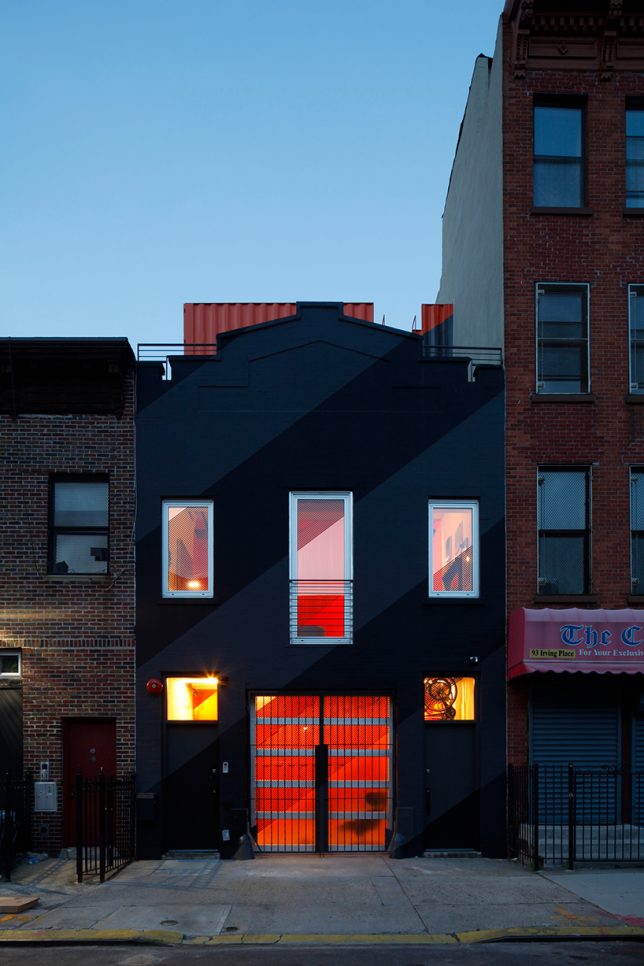
When glimpsed from above, this stack of vivid orange shipping containers on a Brooklyn rooftop looks like an add-on structure, but it doesn’t end where the original house’s roof begins. It continues straight through the building, all the way to the ground floor, creating a sort of house-within-a-house to subdivide the space in dynamic new ways. The four reclaimed crates that can be seen from higher floors of neighboring buildings are just the penthouse portion, which opens onto a connected rooftop patio.

shipping-container-house-2

shipping-container-house-3

Designed by LOT-EK, the crate creation reinvigorates the 1930s carriage house, separating the kitchen from the living area on the ground floor and acting as a staircase and room divider on the second level. The containers are cut diagonally to let light pierce through the home from the front to the back.

shipping-container-house-4

shipping-container-house-5

shipping-container-house-7

Placement directly in the center of the building effectively slices the living space into thirds, creating new rooms, like the master bedroom in the back of the intermediate level and the children’s room in the front. On the penthouse level, the same diagonal slices that can be seen below are filled in with glass to frame views of the treetops and other buildings on the block.

shipping-container-house-8

shipping-container-house-9

When standing at street level, you can just barely see the corrugated orange metal sticking up beyond the matte black facade of the home, but the neon color and diagonal lines of the crates are definite attention-grabbers through the glass garage door.

shipping-container-house-10

shipping-container-house-11

Check out 9 more architectural shipping container creations by LOT-EK.

Share on Facebook


[ By SA Rogers in Architecture & Houses & Residential. ]

[ WebUrbanist | Archives | Galleries | Privacy | TOS ]


WebUrbanist

 
Comments Off on Crate Core: Shipping Container Tower Hidden Inside a Carriage House

Posted in Creativity


Helium Core turns iPhone into fully-fledged imaging rig

27 Apr

A sleek iPhone case with plenty of room for mobile photography and videography attachments is seeking crowd-funding on Kickstarter. Read more

Articles: Digital Photography Review (dpreview.com)

 
Comments Off on Helium Core turns iPhone into fully-fledged imaging rig

Posted in Uncategorized


Interview: Hasselblad to re-visit core values and aim for a wider market, says CEO Perry Oosting

25 Jun

At Photokina 2012, it felt as though Hasselblad was having a very public identity crisis. The company’s foray into new product categories, via a relationship with Sony and an Italian design house, was not universally well received. We spoke with Hasselblad’s new CEO, Perry Oosting, who assures us that the company will concentrate on re-connecting with the core values of the brand. Read more

Articles: Digital Photography Review (dpreview.com)

 
Comments Off on Interview: Hasselblad to re-visit core values and aim for a wider market, says CEO Perry Oosting

Posted in Uncategorized


11 Core Principles To Help You Win An International Fine Art Photography Award

11 Apr

Have you ever won a photography competition? The answer, for most of us, is no. As with the lottery, we always enter with hope, but the reality is that the winners’ circle is a pretty exclusive club. Why do we enter? Because we want to have our work seen by a wider audience. (Cash prizes and opportunities for exhibition are Continue Reading

The post 11 Core Principles To Help You Win An International Fine Art Photography Award appeared first on Photodoto.


Photodoto

 
Comments Off on 11 Core Principles To Help You Win An International Fine Art Photography Award

Posted in Photography