Tag: Computer

  • In The Fold: 10 Futuristic Folding + Flexible Computer Ideas

    [ By Delana in Conceptual & Futuristic & Technology. ]
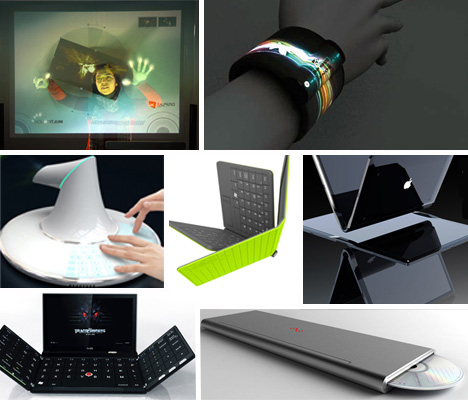
    flexible computer concepts

    The concept of computers has changed dramatically over the past 50 years. They have gone from room-sized monstrosities to desktop beasts to laptop machines to tiny powerhouses that we can carry in our pockets. But it would be a mistake to think that computers are done evolving. The materials we use to build computers are constantly changing, and their form factors will undoubtedly change rapidly as well. These concepts show just what might be possible in the very near future of computer design.

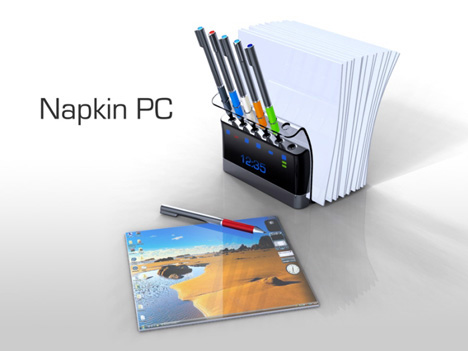
    Napkin PC Concept
    napkin computer

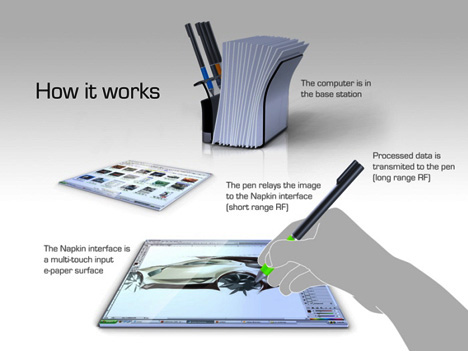
    Operating on the idea that most great ideas start as napkin sketches, designer Avery Holleman decided to design a computer system that looks just like a group of napkins. A stack of napkin-like screens and a set of “pens” are kept in a handy holder, allowing collaborators to simply grab one of each and sketch out an idea.
    napkin pc concept

    The holder is actually a base station and computer, allowing all of the processing to be done in the case so that the “napkins” themselves can remain small and easy to handle. A couple of napkins can roll up and be secured with a kind of napkin ring that holds two pens, letting the system go with you to impromptu meetings or anywhere great ideas might strike.

    Feno Foldable Notebook
    feno foldable notebook concept

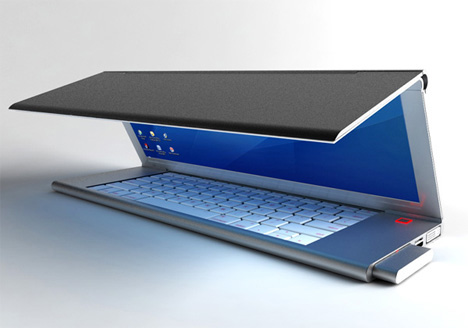
    Designer Niels Van Hoof had a compelling vision for the modern laptop: why not eliminate wasted space and make the screen itself fold up to make the entire machine smaller? The screen would use OLED technology to let it fold in half without damaging the display.
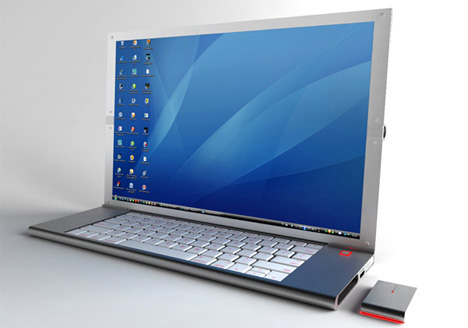
    feno foldable laptop concept

    The keyboard could then shrink significantly, allowing just enough room for the keys and eliminating the vast amounts of space under the keyboard that is usually dedicated to the trackpad. A pop-out mouse takes care of that, letting you navigate naturally and then store the mouse inside the laptop’s body when you’re done.

    Next Page:
    In The Fold 10 Futuristic Folding Flexible Computer Ideas

    Share on Facebook


    [ By Delana in Conceptual & Futuristic & Technology. ]

    [ WebUrbanist | Archives | Galleries | Privacy | TOS ]


    WebUrbanist

  • Computer History Museum shares original Adobe Photoshop source code

    splashscreen.png

    The source code of the original version of Adobe Photoshop has been made available by The Computer History Museum, based in California. Photoshop started off in the 1980s as a program called ‘Display’ written by Thomas Knoll, before being renamed ‘Photoshop’ in 1990 – the year that the first version of the software shipped to customers. The download, which is available for non-commercial use with the permission of Adobe, consists of around 128,000 lines of code. Click through for more details (and some nostalgia-inducing screenshots of Photoshop 1).

    News: Digital Photography Review (dpreview.com)

  • Creators of Raspberry Pi computer announce $25 camera module

    rasppi.jpg

    The makers of Raspberry Pi – the popular low-cost computer – have announced the development of a new camera module, expected to cost $ 25. Since the first version of Raspberry Pi was released early last year, more than half a million of the low-cost boards have been sold to eager enthusiasts all over the world, and put to use doing everything from running games to powering a voice-activated coffee machine (yes, really). Details on the forthcoming camera module are vague, but it is expected to offer at least 5MP resolution and the ability to capture HD video. Click through for more details. 

    News: Digital Photography Review (dpreview.com)

  • My computer setup

    this is an update to the older mac room tour. I bought everything you see for mowing countless lawns and selling photographs, so dont say I’m spoiled, I’m not…. I just work harder than the rest of you. lol jk….but seriously. Follow Me on FaceBook: bit.ly Twitter too: bit.ly …and visit my newly updated site! thecheez.weebly.com Please Subscribe, Rate and comment and check out the bonus video at the end!
    Video Rating: 4 / 5

  • Computer Art Basics : How to Draw Realistic People in Photoshop

    Drawing realistic people in Photoshop requires you to build ellipses and other shapes using the lasso, rectangle and other tools, using a photo image as your guide. A professional artist demonstrates figure drawing techniques in this free video on computer art basics. Expert: Matt Gavenda Contact: mattgavenda.com Bio: Matt Gavenda creates graphic animation for NeoSci and also works as a freelance graphic artist. Filmmaker: Nathanael Rittichier Series Description: To master the basics of computer art you have to know how create shapes, templates and vectors in Adobe Photoshop, and now you can learn these and other techniques from a professional artist. Brush up your computer art skills with the help of this free video series.
    Video Rating: 2 / 5

  • How to Build a Computer for Gaming (2012) Part Two

    Gaming PC Build for 0: youtu.be Build Tutorial Part One: youtu.be Build Tutorial Part Three: youtu.be How to Build a Computer for Gaming (2012) Part Two In this video I give a full tutorial on how to build a computer for gaming. This is my 0 cheap budget gaming PC however this is how to put together almost any computer. In part two of my computer build tutorial I go over installing the motherboard into the case, how to install the graphics card / GPU and how to connect the hard drive or SSD and DVD / Bluray / optical drive. Intel Core i3-2120 CPU: goo.gl Gigabyte GA-H61M-DS2 Motherboard: goo.gl Sapphire Radeon HD 7770 Graphics Card: goo.gl PNY Optima 4GB RAM: goo.gl Western Digital Caviar Blue 500GB Hard Drive: goo.gl Cooler Master eXtreme Power Plus 500W Power Supply: goo.gl Antec Three Hundred Case: goo.gl Sony DVD Burner: goo.gl Molex Adapter: goo.gl Video Gear: Nikon D3200 Camera: goo.gl Nikon 50mm 1.8G Lens: goo.gl Nikon 40mm 2.8G Micro Lens: goo.gl MacBook Air 11″ 2012: goo.gl Blue Yeti Microphone: goo.gl Zoom H1 Microphone: goo.gl 2400 Watt Softboxes: goo.gl Manfrotto 701HDV Fluid Video Head: goo.gl Dolica AX620B100 Tripod: goo.gl Audio-Technica ATH-M50 Headphones: goo.gl Corel VideoStudio Pro X5: goo.gl Subscribe! www.youtube.com Circle me on Google+! gplus.to Follow on Twitter! twitter.com Check me out on Facebook! www.facebook.com Channel Link www.youtube.com Transcript: The next step is to install the motherboard into the case. Before doing this you need

    Gaming PC Build for 0: youtu.be Build Tutorial Part One: youtu.be Build Tutorial Part Two: youtu.be How to Build a Computer for Gaming (2012) Part Three In this video I give a full tutorial on how to build a computer for gaming. This is my 0 cheap budget gaming PC however this is how to put together almost any computer. In part three of my computer build tutorial I go over wiring and cable management including connecting the motherboard, CPU, fans, hard drive and optical drive. Intel Core i3-2120 CPU: goo.gl Gigabyte GA-H61M-DS2 Motherboard: goo.gl Sapphire Radeon HD 7770 Graphics Card: goo.gl PNY Optima 4GB RAM: goo.gl Western Digital Caviar Blue 500GB Hard Drive: goo.gl Cooler Master eXtreme Power Plus 500W Power Supply: goo.gl Antec Three Hundred Case: goo.gl Sony DVD Burner: goo.gl Molex Adapter: goo.gl Video Gear: Nikon D3200 Camera: goo.gl Nikon 50mm 1.8G Lens: goo.gl Nikon 40mm 2.8G Micro Lens: goo.gl MacBook Air 11″ 2012: goo.gl Blue Yeti Microphone: goo.gl Zoom H1 Microphone: goo.gl 2400 Watt Softboxes: goo.gl Manfrotto 701HDV Fluid Video Head: goo.gl Dolica AX620B100 Tripod: goo.gl Audio-Technica ATH-M50 Headphones: goo.gl Corel VideoStudio Pro X5: goo.gl Subscribe! www.youtube.com Merch Store! duncan33303.spreadshirt.com Channel Link www.youtube.com Jailbreaking info stateofjailbreak.com Transcript First step is to grab the pair of SATA cables that came with the motherboard. Plug both of these into the connectors on the bottom right of the board. Grab one

  • How to Build a Computer for Gaming (2012) Part One

    Gaming PC Build for 0: youtu.be Build Tutorial Part Two: youtu.be How to Build a Computer for Gaming (2012) Part One In this video I give a full tutorial on how to build a computer for gaming. This is my 0 cheap budget gaming PC however this is how to put together almost any computer. In part one of my computer build tutorial I go over how to handle parts, preparing your case, installing the power supply, giving an overview of the motherboard, installing the CPU / processor along with the heatsink and fan and installing your RAM memory. Intel Core i3-2120 CPU: goo.gl Gigabyte GA-H61M-DS2 Motherboard: goo.gl Sapphire Radeon HD 7770 Graphics Card: goo.gl PNY Optima 4GB RAM: goo.gl Western Digital Caviar Blue 500GB Hard Drive: goo.gl Cooler Master eXtreme Power Plus 500W Power Supply: goo.gl Antec Three Hundred Case: goo.gl Sony DVD Burner: goo.gl Molex Adapter: goo.gl Video Gear: Nikon D3200 Camera: goo.gl Nikon 50mm 1.8G Lens: goo.gl Nikon 40mm 2.8G Micro Lens: goo.gl MacBook Air 11″ 2012: goo.gl Blue Yeti Microphone: goo.gl Zoom H1 Microphone: goo.gl 2400 Watt Softboxes: goo.gl Manfrotto 701HDV Fluid Video Head: goo.gl Dolica AX620B100 Tripod: goo.gl Audio-Technica ATH-M50 Headphones: goo.gl Corel VideoStudio Pro X5: goo.gl Subscribe! www.youtube.com Circle me on Google+! gplus.to Follow on Twitter! twitter.com Check me out on Facebook! www.facebook.com Channel Link www.youtube.com Transcript: Push the case back for a bit and grab your motherboard. In here you

  • Math + Paper Craft: Computer Scientist Creates 3D Origami

    [ By Steph in Art & Sculpture & Craft. ]

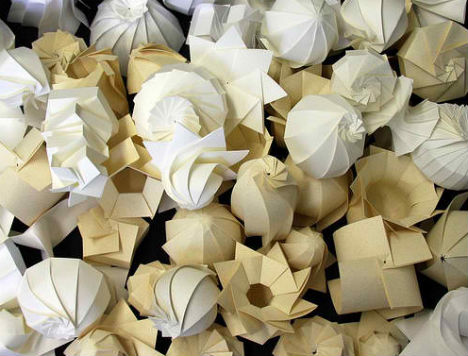
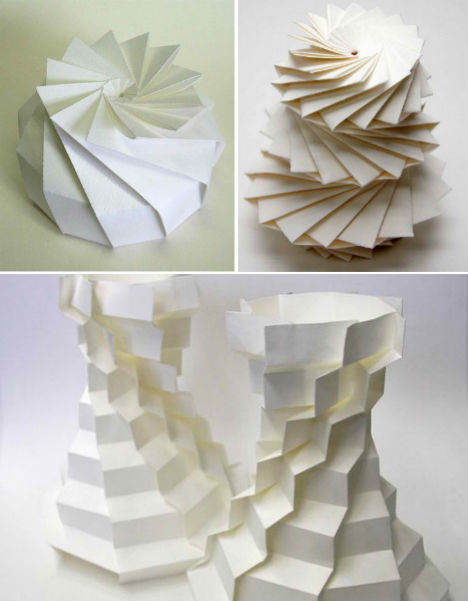
    A single sheet of paper becomes a complex three-dimensional object in the hands of Jun Mitani, a computer scientist who uses geometric modeling software to aid him in his designs. Mitani has been studying algorithms and user interfaces for generating 3D shapes that can be realized with folding paper in a twist on the traditional craft of origami.

    Not only does Mitani fold these mathematical origami objects himself, he also designs computer software to come up with the shapes. Mitani’s origami designs have ‘rotational symmetry’, meaning they look the same after a certain amount of rotation.

    Mitani scores folding lines in a sheet of paper and then folds it by hand. While large sheets of paper don’t work well for complex origami shapes due to a lack of structural strength, Mitani is beginning to experiment with other materials, collaborating with industrial companies. That might reduce one issue that plagues Mitani in his work – he has suffered from, he says, “a few thousand” paper cuts.

    “When I was a kid, I didn’t have much interest in folding origami, but in papercraft,” says Mitani in an interview with The Creators Project. “I fabricated a lot of paper models, such as cars, ships, buildings, and animals, etc. by cutting and gluing pieces of paper. I felt that origami, just folding, was too restricted. On the other hand, I was enthusiastic about the computer, which my father bought when I was a first-year student in elementary school. As a fusion of two objects of interest, papercraft and computer, the theme of my Ph.D. thesis became a method for designing paper models with the computer.”


    Want More? Click for Great Related Content on WebUrbanist:

    Unfolding Interior Design: Origami-Inspired Furniture

    These 12 origami-inspired furniture and home decor designs bring the grace and elegance of this ancient paper art into functional use for the home.
    4 Comments – Click Here to Read More »»


    Elod Beregszaszi: Paper Master Cuts to Create Art

    Elod Beregszaszi is a master of paperwork, but not in the normal sense. He cuts, folds, embosses and sculpts amazing work out of paper.
    6 Comments – Click Here to Read More »»


    Share on Facebook


    [ By Steph in Art & Sculpture & Craft. ]

    [ WebUrbanist | Archives | Galleries | Privacy | TOS ]


    WebUrbanist

  • Windows 8 – Toggle Computer, Control Panel, Files, Network, Recycle Bin on Desktop

    Show or hide a variety of icons on the Windows 8 Desktop: Computer, Control Panel, Files, Network, and/or the Recycle Bin.

    By default, the Windows 8 Desktop is fairly sparse, only showing an icon for the Recycle Bin so you can quickly view deleted files that have not been completely removed from the system.

    While you can access your Computer, Control Panel, the network, and your user files via the Explorer icon in the Taskbar, you might find it more useful to have Desktop icons that you can double-click for instant access to these locations. …

    Read more at MalekTips.
    New Computer and Technology Help and Tips – MalekTips.Com

  • #6 How to make a 3D computer game [level design]

    In this part, we’re taking our first steps into level design by importing models into the Unity 3d engine. To download these models for FREE, click here: gameprefabs.com ALL I ASK IN RETURN… is if you can make a quick capture of your level and post it as a video-reply. I’d LOVE to see what you can come up with!! It makes creating these videos much more fun! -TornadoTwins
    Video Rating: 4 / 5

    40th anniversary of the moon mission