RSS
 

Posts Tagged ‘Blog’

Blog Project: Your Best Photos From 2012

17 Dec

As has become a tradition on the JMG-Galleries blog I’d like to invite you to take part in the 6th annual best photos of the year blog project. This is by far my most popular blog project. Year over year this project has continued to rapid increase in participation with last years participation hitting 289 participants (see Best Photos of 2011, Best Photos of 2010, Best Photos of 2009, Best Photos of 2008 and Best Photos of 2007). Around this time of year people start to ask if I’d be running this project again. The answer clearly is YES! 1. I love this project and I love that so many people get excited about it. 2. It’s a great way exercise to improve your photography (10 Ways to Top Your Best 20xx Photographs). So with out any further delay here is how you take part to submit your best photos of 2012.

How to Participate (Read Carefully)

  1. Review & select your best photos from 2012.
    Note: Photo edit carefully narrowing down your results to your best 10 or 5 photos. Reference Pro Tips: Photo Editing with Gary Crabbe for pointers.
  2. Create a blog post on your web site or a Flickr/500px set containing your best photos from 2012.
  3. Complete the form below by Saturday JANUARY 5th at 11:59PM PST to take part. The following Tuesday I’ll post a link to all submitted sites and photos on my blog. Through out the week I’ll also share the results across all my social media accounts.

Spread the Word!
Feel free to spread the word of this project on Twitter, Facebook, Google+, photo forums you frequent and/or your blogs. All who are interested in taking part are invited.


Thanks again for taking part and spreading word of this years Best Photos of 2011 blog project.

Copyright Jim M. Goldstein, All Rights Reserved

Blog Project: Your Best Photos From 2012

The post Blog Project: Your Best Photos From 2012 appeared first on JMG-Galleries – Landscape, Nature & Travel Photography.


JMG-Galleries – Landscape, Nature & Travel Photography

 
Comments Off on Blog Project: Your Best Photos From 2012

Posted in Equipment


The Hobbit Production Blog 8 [HD]: Comic Con Excitiement & Peter Jackson’s Final Days Of Filming

10 Dec

The 8th “Hobbit” Production Video Blog from Peter Jackson. This production blog includes the “Hobbit” at Comic Con including all the actors like Martin Freeman and Ian McKellen. With the Hobbit done filming principal photography, the long post-production process has begun. Future installments of the video blog will include a look behind the scenes of post-production.

As her viral video tops 4 million, yoga instructor Briohny Smyth returns to the mat for an intimate session with her husband, Dice Iida-Klein. Read the full article on Q: q.equinox.com Another Briohny Smyth yoga video for Equinox: www.youtube.com Download the song, “Point Light,” here: projectdstllrymusic.bandcamp.com Q Editors: Liz Miersch & Ashley Martin Video by: Project Dstllry www.dstllry.com Creative Director Michael Godshall Executive Producer: Bradley Myers Scored by: Sanford Livingston and Jamie Biden // Project Dstllry Music Production Company: Starworks Group Directed by: Brody Baker Director of Photography: Carlos Veron

 
Comments Off on The Hobbit Production Blog 8 [HD]: Comic Con Excitiement & Peter Jackson’s Final Days Of Filming

Posted in Photography Videos


A Fresh Change On The JMG-Galleries.com Blog

26 Nov
Yosemite Sunbeams, Yosemite National Park

Yosemite Sunbeams, Yosemite National Park

Today the JMG-Galleries.com Blog jumps into its 3rd major incarnation with a new design. Over the past 18 months my old blog has become increasingly difficult to work with for a variety of reasons and it’s been a driving factor in my blogging less and less as of late. It’s tough to stay in a groove when you’re constantly fighting technical gremlins.

While I consider myself a perfectionist, I can say with certainty that what you see today is not the final design change. I have a lot of fine tuning to do, but in the meantime you should at least see some of the following benefits:

  • Larger images moving forward
  • Scaleable design layout no matter the device you’re viewing my blog
  • Faster load time

If you notice some bugs don’t be shy in letting me know. I want everyone’s experience with my blog to be a good one so bug fixing will be a top priority this week. Thanks for reading, subscribing and taking an interest in my work.

Copyright Jim M. Goldstein, All Rights Reserved

A Fresh Change On The JMG-Galleries.com Blog

The post A Fresh Change On The JMG-Galleries.com Blog appeared first on JMG-Galleries – Jim M. Goldstein Photography.


JMG-Galleries – Jim M. Goldstein Photography

 
Comments Off on A Fresh Change On The JMG-Galleries.com Blog

Posted in Equipment


Output from Lightroom to Your Blog

16 Oct

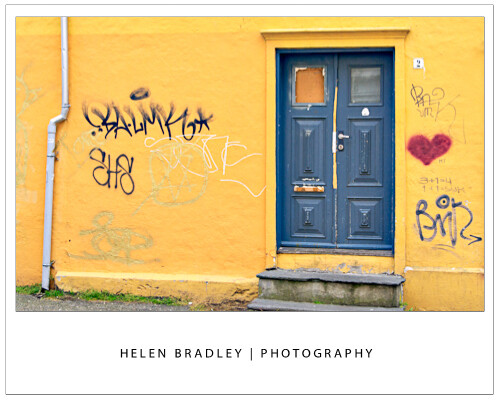
Lightroom print image with border opener

I use Lightroom to prepare the images ready to upload to my blogs so it’s critical that I can get them out of Lightroom all ready to upload without having to do any more work on them. On one blog I use framed images and therein lies a problem – the images need a thin keyline around them so you can see the edge. Without an edge the image would just blend into the surrounding white background of the blog page.

So, here’s how to create a frame effect in Lightroom – the images will be sized for the web with the appropriate resolution, they will have a frame around them, together with my name, and they will have a keyline around the image and around the page itself. And, to finish, it will all be saved as a reusable template.

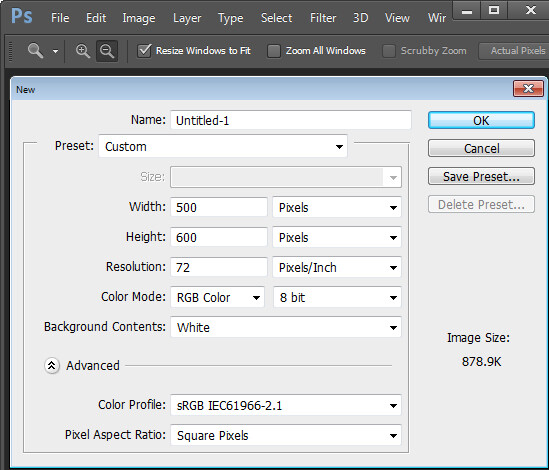
Start outside Lightroom in any graphics or photo-editing program and create an image 500 x 600 pixels in size and filled with white. Save it as a jpeg format image and import it into Lightroom – place it somewhere easy to find.

Lightroom print image with border 1

Then, in Lightroom place the images for the blog post into a collection and add the empty image you just created to the same collection. For convenience I use a single collection for the images destined for my blog – it makes them easier to find and it simplifies the output process.

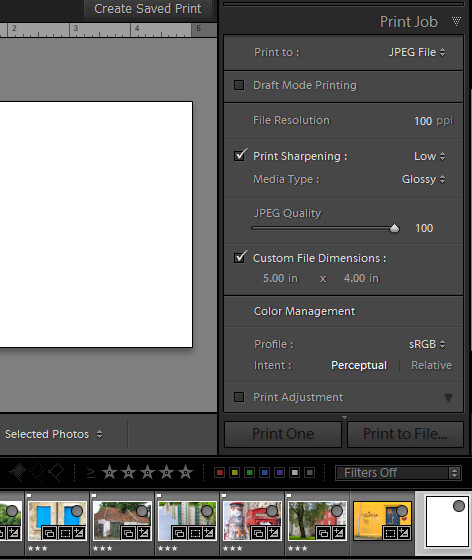
Switch to the Print module and select the collection. To configure the document size, from the Layout Style panel select Custom Package and from the Print Job panel set Print To to read JPEG file. Set the File Resolution to 100 ppi and select the Custom File Dimensions to 5 in x 4 in to make a landscape orientation image which will ultimately be created as a 500 x 400 pixel image. Set Color Management Profile to sRGB.

Lightroom print image with border 2

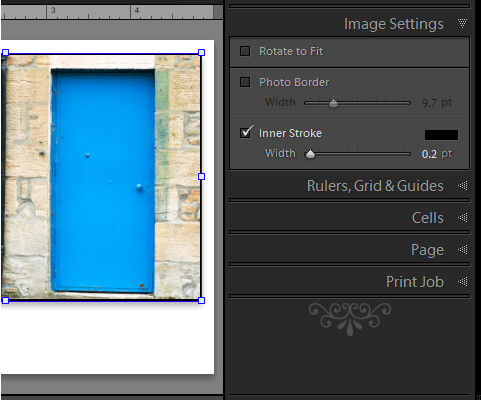
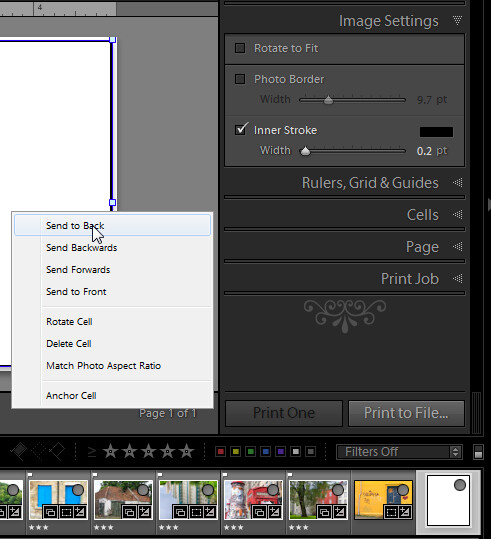
Now, drag and drop the first image into the work area and size it to suit. Choose Image Settings > Inner Stroke and then set the width to 0.2 pt black line. This will appear around the image.

Lightroom print image with border 3

Now drag the empty white image into an empty place in the work area and then size it to just smaller than the size of the work area. It will automatically have a line around it – the Inner Stroke setting is applied to all the images. To place this image behind the first image, right click it and choose Send to Back.

Lightroom print image with border 4

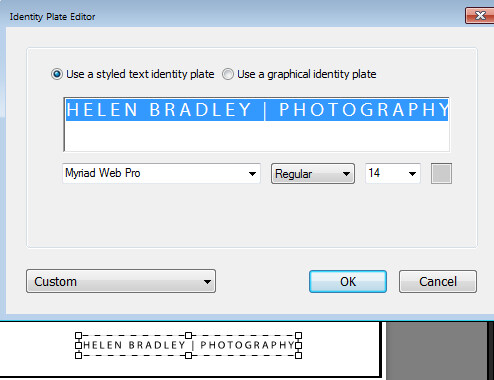
The text is added using an Identity Plate. To make one, click the Page panel and enable the Identity Plate checkbox. Click the small triangle in the Identity Plate box and click Edit and then click Use a styled text identity plate. Type the Identity Plate text – for example, mine reads Helen Bradley | Photography – select and format it as desired. Click the Custom button, click Save As and type a name for it, click Save and then Ok to add it. Move it into position and size it to suit.

Lightroom print image with border 5

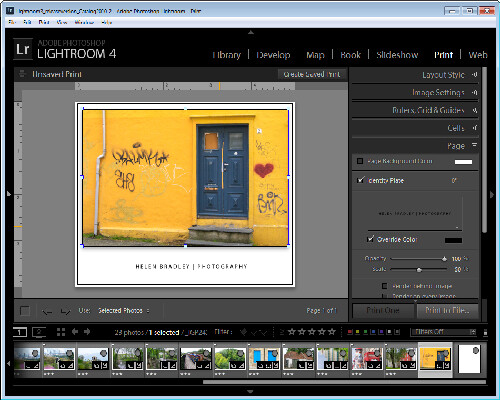
When you’re done click Print to File to print the image.

Lightroom print image with border 6

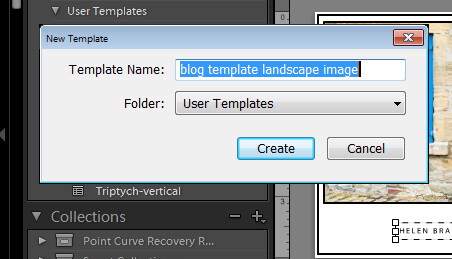
To save the design as a template you can use over and over again, click the + opposite Template Browser in the left panel. Type a name for the template.

Lightroom print image with border 7

In future you can select this template and use it to print another image. Before you do so, you will need to drag and drop an image into the image placeholder and add the empty image to the larger placeholder. If you want to be able to print portrait orientation images, repeat the process to create a second template – you can reuse the empty image and the Identity Plate.

Lightroom print image with border 8

Post originally from: Digital Photography Tips.

Check out our more Photography Tips at Photography Tips for Beginners, Portrait Photography Tips and Wedding Photography Tips.

Output from Lightroom to Your Blog


Digital Photography School

 
Comments Off on Output from Lightroom to Your Blog

Posted in Photography


20 September, 2010 – Mark Dubovoy’s Photokina Blog Now Online

17 Oct

Photokina opens Tuesday, and our Contributor Mark Dubovoy will be there filing daily reports from the show floor.

Due to a scheduling conflict Michael will not be attending this year, but will be filling in Mark’s reports with fresh press announcements and observations.

If you’re interested in the world of speciality cameras, medium format, large format, image processing, lenses, printers, papers and other pro gear this will be the place to find out about what’s new and what’s coming.

Mark’s Photokina Blog is now online.

Most Recent Update was at 11:15 am EDT


 "Awesome video presentation.
 
I have learnt so much more after looking through this on the weekend.  The tip about pushing blacks and fill light in the Basic Module was worth the price alone.  My images of a recent trip to the Australian Outback are popping and punching with delight!
 
Thanks Michael and Jeff – I really appreciate you taking the considerable time to share your in-depth knowledge and insights."


The Luminous Landscape – What’s New

 
Comments Off on 20 September, 2010 – Mark Dubovoy’s Photokina Blog Now Online

Posted in News


23 September, 2010 – Photokina Blog Updated Again. Lots of Medium Format News

16 Oct

Mark continues to prowl the halls of Photokina, looking for some of the speciality items that we know our readers will be interested in.

Mark Dubovoy’s Photokina Blog

___________________________


 "Awesome video presentation.
 
I have learnt so much more after looking through this on the weekend.  The tip about pushing blacks and fill light in the Basic Module was worth the price alone.  My images of a recent trip to the Australian Outback are popping and punching with delight!
 
Thanks Michael and Jeff – I really appreciate you taking the considerable time to share your in-depth knowledge and insights."


The Luminous Landscape – What’s New

 
Comments Off on 23 September, 2010 – Photokina Blog Updated Again. Lots of Medium Format News

Posted in News


26 September, 2010 – Photokina Blog Final Installment

26 Sep

Photokina 2010 ended on Saturday afternoon and Mark Dubovoy, who has been filing daily reports from the show floor all week, is now on his way home to SFO.

His final report, including a video interview with Photokina TV, is now online.

________________________________


NOW AVAILABLE

The Luminous Landscape Guide 
to Capture One Pro

Thank´s for one of the best tutorials I´ve seen so far! 
It´s much easier to listen and learn when there is an educated discussion going on 
between two very knowledgeable guys!

Find out more and watch our sample training video. 


The Luminous Landscape – What’s New

 
Comments Off on 26 September, 2010 – Photokina Blog Final Installment

Posted in News


21 September, 2010 – Photokina Blog Updated

22 Sep

Today is the official opening day of Photokina and the announcements are pouring out.

New cameras from Panasonic, Sigma, and Leica have been announced as well as three new printers from Epson.

Mark Dubovoy’s Photokina Blog

Most Recent Update was at 10 am EDT

____________________

NOW AVAILABLE

The Luminous Landscape Guide 
to Capture One Pro

Thank´s for one of the best tutorials I´ve seen so far! 
It´s much easier to listen and learn when there is an educated discussion going on 
between two very knowledgeable guys!

Find out more and watch our sample training video.


The Luminous Landscape – What’s New

 
Comments Off on 21 September, 2010 – Photokina Blog Updated

Posted in News


Fashion Photography Blog- A Day at the Beach

01 Mar

A Day at the Beach ~ Behind of the Scenes of Fashion Photography for Melissa Rodwell’s Gothic Themed Fashion Shoot for Flaunt Magazine. BIG THANKS TO OUR FILM CREW: Dimitrios Papagiannis + Tim Glass @ www.theeyelab.com For making the best BEHIND the SCENES Photography Video EVER MADE! Read the Full Story here www.fashionphotographyblog.com Additional Credits: Styling: George Blodwell Art Direction: Douglas Little Hair : Drew Krake Make-up: Retouch Artist: David Skyler www.davidskyler.net Models Peter@LAModels, Ridge@Ford, Scarlett@Photogenics
Video Rating: 4 / 5